How to Export Security Camera Footage Without Losing Quality or Important Context
You can watch an incident in the camera app, but that is not yet a preserved copy. The original may expire, be overwritten or become unavailable after an account or storage change. Sending someone a screen recording or an expiring share link can also leave them with less useful information than the system actually captured.
Use the camera or recorder’s supported download/export function, preserve the best available original or native recording, and verify the exported files independently. Include enough context around the event and record any known clock discrepancy. Keep an untouched copy before making a shorter or more convenient version for viewing.
This guide explains a practical owner workflow. For an active police, insurance or workplace investigation, follow the responsible recipient’s preservation and submission instructions. A household export checklist is not a forensic certification or a replacement for those procedures.
Before downloading, identify the source and expiry risk
Find the actual recording destination: camera card, recorder hard drive, hub or cloud library. More than one may exist, with different video quality and retention. A cloud event clip can be shorter than the continuous video stored on a recorder.
Check whether the relevant interval is still playable and how soon it may be replaced. Export promptly when footage matters rather than waiting until the last day of an assumed 30-day window. Our retention guide explains why there is no universal history period.
Do not remove the camera from its account, cancel recording services or format storage while preparing the download. Those actions can change access or delete history on some systems.
Choose the correct camera and time range
Note the camera name or channel, physical view and approximate real-world event time. Compare the recorder’s clock with a reliable reference before changing any settings. If they differ, record both times and the direction of the difference.
Clear playback filters and check the full relevant interval. A person-only filter can hide an unclassified event; an incorrect time zone can put it on another hour or day. Preserve relevant views from more than one camera where they show different parts of the event.
The College of Policing’s CCTV guidance emphasizes time verification, overwrite periods and native-format retrieval in its investigative context. For an owner, the useful preparation is to provide original files and accurate context rather than silently correcting the only copy.
Include context, not just the dramatic second
A very short crop can omit how a person arrived, what happened before contact or what followed. Choose an interval that reasonably covers the event and the surrounding activity. The appropriate length depends on the situation and the recipient’s request.
As a practical reporting example, Police.uk advises preserving footage before and after an incident and not deleting the original. Its instructions also caution against changing devices or settings while evidence is being handled. Follow the guidance for the actual report rather than treating a generic duration as a universal legal requirement.
If the camera saved only a short motion event, export what exists and state that limitation. Do not manufacture a continuous account by joining unrelated fragments without identifying the edits.
Native format, original quality and MP4 are different questions
Some recorders offer a proprietary or native export plus an optional standard video conversion. The native export may preserve information or stream structure that a conversion does not. Keep it where available, along with any official player or associated files the manufacturer supplies.
An MP4 extension does not itself mean poor quality or original quality. Some consumer systems natively provide MP4 downloads, while other systems create a re-encoded working copy. Use the supported highest-quality export and check what the manufacturer says it contains.
The UK government’s CCTV system guidance explains the value of native-quality export and including the necessary playback software. That is particularly relevant when handing material to someone who does not own your recorder.
Use the right export route
| Route | Useful for | Check carefully |
|---|---|---|
| Phone app download | One or several ordinary event clips | Clip limits, destination folder and whether the file really downloads |
| Manufacturer desktop client | Longer intervals, batch selection and local recorder footage | Channel, event filters, stream quality and completion status |
| Recorder to compatible USB media | Local export without relying on remote upload | Supported filesystem, available space, safe removal and included player files |
| Cloud account in a browser | Supported batch download or eligible custom clips | Account entitlement, expiry and differences from the phone app |
| Share link | Convenient controlled access where appropriate | Whether the source expires and who can open the link |
A share link can be useful for the intended recipient, but it is not automatically an independent backup. Keep an actual downloaded copy when the footage needs to survive loss of the source account or history.
Example: Reolink Client
Reolink’s desktop-client guide describes opening playback, using the download control and selecting a date/time range and recording types before downloading individual or multiple files. Check the destination folder and wait for completion.
Choose the stream appropriate to the purpose where the interface offers that choice. A lower-bandwidth preview can be convenient for remote browsing but should not be mistaken for the highest-quality source. Verify the exported resolution and scene rather than assuming every download setting is identical.
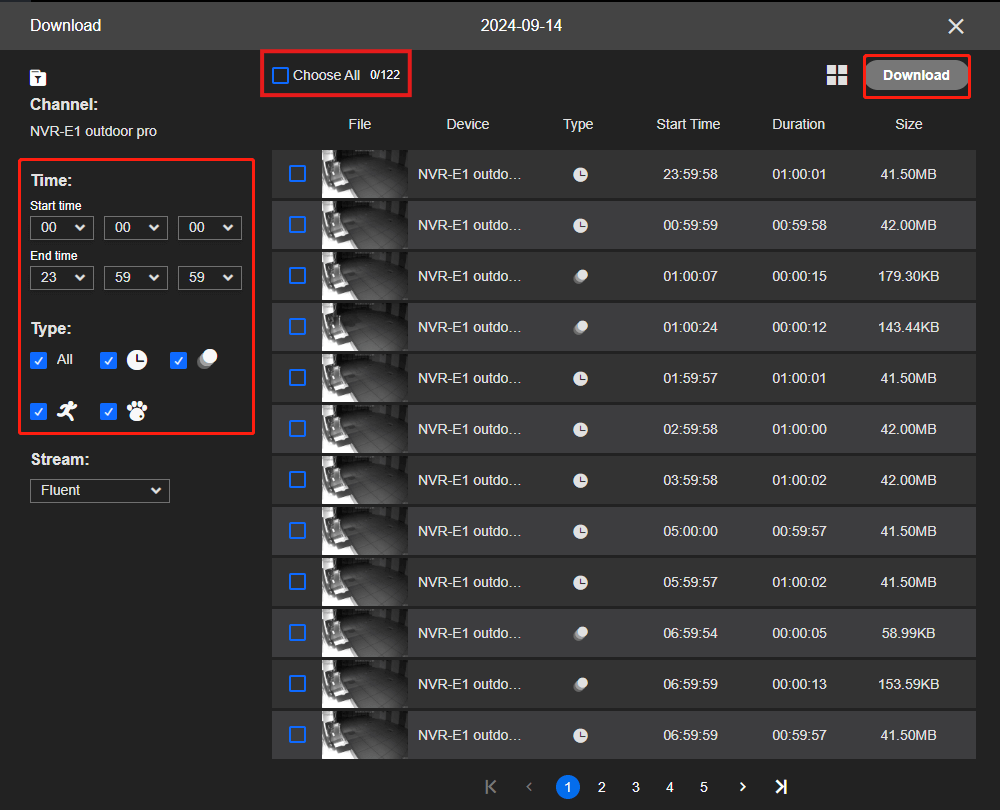
Menu wording can change by software and hardware generation. Use the guide matching the current product, and do not reset a recorder simply because a button is located differently.
Examples: Ring and Google Home
Ring’s video-management instructions distinguish one-at-a-time app downloads from multiple-video downloads through the web account. Check that the selected events still contain playable video and that your account has the required recording access.
Google’s clip-export guidance distinguishes Google Home, older Nest interfaces and web tools. Its documented custom-clip options depend on eligible hardware and video history; the existence of a live view does not mean any arbitrary past interval can be downloaded.
These examples explain why desktop and mobile interfaces can offer different choices. Do not follow a tutorial for an older app and assume a missing button proves the footage is gone.
How much free space do you need?
Estimate the export from bitrate and duration, then allow room for associated files and the actual format. At a constant 4 Mbps, one hour of video is approximately 1.8 decimal GB before audio and overhead. Four such camera streams for one hour total about 7.2 GB.
Large exports can encounter destination-filesystem limits. For example, FAT32 cannot hold a single file of 4 GiB or more, while a recorder may not support every alternative filesystem. Use the recorder’s approved export-media requirements rather than formatting a USB drive blindly.
Exporting shorter consecutive segments can be appropriate where the supported workflow requires it, but keep a record of segment order and verify there are no unintended gaps. Do not erase unrelated material from a borrowed drive just to prepare export space.
Verify the files outside the camera app
Open the export using the appropriate supported player on the receiving device. Confirm the correct camera, beginning, middle and end, expected duration and usable picture. Check audio only where it was lawfully and intentionally recorded.
Inspect all exported segments, not merely the first file in a ZIP archive. A successful download notification is not proof that every selected clip completed. If a proprietary player is required, obtain it from the manufacturer rather than a random codec-download site.
A system playback index and a playable export are different resources. If the file will not open, preserve it unchanged and investigate format support before deciding it is corrupt.
Keep an untouched copy and a simple export record
Store the original exported files in a clearly named folder with restricted access. Make a separate working copy before trimming, annotating or converting. Avoid overwriting the original filename when creating a smaller version for convenient review.
| Field | What to record |
|---|---|
| Source | Recorder or account, camera/channel and view description |
| Recorded interval | Displayed start and end time, date and time zone where known |
| Clock check | Observed device time, reference time and when the comparison was made |
| Export | Date, authorized operator and download/export method |
| Files | Original filenames, associated player or metadata files and storage location |
| Copies supplied | Recipient, date and agreed transfer method |
This is an organizational record, not a claim of certified chain of custody. Follow a receiving investigator’s or organization’s process where one applies. A later measured clock offset also does not prove the offset was identical throughout earlier footage.
Why filming the monitor is a last resort
A phone recording of a screen introduces another image capture, with possible glare, frame mismatch, cropping and lost metadata. It can make text or faces less useful while leaving the original trapped in the recorder.
Use a proper export wherever possible. If an urgent situation leaves no other immediate option, identify any screen capture honestly and continue seeking the original through the responsible support or investigator. Do not present a phone video of a monitor as the native recording.
Similarly, sending the only copy through a messaging service may cause recompression. Use the recipient’s approved file-transfer method and retain the untouched source export.
Confirm the recipient and destination, particularly when someone unexpectedly requests private footage. Use an official reporting portal or agreed secure transfer method where available. Do not email account passwords to let someone browse all cameras.
Restrict a share link to the appropriate audience if the service supports it, and understand whether it expires or remains accessible after other changes. Review public-posting requests separately from a legitimate incident report; unrelated bystanders and private activity may appear in the same recording.
Our camera-privacy guide covers the broader questions. Recording material does not automatically authorize every subsequent use of it.
When export fails
Distinguish a missing source clip from a failed transfer. If the original plays, check storage on the receiving device, permissions, supported file format and connection stability. Try an approved shorter export to isolate a size or timeout problem without deleting the source.
If the source no longer plays, check local and cloud destinations, dates and filters before concluding it is deleted. Use our recording diagnosis or recovery guide as appropriate.
Do not reset or format the source to make an export work. When an incident is under investigation, explain the technical problem promptly so the responsible people can arrange retrieval before overwrite.
Prepare before the first incident
Download a harmless test clip now and keep the procedure with the system’s records. Make sure another authorized person can find the instructions if the usual administrator is unavailable. A recorder nobody can export from is not fully commissioned.
Use our backup guide to decide where incident copies will live and how access will be protected. The successful test is a file that still plays when you are no longer relying on the camera’s live session.
Frequently asked questions
Is a screenshot enough?
It may document one visible moment, but it does not preserve motion, surrounding context or all recording information. Export the relevant video as well where available.
Should I convert everything to MP4?
Keep the best available original or native export first. A supported MP4 working copy can improve accessibility, but it should not replace a richer source solely for convenience.
Can I download footage after the cloud history expires?
Only if another retained source or prior download exists. An expired event entry is not proof that its video remains recoverable.
Does this process make footage legally admissible?
No generic checklist can guarantee that. It supports orderly preservation; follow the applicable recipient, legal and investigative requirements.