How to Back Up Security Camera Footage: Incident Copies, Scheduled Archives and Restore Tests
A camera card and a recorder can both contain video without providing the backup you expect. They may hold different intervals, use different quality settings or be lost together. A cloud history can also expire on schedule, while a shared link may disappear when the original recording does.
A useful footage backup is a separate, verified copy that survives the failure you are trying to protect against. For many households, that begins with exporting important incidents promptly and keeping a protected second copy. For larger systems or premises where incidents may be discovered late, supported scheduled archives can be appropriate.
Decide which problem you are solving before buying storage. Preserving one package-theft clip, surviving a failed recorder and keeping a rolling off-site archive are different jobs with different costs.
Two backup tasks: important incidents and routine history
An incident export preserves a selected event and its surrounding context after you know it matters. It can be small enough to store securely on an authorized computer plus a separate backup destination. It does not protect an event that disappears before anyone notices it.
A scheduled archive copies selected ongoing recordings according to a policy. That can reduce the risk of losing unknown incidents, but it needs capacity, communication, monitoring and a retention plan. A scheduled job that silently fails for a month provides little practical protection.
Start with the time between an event and when someone is likely to investigate it. If a remote property is checked only occasionally, a tiny event history and occasional manual downloads may not meet the requirement. Our retention guide helps establish the source window you actually have.
Choose the failure you need the copy to survive
| Concern | Potentially useful arrangement | What still needs checking |
|---|---|---|
| Camera stolen with its card | Supported recording or copies stored on a separate recorder or remote service | Whether the event reached that destination before loss |
| Recorder disk fails | Independent copies or an appropriate supported backup system | Backup completion and restoration, not merely another disk being installed |
| Fire or theft affects the whole property | A suitable off-site copy | Bandwidth, retention, account access and the freshness of the copy |
| Accidental deletion | A retained version or separate copy not automatically deleted with the source | Whether synchronization propagates deletion |
| Cloud history expires | Completed downloads or another intentionally retained source | That a share link is not the only preserved item |
| Owner loses account access | Protected recovery arrangements and independently accessible files | Whether every recovery factor depends on the same missing device |
No single row is a complete guarantee. Use the table to identify shared dependencies and verify what your actual products support.
A practical incident-copy workflow
Locate the original recording, select the relevant cameras and include reasonable context before and after the event. Record the source, displayed time and any known clock discrepancy. Export through the manufacturer’s supported process.
Keep the best available original or native files and any required official player or metadata. Create a working copy before trimming or converting. Follow the recipient’s instructions when the footage is part of an investigation or insurance process.
Use our export guide for the detailed procedure. Backing up a screen recording of the monitor is not equivalent to preserving the source video.
Confirm that the file really left the camera service
Open the destination folder and play the completed file independently. Check the correct camera, start, middle and end. A notification saying the download started does not establish that a large transfer finished.
Some apps distinguish saving a clip within an account from downloading it to a phone or computer. A share URL may continue to depend on the provider’s source history. Know which action you performed.
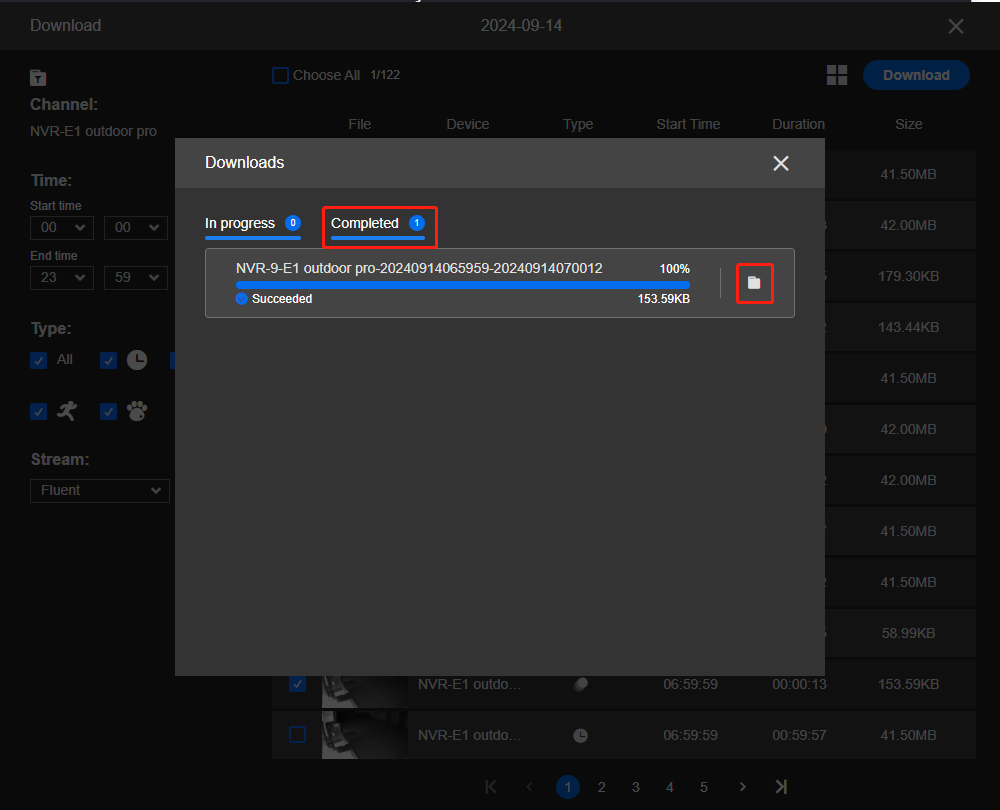
Make a second protected copy at a suitably independent destination. Two folders on the same laptop do not protect against losing that laptop. Similarly, an external drive left beside the recorder may not address a whole-property incident.
Does camera-plus-NVR recording count as backup?
It can provide useful separate sources where the equipment supports both, but verify that both are actually recording. They may use different modes, quality levels and schedules. One destination may have missed the beginning of an event or already overwritten it.
Check ordinary playback from each location with a known event. Do not assume an inserted camera card automatically mirrors the NVR or that a recorder retroactively copies all card footage after an outage.
Reolink’s backup guide distinguishes downloading from supported cards, recorder storage and eligible cloud services to other media. Its product-specific options illustrate why an actual supported workflow matters more than the number of storage icons in an app.
Why RAID is not an independent backup
A supported redundant disk arrangement can help maintain availability after particular drive failures. It does not necessarily provide an earlier version after accidental deletion, protect against loss of the entire recorder or prevent a user from formatting the array.
Some recorders simply use multiple disks for additional capacity without redundancy. Identify the exact arrangement and the usable capacity it provides. Two installed drives do not automatically mean every recording exists twice.
Use our recorder-storage guide when choosing disks and the storage-error guide when a fault occurs. Availability, retention and backup should remain separate decisions.
Scheduled archives require supported software
For ongoing copies, use the recorder or surveillance platform’s documented export, archive or backup functions. Copying files from a live recording directory with an arbitrary synchronization tool can miss required information or interact badly with open files and deletion policies.
Synology’s Surveillance Station specifications describe Hyper Backup support for configurations and recordings, and Archive Vault for recording archives with defined cameras, time ranges and event modes. These are examples within that ecosystem, not features available on every consumer camera or NVR.
Check software version, licensing, destination compatibility and the restoration procedure before committing to a design. Cloud services and product offerings change, so verify present availability rather than buying around an old tutorial.
How often should automatic copies run?
Decide how much recent video you could afford to lose if the source failed just before the next copy completed. An archive that finishes once per night can leave much of the current day unprotected. More frequent or near-real-time copying reduces that gap only if the system and connection can sustain it.
Also consider when footage leaves the source retention window. The copy needs to complete before the original is overwritten. A slow archive that consistently falls behind can eventually miss files even if the task keeps running.
Document the intended interval and observe actual completion times. Do not equate a scheduled start with a successful protected copy.
Estimate off-site bandwidth and storage honestly
At a constant combined 8 Mbps, continuous video produces about 86.4 decimal GB per day. Copying a full month of that history involves roughly 2.59 TB over 30 days before overhead. Event-only archives can be much smaller, depending on real activity.
A hypothetical 1 TB initial transfer over a perfectly sustained 20 Mbps upload would take about 111 hours, or 4.6 days, before protocol overhead and other traffic. That arithmetic shows why a first backup may not finish overnight and why a faster local link does not necessarily improve the internet upload.
Use the data calculator with your actual streams and the ownership-cost calculator for charges. Include retention and retrieval costs where the chosen service applies them.
Protect the backup account and encryption keys
Restrict administration and deletion permissions to the people who need them. Use supported strong authentication and keep recovery details accessible through an authorized route independent of the original recorder.
Where encryption is used, document how the legitimate owner will recover the keys. An encrypted archive with its only key on the failed device may be secure from unwanted viewing but useless to its owner. Test the intended recovery process rather than storing an unprotected password beside the backup.
Do not expose the recorder or an unprotected file service to the internet merely to automate copying. Use supported secure connections and involve the responsible administrator for a business network.
Synchronization, versions and deletion policies
A mirror can propagate a deletion from the source to the destination. That may be correct for a synchronization task but wrong for preserving an incident. Understand whether the destination retains earlier versions, locked incident copies or a separate archive window.
Do not assume a cloud folder automatically has unlimited version history. Check the actual service’s retention and recovery controls, including what happens when an account or subscription changes.
For a specific incident, separate the retained original from routine rotating files and follow applicable preservation instructions. Our recovery guide explains why waiting until after expiry makes the options much narrower.
A restore test is the proof that matters
Select a harmless test interval and retrieve it from the backup destination without relying on the original camera’s live session. Use the documented restoration or archive-mounting process and an appropriate supported player.
Confirm the expected cameras, dates, quality, audio where intended and the complete chosen interval. Check that another authorized person can obtain the instructions and legitimate access if the regular administrator is unavailable.
Record how long retrieval takes and what it depends on. A backup that is technically intact but requires an unavailable account owner, missing key or unsupported player is not a finished operational solution.
Monitor the backup, not just the camera
Decide who receives alerts for failed jobs, full destinations and authentication problems. Inspect a recent successful result periodically instead of relying only on the absence of warnings. An email notification sent to an abandoned address is not useful monitoring.
Review the arrangement after changing camera count, bitrate, recording mode, router or storage destination. A previously adequate copy window may no longer keep up with a larger system.
For remote properties, include a realistic local service contact. Our cabin-security guide explains how communication and response limits affect the wider protection plan.
Keep retention and privacy proportionate
A backup can preserve incidental footage long after the source timeline has expired. Apply a purposeful retention policy to every copy, including downloads and shared case folders, not only to the recorder.
Separate ordinary deletion schedules from specific preservation obligations. Where a case, workplace requirement or legal dispute is involved, obtain appropriate instructions rather than automatically deleting material because a generic household schedule says to.
Our privacy guide discusses jurisdiction-specific considerations. Adding an off-site copy does not remove responsibilities toward people recorded.
Three sensible starting arrangements
A single home camera: maintain the supported local or cloud recording, learn to export immediately when an incident matters and keep verified copies in two appropriate places. This is manageable, but it does not protect events that expire before discovery.
A multi-camera home or small premises: consider a supported scheduled archive for the critical views, plus incident-specific copies. Set the frequency around acceptable loss and test the restore path. Do not archive a lower-quality stream without deciding whether it meets the task.
A remote property: prioritize which views require off-site copies, confirm real upload capacity and keep local retention long enough to cover interruptions. An event-only off-site copy may be a deliberate compromise, not equivalent to preserving the complete local timeline.
Your backup record
| Write down | Decision required |
|---|---|
| Purpose | Incident preservation, recorder failure, property loss or another defined risk |
| Scope | Cameras, quality, audio and continuous or event recording |
| Destination | Where the copy lives and which failures it is independent from |
| Schedule and retention | How fresh the copy should be and how long it remains |
| Access and recovery | Authorized users, keys, account recovery and support |
| Verification | Latest completed restore test and who checks failures |
Frequently asked questions
Is my camera’s cloud subscription already a backup?
It may provide an off-site recording destination, but check what it saves, when it expires and whether deletion or account loss affects access. Do not assume it independently preserves the full local timeline.
Can I just copy the recorder’s folders?
Use the platform’s documented backup or export method. Live databases, indexes and proprietary formats may need more than a generic folder copy.
Does keeping two disks protect every recording?
No. The recording arrangement and failure being considered matter. Shared deletion, theft or damage can affect both disks, and multiple drives do not automatically imply redundancy.
What is the best first step?
Export a harmless test clip, verify it outside the camera app and retrieve a second protected copy. That establishes a usable incident-preservation workflow before you design a larger archive.