NVR vs. DVR: Which Camera System Makes Sense for a New Installation or Upgrade?
For a new wired camera installation, an appropriately specified IP-camera and NVR system is usually the more flexible starting point. For a property with sound existing coax cabling, a compatible DVR upgrade may be better value. The decision should follow the equipment you can retain and the functions you need, not the assumption that one three-letter label makes every camera better.
A recorder comparison is also a compatibility comparison. The number of connectors on a box does not establish supported resolution, audio, analytics or storage capacity. This guide separates a new installation from an upgrade so you can compare complete quotations rather than buying a recorder that cannot use the cameras already on the wall.
The basic difference
An NVR, or network video recorder, receives encoded video from compatible IP cameras over a network. A conventional DVR camera system receives supported camera signals, commonly through coaxial connections, and performs the recording-side processing appropriate to that system. Modern high-definition coax systems should not be confused with only the oldest low-resolution analog equipment.
Some hybrid or multi-format recorders accept more than one kind of camera. Their supported formats, channel allocations and feature combinations are model-specific. The word hybrid is not a promise that any camera can plug into any socket.
IP camera encodes video → supported network connection → NVR stores the stream → local monitor or authorized app.
Compatible coax camera signal → matching recorder input and processing → stored video → local monitor or authorized app.
Either architecture can provide local recording. Neither inherently requires a cloud subscription, and either may need internet for supported remote functions. Do not confuse network video recorder with internet-only recorder.
Compare the right properties
| Question | NVR system | DVR system |
|---|---|---|
| Camera connection | Compatible IP streams over a supported network | Supported coax/video formats, with hybrid exceptions |
| Typical cabling | Ethernet; some compatible wireless cameras can join through the network | Coax video, often with a separate power connection |
| Power | PoE where supported, or another specified supply | Often separate camera power; model-specific alternatives exist |
| Best upgrade starting point | Existing usable network infrastructure or a new cable installation | Sound compatible coax infrastructure worth retaining |
| Feature compatibility | Protocols, codecs, profiles, firmware and manufacturer support matter | Signal format, resolution, audio and recorder generation matter |
| Local operation | Possible on a suitable powered setup | Possible on a suitable powered setup |
A weak comparison says NVR is digital and DVR is old, then stops. A useful comparison asks what the intended recording actually contains and how the household or business will retrieve it.
Starting from scratch: what I would specify first
Define camera positions, viewing tasks and recording requirements before choosing the recorder. Identify which locations need a close view, which need an overview and whether any location requires a specialized task such as reliable plate capture. A generic high-resolution bundle does not answer those design questions.
For a fixed wired installation, compare a suitable NVR and PoE arrangement with the required number of channels, power capacity and supported camera models. Document cable routes and safe maintenance access. Keep a realistic allowance for later expansion rather than filling every available resource immediately.
Use our PoE-versus-Wi-Fi guide for the connection decision and the placement guide for the actual scene. An NVR purchase should follow those requirements rather than define them after the fact.
Upgrading an existing system: inventory before removal
Record the current recorder model and hardware revision, every camera model, the cable type and approximate routes, power supplies and the functions that still work. Save important recordings and configuration information before making changes.
Inspect the existing cable condition with competent assistance where needed. Reusing damaged cable because it is already in the wall can make a new system unreliable. Conversely, removing sound compatible coax solely because an advertisement says Ethernet is newer may waste substantial installation work.
List the actual problem: insufficient detail, unreliable remote access, failed storage, unavailable replacement cameras or lack of a needed feature. A replacement recorder may solve one of those and not another. For example, a new recorder does not fix an unsuitable lens angle.
Why the same BNC connector does not guarantee compatibility
Coax systems can use different video formats and supported resolution combinations. A camera and DVR may have matching physical plugs while being unable to exchange the intended signal. Audio and special camera functions can introduce additional requirements.
Swann’s DVR connection guide directs users to its compatibility information and identifies separate video and power connections for the listed systems. Its recorder comparison also describes audio-over-coax on compatible equipment. Those examples show why blanket claims that DVRs cannot record audio are unreliable.
Ask the supplier to confirm the exact camera-to-recorder pairing in writing. A retailer saying works with BNC cameras is not an adequate specification for an upgrade involving several generations of equipment.
IP camera compatibility has its own limits
An NVR can receive a live picture yet fail to use the camera’s smart events, two-way audio or other controls. A successful stream is the first test, not proof of complete integration. Check the manufacturer-supported arrangement and the relevant protocol or profile.
The ONVIF conformant-products database ties official conformance to particular products and firmware/software versions. A brand’s membership or a generic ONVIF claim is not equivalent to a confirmed listing for the device you are buying.
For mixed systems, compare the functions one by one. Our mixed-brand NVR guide includes a worksheet for live video, audio, event recording, playback and advanced features.
Channels, PoE ports and decoding capacity are different limits
A channel is a supported recording input within the recorder’s design. A physical PoE port supplies a connection and compatible power. The number of ports does not automatically tell you how many cameras can be added through a separate network switch.
Also check incoming bandwidth, supported camera resolution and live-view or playback decoding limits. A recorder may save a high-resolution stream while being unable to display several such streams simultaneously at the requested frame rate. That is a different limitation from recording failure.
Reolink’s Duo-series compatibility guidance demonstrates how hardware revision, channel use and display decoding can matter. Do not reduce a purchase to eight channels means eight of any camera forever.
A practical pre-purchase compatibility sheet
| Item | Information to obtain |
|---|---|
| Camera identity | Exact model, lens, hardware revision and firmware |
| Recorder support | Manufacturer confirmation for that camera or documented integration |
| Recording | Required resolution, frame rate, codec and schedule |
| Events | Which motion and smart classifications reach the recorder |
| Audio | Recording, listening and two-way functions checked separately |
| Expansion | Channel, bandwidth, power and disk limits |
| Exports | Original-file retrieval and supported playback tools |
Test one representative camera before buying a large replacement batch. A small pilot can reveal a missing event function that a specification sheet or sales conversation overlooked.
Storage: compare retained footage, not hard-drive size alone
A recorder’s disk capacity means little without camera count, bitrate and recording schedule. Continuous video uses storage during quiet hours, while event recording depends on activity. Higher quality or additional cameras can shorten the retained history.
For a worked example, four cameras averaging 4 Mbps each produce about 172.8 decimal GB daily if recorded continuously. A nominal 4 TB allocation would provide less than 23.2 days after allowing for the capacity actually available and system overhead. That is a calculation, not a promised retention period for any recorder.
Use our bitrate and storage calculator with measured or configured values. Check supported disk types, capacities, overwrite behavior and the process for replacing a failed disk. Formatting is not the first response when needed evidence may still be present.
Picture quality is a system outcome
A modern coax camera can provide useful high-definition footage, and an IP camera can still produce poor evidence if badly placed or heavily compressed. Lens selection, lighting, exposure and recording quality remain important in either architecture.
Ask for a representative moving-subject test at the relevant distance. Do not compare a static showroom image from one system with an old compressed export from another and attribute every difference to NVR versus DVR.
Our image-quality guide distinguishes optics, motion and compression. A replacement project should address the observed shortcoming, not just change the acronym on the recorder.
Local displays and remote access
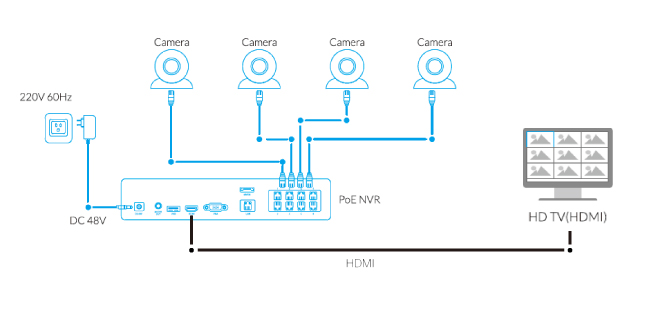
A compatible local monitor can show a recorder’s interface without needing to stream through a cloud account. The output resolution and input selection still need to match. A blank TV screen can be a display problem even while recordings continue.
Remote viewing needs a supported, secure communication arrangement. Keep firmware and credentials maintained and avoid opening broad internet access merely because an old app no longer connects. Use the TV connection guide and offline-operation guide to keep those tasks separate.
Power backup and common points of failure
A PoE NVR can centralize power for attached cameras, making an appropriate UPS arrangement easier to plan. A DVR installation may have separate camera supplies that also need protection. Neither label establishes that the whole system will continue through an outage.
List the recorder, camera power, switch, router and any broadband equipment needed for the functions you want to preserve. The local monitor may be optional for unattended recording, so backing it up can waste capacity if the goal is maximum recording runtime.
See our backup-power guide for the component worksheet and runtime limits. A single protected plug does not prove every camera remains powered.
Compare the installed replacement cost
Ask for separate line items for recorder, disks, cameras, cable repair or replacement, power, mounting, commissioning and old-equipment disposal. Include any software licenses or recurring services actually needed.
For a property with usable coax, compare two complete options: retaining compatible cameras and wiring with targeted replacements, versus moving to a new IP layout. Include the value of features genuinely needed rather than assigning value to every new dashboard option.
There is no universal break-even figure. A small finished apartment and a building already undergoing renovation can have very different labor costs. Transparent scope is more useful than an invented average that excludes half the installation.
A migration sequence that avoids losing coverage
Preserve evidence and configuration first, then test the new recorder and one camera before replacing the whole system. Confirm clock settings, recording mode and export. Plan the period during which old coverage is unavailable.
Where the architecture supports a phased migration, verify that the temporary mixed arrangement works rather than assuming hybrid support. Keep accountable ownership of the new administrator account and remove the former installer’s access when the handover is complete.
Only retire the old system after the replacement passes a daytime and nighttime event test. A new live picture is encouraging, but it is not proof that yesterday’s activity will be available tomorrow.
Final recommendation
For a new installation with suitable cable routes, begin with a well-specified IP/NVR design and compare the complete cost. For an existing coax installation, inspect what can be retained and require exact compatibility before deciding to replace everything.
In both cases, choose the recorder that supports the intended cameras, recording quality, retained history and retrieval process. The best result is a working evidence system, not simply ownership of the newer-sounding box.
Frequently asked questions
Does an NVR require Wi-Fi?
No. It can receive supported cameras through Ethernet, and some systems also accept compatible wireless cameras through the network. Check the actual architecture.
Can I connect an analog camera directly to any NVR?
Not as a general rule. A suitable encoder or explicitly supported hybrid arrangement may be required. A connector adapter alone does not convert the system.
Do DVRs always have worse image quality?
No. Compare exact camera and recorder capabilities, placement and saved footage. Older low-resolution equipment is not representative of every current coax system.
Will adding a network switch give me more recording channels?
Not necessarily. Physical connections and the recorder’s supported channel count are different limits. Verify the exact model before expanding.