Do Security Cameras Work Without Wi-Fi or Internet? What Still Records and What Stops
Yes, suitable security cameras can record without an internet connection, and some systems do not need Wi-Fi at all. What stops depends on the recording and viewing arrangement. A PoE camera connected to a local recorder is a different system from a battery camera that sends clips to a cloud service.
The phrase works without Wi-Fi is not precise enough for a purchase. You might mean the broadband service has failed, that the property has no router, or that you want remote video from a cabin with no wired internet. This guide separates those situations so you can buy a system that performs the function you actually need.
Four things people call offline
| Situation | What is absent | What may still be available |
|---|---|---|
| Internet outage | The connection from the property to online services | A powered local network, local cameras and recording |
| No Wi-Fi | A wireless local connection | Ethernet, a wired recorder or cellular service |
| No router or local network | The normal network path between devices | A standalone supported card recorder or direct camera-to-recorder system |
| Power outage | Electricity to some or all equipment | Only components with adequate independent or backup power |
A fifth issue, no subscription, is about payment rather than connectivity. A subscription-free camera may still use an online account for setup and remote access. A paid system may still record locally when broadband fails. Keep those questions separate.
The simplest fully local architecture
A compatible camera can send video to a local recorder, which stores it on its own disk and displays it on a connected monitor. That local path does not inherently require a broadband service. It does require power, supported equipment, adequate storage and correct configuration.
Remote viewing adds another path from the property to your phone elsewhere. Disconnecting that path does not necessarily stop the first four stages. Disconnecting power to the recorder does. This is why a blanket statement that cameras stop when Wi-Fi stops can be misleading.
PoE cameras and an NVR without internet
In a suitable PoE system, a compatible recorder or switch supplies camera power and carries data over Ethernet. The recorder can provide local live view and playback through its own display output. That can be useful in a workshop or property where internet is unavailable or deliberately not connected.
Reolink’s offline-function table distinguishes directly connected recorder operation from local-network and remote access. It is evidence for the listed Reolink arrangements, not a guarantee that every camera works with every NVR. Confirm the exact hardware combination.
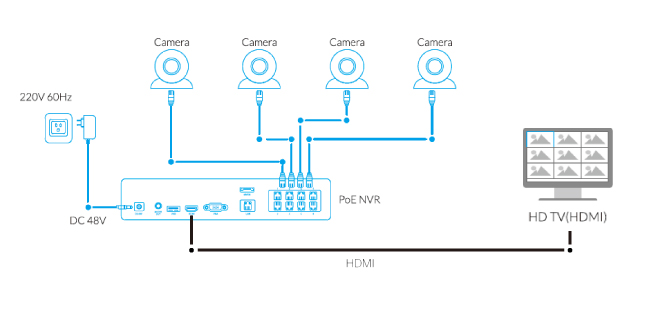
Do not assume Ethernet from a computer or ordinary switch provides power. The camera needs the specified supply, and a non-PoE port is not equivalent to a compatible PoE source. Our PoE comparison explains the installation choices.
Wi-Fi cameras during a broadband outage
Your router can continue providing a local wireless network even when its internet connection is down. A supported camera may still reach a recorder on that network, or save to its own card. Whether the phone app can view it locally depends on the product’s design and authentication state.
TP-Link’s Tapo FAQ distinguishes recording and local access from cloud-dependent services. It also explains that initial configuration needs a supported network connection. Do not assume the behavior of a configured camera proves a brand-new unit can be activated offline in the field.
For your own setup, check the required functions individually. Local video may continue while push notifications, remote viewing, cloud uploads or time synchronization are interrupted. An app reporting offline is not proof that every local recording stopped.
What happens if Wi-Fi itself disappears?
A camera saving directly to a supported memory card can sometimes continue recording after it loses the router connection, provided it remains powered and configured. A Wi-Fi camera that depends entirely on sending footage elsewhere may lose its recording destination.
Reolink’s wired-power Wi-Fi support table explicitly separates no internet from no Wi-Fi and excludes battery models from its general applicability. That is the kind of scope statement to look for when verifying a product.
Even when card recording continues, you may need to restore a supported connection or use an approved card-reading process to retrieve it. A camera silently storing evidence is not the same as an alarm notifying you while you are away.
A function-by-function comparison
| Function | Powered local system, broadband unavailable | Camera entirely disconnected from its local network |
|---|---|---|
| Recording to a configured camera card | Possible on supported models | Possible on supported models; verify explicitly |
| Recording to a local NVR | Possible if the camera-to-recorder path remains working | Not through the missing path |
| Viewing on an NVR-connected monitor | Possible on a suitable system | Depends on whether cameras still connect directly to that NVR |
| Phone playback at home | Model- and network-dependent | Normally unavailable through the disconnected path |
| Viewing from another location | Needs another working communication route | Needs a supported independent route |
| Cloud video or push alerts | Normally interrupted without an alternative internet route | Normally interrupted without a supported independent route |
This table describes dependencies, not a promise about every product. Request an answer tied to the exact camera, recorder, app version and intended setup before buying.
No broadband at a cabin: three realistic choices
Local recording only suits a property where you mainly need to review events on the next visit. Choose equipment that supports the intended unattended recording and retention, with adequate power. You cannot expect an ordinary offline setup to deliver immediate remote alerts.
A cellular camera uses a compatible mobile network for supported remote functions. It needs coverage, an appropriate plan and the model’s power arrangement. No Wi-Fi does not mean no recurring communication cost.
A cellular router feeding a local system can serve several devices, but it adds power demand, data planning and network administration. It may be more coherent than maintaining separate SIM plans for several cameras, depending on the property. Our 4G camera guide compares the alternatives without assuming a coverage map guarantees service at your mounting point.
Remote viewing always needs a communication path
A common misleading claim is that a camera needs no internet yet can be viewed from anywhere for free. The claim may mean it does not need your home’s Wi-Fi because it uses cellular data, or that it records locally but remote functions still use broadband.
Ask the seller to identify the path from camera to phone. A local Bluetooth connection, a direct wireless access point and a remote cellular connection have very different reach and requirements. A phone standing beside the device is not a test of viewing it from another city.
Do not expose an otherwise local recorder to the public internet as an improvised fix. Use supported secure remote access or a professionally managed solution with appropriate accounts and updates.
Recording mode matters more than the network label
A battery camera can remain operational without the same continuous video behavior as a powered recorder system. Many products conserve energy through event-triggered recording, though some newer configurations offer other modes. Check the exact specification rather than treating every battery model as identical.
Ask whether you can play an uneventful time between motion clips. That simple question separates a continuous timeline from an event library. Our doorbell recording guide shows why optional wiring and a familiar brand name do not settle the recording mode.
A solar panel addresses energy supply within a supported arrangement. It does not automatically add a continuous-recording feature the camera lacks.
Plan enough storage for the offline period
Estimate how much footage accumulates before you can check the property. For an illustrative constant 2 Mbps stream, one camera generates about 21.6 GB per day in decimal units. Four comparable streams would generate about 86.4 GB daily before additional overhead.
Those figures follow bitrate and time, not a universal camera rating. Variable bitrate, audio and recording schedules change actual consumption. Event-only storage also depends on activity, so a quiet-week estimate can be misleading during heavy movement.
Use our data-usage calculator and check overwrite behavior. If the oldest recordings disappear before your next visit, an offline system may miss the incident you hoped to investigate.
Keep timestamps meaningful when disconnected
A disconnected system may not receive its usual network time updates. Check how it maintains its clock and what happens after a complete power interruption. A correct timestamp helps relate a camera event to a delivery or other record.
For an incident already recorded, note a known discrepancy rather than silently altering the only evidence copy. Preserve the original file and provide the timing context through the appropriate reporting process.
Include clock verification in periodic maintenance. A system that records clear footage with a substantially wrong date can be difficult to search when something happens.
Internet failure and electrical failure need different plans
Local recording helps with loss of broadband only while the relevant equipment remains powered. A router on a battery pack does not keep an NVR, PoE switch or separate camera adapter alive unless those components are protected too.
Make a component list and identify which power source feeds each part. Then decide whether the goal is surviving a short interruption, keeping remote alerts available or recording throughout a longer outage. Those goals can require different capacity and connectivity.
Our backup-power guide includes a dependency worksheet. Do not substitute a large watt rating on a UPS for evidence of adequate runtime at your real load.
Perform an outage test before relying on the setup
Use a controlled maintenance period and do not interrupt a monitored alarm, medical device or shared network without the responsible person’s agreement. Save important recordings and note the normal configuration first.
- Verify a normal saved event and export before changing anything.
- Use the router’s supported method to isolate broadband while keeping the local system powered.
- Record a controlled walk and check local live view, playback and notifications separately.
- Restore the connection and confirm whether footage exists for the offline interval.
- Check whether any queued uploads or alerts are delivered and whether timestamps remain correct.
- Only where safe and supported, test a different failure such as local Wi-Fi loss as a separate experiment.
Do not pull the camera’s power and call that a Wi-Fi test. You need to isolate one failure at a time to learn which function depends on it.
Choose the setup for the actual property
For a house with unreliable broadband but stable power, prioritize supported local storage and a reliable local network. For a workshop without internet, a suitable recorder and local display can be practical. For an unattended cabin requiring prompt alerts, investigate cellular service and the full power budget.
For a renter wanting a simple indoor recorder, a supported plug-in card camera may be adequate, but check activation and retrieval requirements before purchase. Our subscription-free shortlist helps separate local-recording products from devices whose useful history disappears after a trial.
Frequently asked questions
Will my camera keep recording when the router is unplugged?
Only if its power and supported storage path remain available. A card-based camera may continue; a camera relying on that router to reach its recorder may not. Test the exact configuration.
Can a camera work without Wi-Fi but still send alerts?
Yes, through a supported alternative such as Ethernet-backed internet or cellular service. An entirely isolated recorder cannot send an ordinary remote notification without a communication route.
Does local storage mean there is no cloud involvement?
Not necessarily. Setup, accounts, remote access or notifications may still use online services. Examine each feature separately.
Which setup is easiest to understand?
A documented camera-to-recorder-to-monitor path is often straightforward for local-only use. For remote access, add the communication requirements explicitly instead of relying on a vague offline claim.