
Can You Mix Security Camera Brands on One NVR? ONVIF, RTSP and Compatibility Checks
You can mix camera brands on some network video recorders, but basic video compatibility is not the same as complete feature compatibility. A camera might display and record while its person alerts, two-way audio, lens controls or on-camera playback remain unavailable through the NVR.
Before buying, define the functions you need and check the exact camera, recorder and firmware versions. ONVIF and RTSP can provide useful interoperability, but a protocol logo is not a promise that every proprietary feature crosses between brands. This guide gives you a verification process that is more reliable than discovering the limitations after several cameras have been installed.
Start with a compatibility ladder
| Level | What success means | What still needs checking |
|---|---|---|
| Discovery | The NVR finds or accepts the camera address | Credentials and a usable video stream |
| Live video | A picture appears | Recording quality, continuity and retention |
| Recorded playback | Saved footage can be replayed and exported | Audio, time accuracy and event search |
| Event integration | The intended camera events reach the recorder | Exact classifications and notification actions |
| Controls | Required PTZ, zoom or other settings operate | Limits on presets, tracking and advanced features |
| Recovery behavior | The connection resumes after supported interruptions | Long-term stability and changes after updates |
Decide which level is necessary. A continuously recording overview camera may be useful without proprietary analytics. A system purchased specifically for person-triggered search is not complete when it only saves undifferentiated video.
ONVIF and RTSP are not interchangeable labels
RTSP is used to establish and control supported media streams. In a camera setup, it can provide a direct video path to compatible software or a recorder. It does not by itself define a complete management interface for users, alarms, storage and every camera control.
ONVIF profiles group functions for interoperability between conformant devices and clients. Different profiles cover different tasks. A camera and recorder need a relevant shared capability, with the applicable mandatory and conditional functions understood.
The ONVIF profile overview is a better reference than a retailer’s generic ONVIF compatible phrase. The organization also provides a conformant-product database; the exact product and software version matter.
Check genuine conformance, not only a marketing badge
Search the official directory for the model and relevant firmware or software version. ONVIF’s conformance guidance states that registered products and matching versions are the basis of its conformance claims. Membership of the manufacturer alone does not certify every item it sells.
A manufacturer can also document a proprietary integration or a supported basic stream without that being identical to certified end-to-end profile support. Keep the claims separate. Ask the seller which exact functions have been verified with your recorder.
Save the compatibility information used for the purchase. A product name can remain the same across hardware revisions, and a future firmware change can require a new check. Written specifics are more useful than a verbal assurance that all IP cameras work.
Understand the profiles relevant to your task
| Profile | General focus | Buying implication |
|---|---|---|
| S | Basic video-streaming interoperability | Legacy support can still be useful, but review current security and lifecycle guidance |
| T | Advanced video-streaming capabilities | Check shared functions rather than assuming every camera has every optional feature |
| G | Recording, storage and retrieval functions | Relevant where edge storage and compatible retrieval are required |
| M | Analytics metadata and event-related interoperability | Useful to investigate when classification and metadata transfer matter |
These are summaries of scope, not guarantees for an arbitrary pair of products. ONVIF’s profile explanation distinguishes mandatory and conditional features. A fixed-lens camera does not acquire a pan motor because its supported profile also accommodates PTZ functions.
Profile S is being phased out for new conformance submissions
As checked on November 5, 2026, ONVIF identifies March 31, 2027 as the final date for new Profile S conformance submissions. Its deprecation FAQ says existing deployments do not simply stop working on that date and recommends more appropriate security mechanisms and Profile T for new development.
Do not interpret deprecation as a remote shutdown of installed cameras. Equally, do not buy a new system on the assumption that a legacy authentication method should remain the preferred long-term choice. Ask both manufacturers about current supported interoperability and secure operation.
If an integration guide requires a weaker legacy mechanism, assess the security tradeoff with the vendor or a qualified administrator rather than silently disabling protections. Compatibility should not be achieved by making the recorder publicly accessible.
Confirm the physical and network architecture
An Ethernet connector does not guarantee PoE, and a powered NVR port is not necessarily equivalent to the household LAN. Some recorders manage their direct camera ports as a separate network with particular enrollment behavior.
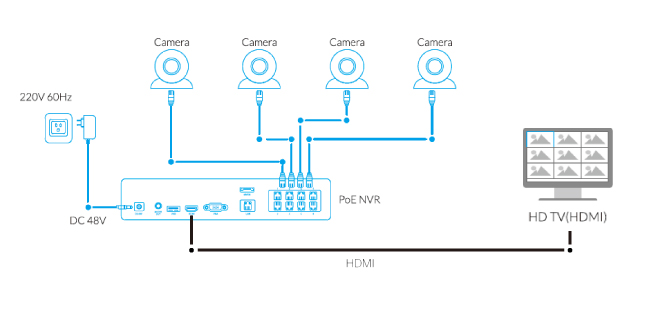
For example, Reolink’s current third-party guide directs the camera onto the same local network rather than simply plugging it into the recorder’s camera ports, and does not guarantee every third-party combination. Apply those instructions only to the relevant recorder arrangement.
For another brand, the supported topology may differ. Draw the power and data paths before moving cables. Our PoE comparison explains why network and power compatibility must be checked separately.
Create the correct local camera credentials
A cloud account login is not always the credential a recorder needs. Some cameras require a separate local account or ONVIF user, with specific permissions. Using the wrong account can produce repeated failures even when the camera is online.
TP-Link’s Tapo integration guide explicitly requires a separate camera account. It also describes recording-stream resource limits and exceptions for certain power modes and dual-lens cameras. A successful login should not be generalized into a claim that every Tapo camera exposes every feature.
Use unique credentials and appropriate permissions. Do not paste a live stream URL containing a password into a public forum, shared screenshot or unrestricted log. Keep secrets in the recorder’s supported credential store rather than a public shortcut.
Match codecs and stream capabilities
A recorder can support a camera’s network protocol but not a particular encoding profile, resolution or frame-rate combination. Vendor-enhanced codec modes may also behave differently from standard modes supported by the client.
Start with a configuration both manufacturers explicitly support and record the result. The highest-resolution stream may require more processing or bandwidth than the recorder can accept on every channel simultaneously. Check total incoming bandwidth as well as the headline channel count.
Do not permanently lower quality without checking the consequence for your actual evidence requirement. A tiny low-quality preview can prove communication while failing the reason you installed the camera.
Audio and two-way conversation are separate features
A recorder may save a supported microphone stream without providing a way to speak through the camera. Speaker control, talk mode and audio codecs need their own compatibility check. A phone app working normally does not prove the NVR exposes the same function.
Review whether audio is needed and appropriate for the location. Do not enable broad recording merely because a new integration makes it possible. Privacy and local rules remain relevant regardless of which brand records the sound.
Include a realistic test from the actual viewing client. A feature shown on the recorder’s local monitor may behave differently in its mobile app or remote client.
Events and analytics are the usual surprise
Person, vehicle, pet and line-crossing classifications can use proprietary event types or require particular profile support. The camera’s own app may display them while the recorder sees only generic motion or no event marker.
Make a feature list before purchase. If searchable person events are essential, ask for evidence using the exact models and supported versions. Do not accept a demonstration of live video as proof of analytics integration.
Continuous recording can preserve footage when an event marker is absent, provided storage and schedules are correct. It does not automatically restore a missed notification. Our motion guide separates those failure stages.
Camera-card playback is not the same as NVR playback
A recorder normally has its own archive. It may not automatically retrieve older clips from the camera’s card or fill every outage gap after reconnection. Edge-storage recovery needs specific support and configuration.
Test where the recording resides and what happens during a controlled connection interruption. Do not remove the camera card simply because a generic old guide says two destinations cannot coexist; current model and stream-resource restrictions need checking.
Our storage comparison helps separate where footage lives from how it is viewed. A unified app screen can conceal several distinct archives.
Check time, users and configuration ownership
Align time zones and time sources appropriately so events can be related across cameras. Document a known discrepancy in preserved evidence instead of silently editing the only recording. Check daylight-saving behavior where relevant.
Decide where configuration changes are made. Some settings may need the manufacturer’s own interface even after the NVR receives video. Two administrators changing image settings in different tools can make results inconsistent.
Maintain a record of accounts and authorized integrations. When an installer leaves, the property owner should retain the ability to manage both recorder and cameras without sharing one password indefinitely.
Troubleshoot one stage at a time
| Failure | Check first |
|---|---|
| Camera not discovered | Supported topology, local address, enabled services and network policy |
| Authentication rejected | Correct local account, permissions and any temporary lockout |
| Login succeeds, picture absent | Supported codec, stream path and resolution |
| Picture appears, no recordings | NVR schedule, channel settings and disk status |
| Recordings exist, no person markers | Event/profile compatibility and configured analytics |
| Works until restart | Persistent addressing, saved credentials and reconnection behavior |
Do not turn off account lockout, firewalls or network segmentation wholesale to make discovery easier. Use a controlled authorized test and restore the intended protections. Where supported routing is necessary, involve the network administrator rather than flattening a business network.
Keep local protocols off the public internet
Use the vendors’ supported secure remote-access architecture or a properly managed protected connection. Forwarding a camera’s streaming and management ports to the public internet is not an appropriate generic fix for a recorder that cannot find it locally.
Keep firmware supported and use credentials distinct from the cloud owner account where the product permits. Verify which services must remain enabled for the chosen integration, and disable unnecessary exposure through the documented process.
Our network-security guide covers administration and recovery. Interoperability is valuable only when the resulting system remains manageable and reasonably protected.
Run a pilot before purchasing several cameras
Buy or borrow a supported test unit through an authorized arrangement and confirm the return conditions. Test local video, actual recording, playback, export, required audio and the precise event categories. Include ordinary nighttime conditions and a supported restart.
Record what works and what does not. A limitation may be acceptable for an overview channel but unacceptable at a critical entrance. Decide before multiplying the configuration across a whole property.
For a business, obtain a written compatibility scope from the installer. It should identify required functions and support responsibilities instead of simply promising ONVIF support.
When staying with one supported ecosystem is sensible
A mixed system can reuse useful equipment and offer more choice, but it can also increase setup and support effort. If the household wants straightforward alerts, playback and updates, a well-documented single ecosystem may be the better value despite a higher unit price.
Conversely, replacing every functioning camera merely to match a logo may be unnecessary where basic recording is all that is required and a verified integration works. Compare the cost of replacement with the cost of maintaining the mixed arrangement.
The right answer follows the required features and the person who will maintain them. An enthusiast’s manageable project can be an unsuitable handover for a user who only wants dependable recordings.
Frequently asked questions
Does ONVIF mean every feature will work?
No. Check the relevant profiles, conditional functions, exact products and firmware. Live video is only one level of compatibility.
Can RTSP replace an NVR integration?
It may provide a supported media stream, but management, events and recording behavior need separate support. Define the function before choosing the protocol.
Will Profile S cameras stop working in March 2027?
ONVIF’s announced deadline concerns new conformance submissions, not an automatic shutdown of installed systems. Review security and support planning for any new purchase.
What is the most useful pre-purchase test?
Record and export a representative event through the intended NVR, then verify every required alert and control on the exact camera and recorder combination.


