
Smart Lock Battery Draining Fast? Check Alignment, Power and Connectivity Before Resetting
If your smart lock needs fresh batteries every few weeks, buying a larger multipack may hide the problem rather than solve it. The motor might be pushing against a misaligned strike, a radio might be repeatedly searching for its connection, or the battery warning might not yet reflect a recent replacement. Those situations need different checks.
Start with smooth mechanical operation and the exact model’s specified power source. Then examine usage, connectivity and configuration, changing one variable at a time. Do not begin with a factory reset that removes access credentials while leaving a binding deadbolt untouched. Keep a legitimate backup way into the property throughout testing.
Is this real drain or a stale warning?
Record when the batteries were installed, their exact type and when the first warning appeared. Note whether the motor has actually slowed, failed to operate or produced a jam error. A displayed percentage alone is not a laboratory measurement of remaining energy.
Some products update their battery estimate after supported electronic operations rather than immediately after a manual turn. Yale’s Approach battery instructions, for example, explain how to clear an old warning through app-operated cycles after replacement. That procedure is for the named product, not every lock carrying the Yale name.
If a lock is unresponsive, do not assume the app’s last recorded battery value is current. Follow the exact model’s legitimate backup and support instructions. A stale online status and a physically exhausted battery can require different next steps.
Use a symptom-based starting point
| What you notice | Investigate first | What not to assume |
|---|---|---|
| Motor strains or repeats a movement | Bolt travel, door fit and calibration | Higher-capacity cells will repair the door |
| Drain began after changing router | Supported wireless connection and reconnection behavior | The lock mechanism failed at the same time |
| Warning remains immediately after replacement | Correct cells and model-specific status refresh | Every new battery is already exhausted |
| Only one installation drains quickly | Its fit, usage, environment and connection | The whole brand has identical battery performance |
| Lock works open but struggles closed | Receiver alignment and pressure | A software reset is the first repair |
| Unexpected heat, leakage or damage | Stop ordinary use and obtain appropriate support | More trial-and-error cycling is safe |
Take screenshots of settings and errors before changing them. A useful record lets you return to a working configuration and gives support evidence beyond batteries do not last.
Check the door before checking the app
Where the manufacturer permits it, compare manual bolt operation with the door safely open and normally closed. The lock should not need to pull the whole door into place. If it catches only while you push or lift the leaf, inspect the door and receiver relationship.
Look for rubbing, loose hinges, a displaced seal or seasonal movement. A door can appear shut while putting persistent sideways pressure on the bolt. Do not enlarge the strike randomly or remove required fire and weather components to make the symptom disappear.
Kwikset’s battery-performance guidance identifies alignment as the first check for its listed Halo and Aura families. Our door-not-locking guide helps describe the underlying mechanical fault before replacing electronics.
Check fitting and calibration together
A loose mounting plate, unsuitable adapter or incorrect installation can change how the motor drives the mechanism. Follow the exact manufacturer’s installation and calibration procedure. Do not tighten hardware indiscriminately or use a spacer not approved for the product.
Some locks learn their direction or travel during setup. If the door hardware has been changed, that learning may need to be repeated through a supported process. Calibration cannot restore damaged framing or make an incompatible tailpiece fit properly.
For a retrofit, verify that the original deadbolt works smoothly before the motor is fitted. A replacement cylinder with different dimensions can affect both operation and outside-key backup. Our retrofit buying guide explains why compatibility comes before convenience features.
Use the battery specification for the exact model
There is no universal rule that every smart lock should use alkaline AA batteries or that every rechargeable cell is unsuitable. Products use different voltages, chemistries and charging systems. The right source is the manual for the lock and hardware generation in your hand.
| Documented example | Power arrangement to verify | Important distinction |
|---|---|---|
| Listed Kwikset Halo and Aura models | Manufacturer-specified non-rechargeable alkaline cells | Follow model-specific replacement instructions |
| Yale Approach | Four standard non-rechargeable alkaline cells | Replace the set and use its documented warning-refresh process |
| August Wi-Fi Smart Lock | Two specified CR123/CR123A lithium cells | Do not apply an AA-lock rule to this product |
| Current Nuki Pro and Ultra examples | Built-in rechargeable pack | Use the supported charging arrangement rather than attempting cell substitution |
These examples demonstrate variation; they are not interchangeable shopping instructions. See August’s battery guide and Nuki’s generation-specific guidance before servicing those products.
Replace a set cleanly rather than mixing assumptions
Use fresh approved cells and the specified polarity. Follow instructions about replacing the complete set rather than combining old and new batteries. Check the tray is seated and contacts are in normal condition without bending or scraping them.
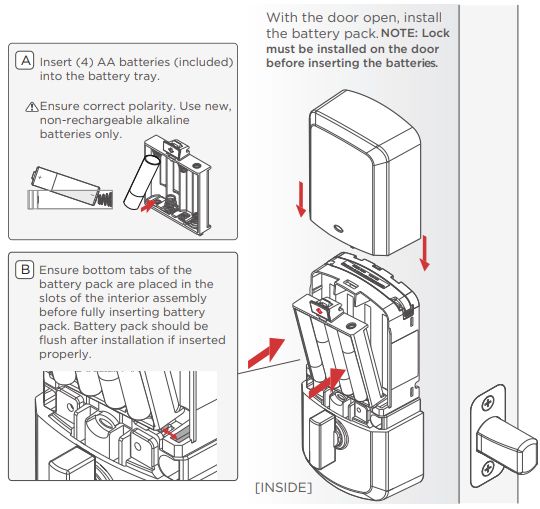
If you see leakage, corrosion or a damaged tray, seek the manufacturer’s repair advice. Do not bridge contacts with foil, attach an improvised external supply or attempt to open a sealed rechargeable pack. The objective is reliable operation, not defeating a power warning.
Keep replacement batteries accessible to authorized users without leaving them loose where children can reach them. Record the replacement date so the next warning can be compared against actual use.
Weak or missing wireless connections
Some connected locks expend additional energy while attempting to restore a lost connection. Check the radio path the model actually uses: direct Wi-Fi, Bluetooth to a bridge, Z-Wave, Thread or another supported arrangement. Restarting the household router does not diagnose every one of those paths.
Schlage’s Encode-series support article identifies weak or absent Wi-Fi among its battery-drain causes. That is a relevant branch for the covered models, not proof that every locally operated keypad needs a stronger router.
Use supported signal diagnostics at the installed door. Check for recent network-name or password changes and whether a required bridge remains powered. Avoid creating an open network, disabling protections or installing undocumented repeaters as a generic fix.
Review multiple integrations before deleting anything
List the apps and home systems connected to the lock. Some combinations can produce additional communication or redundant operations. Schlage’s Encode Plus guidance specifically discusses the battery implications of a dual pairing with its app and Apple Home.
Do not remove a household’s working integration blindly. First identify which service provides the needed remote access, guest credentials and automations, and preserve account recovery information. Follow the exact support procedure if changing the pairing arrangement is justified.
A connection badge alone does not explain the active route. A Matter-compatible lock can still have different setup and remote-control requirements depending on its generation and home controller. Check the product’s actual configuration rather than applying a universal Wi-Fi-off trick.
Count how often the lock really operates
A busy household, rental property or shared office can cycle a lock much more often than a quiet home. Auto-lock routines, repeated retries and people checking status can also change activity. Compare actual use before interpreting an advertised maximum as a promise.
Look for unnecessary repeated lock commands or automations that conflict. A routine trying to secure an open door can create repeated motor attempts. Correct the intended behavior rather than suppressing every useful warning or removing necessary access.
Do not disable safety-relevant functions solely to extend battery life. An optional sound or status light can be a supported adjustment on certain models, but the household still needs clear normal operation and warning information.
How long should batteries last?
Use the maker’s estimate as a starting reference for the exact model, then interpret it alongside usage and configuration. Schlage currently states a six-month expectation for the covered Encode models, while August’s Wi-Fi product page describes up to three months for its specified arrangement. Those different figures should not be combined into a universal smart-lock average.
Battery condition, temperature, connections and mechanical effort can change the experience. A sudden fall from your own previously stable interval may be more diagnostically useful than a comparison with a stranger’s different model.
Document the change. If a correctly fitted lock starts exhausting fresh approved batteries in days, contact support with the evidence instead of accepting frequent replacement as normal indefinitely.
Environment and intermittent problems
Check the product’s operating limits and exposure. An interior module on a damp, unheated outbuilding may not be an approved application simply because the exterior keypad tolerates weather. Temperature changes can also coincide with door movement that increases motor load.
Note whether the drain appears after rain, cold spells or a period of unusual traffic. Correlation is a clue, not a confirmed diagnosis. Test the mechanical fit under the conditions in which the problem occurs.
Do not apply direct heat, insulation or an improvised enclosure to electronics without approval. A lock must remain usable and accessible, including its normal inside release.
A practical battery log
| Record | Example entry |
|---|---|
| Installation date | Date the complete approved set was fitted |
| Cells or pack | Exact type, brand and batch where available |
| Mechanical result | Free manual travel open and closed, or noted resistance |
| Daily activity | Approximate lock/unlock cycles and unusual retries |
| Connection | Supported signal result and recent changes |
| Configuration | Active integrations, auto-lock and relevant optional features |
| Outcome | First warning, actual failure or continuing normal operation |
Change one meaningful variable and observe under comparable use. A new battery set, new router and full reset performed together may improve operation without revealing which change mattered. That makes recurrence harder to solve.
Use restart and reset at the right stage
A manufacturer-supported restart may clear a temporary connection issue without deleting configuration. A factory reset can remove users, pairing and calibration. They are not the same operation, even when both involve handling the battery tray.
Before a reset, make sure you have administrator access, recovery information and a legitimate way to enter. Record guest permissions and supported configuration. Follow the exact guide instead of improvising a sequence from another model.
If the lock still binds manually, resetting it cannot fix that physical fault. Resolve the mechanical problem and test again before changing more electronics.
When service or replacement is justified
Seek support for rapid drain that persists with a sound door, approved power and documented configuration. Hardware damage, liquid ingress, repeated unexplained restarts or a motor that fails supported tests can require service rather than another setting change.
Provide the exact model and firmware, battery log, error messages and the result of open-versus-closed manual operation. Share account and device identifiers only through official private support channels.
Do not replace a lock solely because its battery life differs from another product’s marketing. Replacement should address a diagnosed fault or a requirement the existing model cannot meet reliably.
Test access after the repair
Verify normal manual, keypad and app operation as applicable. Confirm that the door closes naturally, the bolt engages fully and low-power information behaves as documented. Test an appropriate backup without risking a lockout.
Check remote access separately from local entry. Our offline smart-lock guide explains why internet loss and depleted lock power are different events. A lock can work perfectly locally while its app displays an old status.
Assign someone to respond to future battery warnings. A repaired device still needs routine maintenance, and an alert ignored by every household member does not prevent the next interruption.
Frequently asked questions
Should every smart lock use alkaline batteries?
No. Many use them, but other models specify lithium cells or integrated rechargeable packs. Follow the exact product instructions.
Can a stiff door really reduce battery life?
It can increase the effort required to drive the bolt, and manufacturers identify alignment as an important check. Repair the fit instead of expecting the motor to pull the door into place.
Why does a new set still show low battery?
The cells may be unsuitable or the status may need the model’s documented refresh process. Check the instructions and actual operation before assuming immediate drain.
Will disabling Wi-Fi solve the problem?
Not universally. Identify the supported communication arrangement and required features, then follow the relevant troubleshooting. A blanket change can remove functions without addressing the cause.


