Home Security on a Budget: Spend on the Weakness, Not the Gadget
The cheapest home-security mistake is often buying nothing. The more expensive mistake is buying the wrong thing: a camera while a rear window will not lock, a stronger cylinder in a damaged frame, or a discounted kit whose useful features require several years of payments. Saving money begins by deciding which weakness the next purchase will actually correct.
You do not need the same equipment as a larger house, a holiday property or a showroom demonstration. A small apartment may need a repair and better delivery arrangements; a detached home may need several different entrances assessed. This guide turns those differences into a spending plan rather than another list of products described as essential.
Make a repair list before a shopping list
Walk through every entrance you use and every accessible opening you rely on. Close doors normally, operate the existing locks and inspect visible frame damage. A lock that works only after lifting the door or slamming it deserves attention even if it still works eventually.
Check the less glamorous parts too: the side gate, garage pedestrian door, shed and windows behind shrubs. Note specific faults, not vague impressions. A written observation such as rear slider latch misses its receiver is easier to price and repair than make the house more secure.
Separate urgent safety problems, failed security hardware and optional improvements. Keep required exits usable and have appropriate professionals assess rated doors, structural damage or electrical work. A cheap improvised repair can become expensive when it damages the assembly or creates an escape problem.
Use a spending order tied to the actual job
| Priority | Spend or act on | Why it comes before extras |
|---|---|---|
| Restore basic operation | Failed latches, damaged frames and unreliable closure | Monitoring does not repair an opening |
| Control existing access | Keys, codes, remotes and guest permissions | Authorized-looking access can bypass a new gadget’s purpose |
| Reduce exposure | Deliveries, portable tools and valuable outdoor storage | Some risks can be reduced without electronic equipment |
| Improve awareness | Suitable lighting and targeted detection | Addresses a known approach or event |
| Add evidence or response | Useful recording or an appropriate monitoring service | The value depends on what is saved and who acts |
The order is a decision aid, not a rule to postpone a critical alarm or specialist requirement. Adjust it to the property and occupants. The important point is to know why one expense takes precedence over another.
Get useful value from the equipment you already own
Check whether existing cameras actually save footage and whether the alarm’s useful sensors are armed. A poorly drawn detection zone can make a working camera seem ineffective. A subscription may already cover a function you are about to buy again in another app.
Review original saved clips in daylight and darkness. If a visitor is cut off or blurred, test a permitted repositioning before replacing the device. Our camera placement test explains how to do that before drilling more holes.
Inspect battery warnings and service messages rather than silencing them indefinitely. Maintenance is not glamorous, but restoring a sensor you already paid for can be better value than buying a new package to cover the same door.
No-cost changes that solve real problems
Use the intended locking sequence, bring unnecessary valuables out of view and stop leaving obvious spare keys outside. Review whether old visitors still have codes or app access. These changes cost little but require a consistent household routine.
For deliveries, compare an eligible pickup point or attended handover when you will be away. A parcel that never sits unattended on the doorstep needs less camera attention. Our package-theft guide explains the available approaches and their practical limits.
Police.uk’s departure checklist emphasizes ordinary locking and securing external storage. Use it as a reminder to make the equipment you already own part of daily use, rather than assuming the next purchase is always the missing layer.
Repair or replace? Ask for a diagnosis
A door that will not lock can have a worn cylinder, a failed latch, a damaged receiver or an alignment problem. Those repairs have different scopes. Ask a locksmith or installer to identify the failed component and explain what the proposed work will restore.
Compare like-for-like quotations. One may include necessary frame repair while another covers only a lock body. A low price is not good value if the same fault returns because its cause was never addressed.
Do not keep investing in accessories when the underlying assembly is beyond a sensible repair. Equally, do not replace a sound door solely because a serviceable mechanism is old. Our door diagnosis guide helps you describe the symptoms accurately.
Start camera coverage with one useful scene
A camera bundle can encourage you to cover rooms simply because spare devices are available. Begin with the event that matters most: a visitor at the front door, the side gate or an entrance to the garage. Verify the view, power, network and recording before expanding.
A compact plug-in camera may be suitable where power is available. A battery camera can simplify cable routing but adds charging and model-specific recording behavior. The lower hardware price is not necessarily the cheaper installed solution if an outdoor electrical connection is needed.
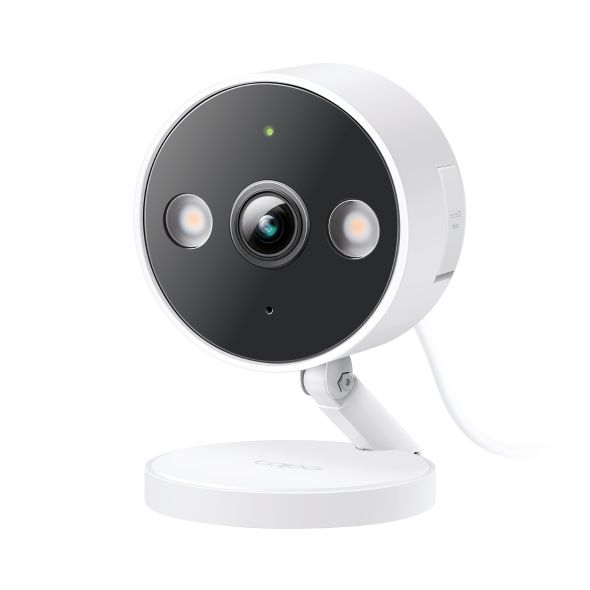
For actual budget examples, use our cameras under $50 guide. It distinguishes the camera price from memory cards, outdoor accessories and ongoing services rather than presenting the checkout headline as the whole cost.
Calculate ownership cost in one line
Use this calculation for each option: purchase price plus installation plus required accessories plus service charges over the intended period plus reasonable maintenance. Write the time period beside the number so that a monthly plan is not accidentally compared with a one-time purchase.
For an illustrative example, Camera A costs $70 and needs a hypothetical $6 monthly recording plan. Over four years that is $358 before installation and maintenance. Camera B costs $130 plus a $20 card and provides the local recording needed for the same task, for an initial $150. These are invented comparison figures, not current product prices.
Camera A may still offer a benefit you value, such as off-site history. The calculation is not an argument that subscriptions are bad; it prevents a small upfront saving from hiding a much larger recurring commitment.
Match storage to the consequence you care about
Local storage can reduce dependence on paid cloud recording, but the camera or card may be stolen together. A separate recorder creates another location to protect. Cloud history can preserve uploaded clips away from the house but depends on the service and the connection needed to upload.
Decide which failure matters most and what you can maintain. A low-cost camera with a card is a plausible choice for one household, while another needs a professionally specified recording arrangement. Do not assume every model keeps recording through every type of outage.
Test a saved clip and its export before a free trial ends. A live view without accessible history may not provide the function you bought. Keep important recordings before rolling retention or storage overwrite removes them.
Pay for monitoring only when the response helps
Professional monitoring can be worthwhile if nobody can reliably respond to your alerts. Self-monitoring can be suitable when an authorized person is available and understands what to do. The difference is the handling of events, not simply the brand of the sensors.
Compare the provider’s verification, contact and dispatch process with your actual circumstances. A remote holiday home may need a local caretaker as well as a monitoring subscription. A renter mainly checking deliveries may not need the same service.
Our security-system value guide examines that decision. Do not assume an app plan, camera storage and alarm monitoring are the same charge or the same function.
Compare the no-monthly-fee alarm-system options by what remains available after the trial, not merely the starter-kit price. List the sensors, remote functions and response arrangements you actually need before deciding whether a subscription-free package is the cheaper complete solution.
Read the cost of leaving, not just joining
Ask about the minimum term, equipment ownership, financing balance, cancellation and moving home. Check which features remain after a subscription ends. A system that cannot be transferred or used independently may have a different long-term value from a portable alternative.
The FTC’s buying advice warns that a free alarm can be tied to an expensive long contract. Its practical lesson is to obtain the whole written offer, not make a decision from the advertised installation price alone.
Keep the comparison limited to the services you actually need. An extra feature included for free is not a saving when it distracts from a higher overall price or encourages an unnecessary upgrade.
Where DIY saves money and where it does not
Simple permitted mounting or configuration may be manageable, but DIY is not a universal discount. Failed attempts, damaged frames, unsafe wiring or loss of a product’s approved installation can cost more than competent fitting.
Use professionals for work involving uncertain structural support, rated entrances, high-tension garage components or electrical installation beyond your competence. Ask them to separate necessary work from optional enhancements in the quote.
You can still save by preparing good information: photographs, model numbers, fault descriptions and the intended outcome. A clear request reduces the chance that the visit becomes an expensive exercise in guessing which accessory you wanted.
Renters: spend on permission-compatible improvements
Document defects and request repair through the proper process before buying devices to conceal them. Do not assume you must personally pay to work around a failed communal entrance or an existing window fault; responsibilities depend on the location and agreement.
Where allowed, portable equipment and removable sensors may be easier to move than permanently installed systems. Confirm they do not damage finishes or obstruct safe operation. Keep original parts when an authorized change is made.
Review the apartment security guide for shared corridors, delivery arrangements and building access. Spending on a well-managed routine can be more useful than filling a small apartment with redundant cameras.
Used equipment and bargains need a lifecycle check
A used device can be poor value if the previous owner has not released it from an account, replacement parts are unavailable or software support has ended. Verify the exact hardware revision and ownership-transfer process before paying.
For locks and safety-related components, visible appearance does not establish their history or suitability. Do not buy an unknown used fitting solely because it once sold at a high price. Compatibility and reliable condition still matter.
A deep discount near the end of support is not necessarily a bargain for a system you expect to run for years. Include likely replacement timing in the calculation.
Three example spending decisions
The back door needs a hard pull to lock
Pay for diagnosis and a suitable repair first. An expensive camera watching that door provides information while leaving the known physical weakness in place. Reassess optional monitoring after closure and locking are dependable.
The house is sound, but deliveries disappear from view
Change the delivery arrangement and test whether an existing camera can cover the threshold. A separate device may be worthwhile if the first view cannot show both the approach and parcel area. Do not buy a whole alarm bundle solely for that question.
You already own several cameras but ignore their alerts
Review zones, event types and placement before adding more equipment. The problem may be notification quality rather than missing hardware. Establish what requires action and remove irrelevant coverage that contributes only noise.
Keep the savings after installation
Maintain batteries, clean accessible optical surfaces according to instructions and check recorded footage periodically. Review subscriptions when household needs change instead of allowing overlapping plans to renew unnoticed.
Keep a short record of hardware models, warranties and who handles support. A device that fails is cheaper to troubleshoot when you can identify its power, storage and network arrangement. Replacing everything because nobody knows how it was configured is avoidable waste.
The best budget plan ends with working equipment and fewer unresolved weaknesses, not the largest pile of discounted boxes. Use our weekend action plan to turn the priorities into manageable tasks.
Frequently asked questions
What should I buy first on a small budget?
Do not assume a product is the first answer. Identify a failed or unreliable entrance, uncontrolled access or exposed valuables, then price the specific correction.
Are subscription-free cameras always cheaper?
Not always. Include local storage, power, installation and replacement costs, and compare the actual service provided. A cheaper total for a different job is not a like-for-like saving.
Can an insurance discount pay for the system?
Ask your own insurer about eligibility and the actual amount before buying. Do not base the decision on a percentage quoted for someone else’s policy.
Is a dummy camera a good bargain?
It cannot detect or record an event. Treat any visual effect as uncertain rather than counting it as equivalent to working equipment.