PoE vs. Wi-Fi Security Cameras: Compare Real Installation Costs, Recording and Reliability
Choose PoE when you can run suitable Ethernet cable and want a permanent installation with centralized power. Choose Wi-Fi when the camera positions already have safe power and a dependable wireless connection, or when a supported battery camera fits the recording task. Neither choice automatically determines whether video is stored in the cloud or whether a subscription is required.
The usual comparison makes PoE sound expensive and Wi-Fi sound cable-free. That is only sometimes true. A Wi-Fi camera on a shelf near an outlet can be an easy purchase; four outdoor Wi-Fi cameras needing new protected power runs can be a different project. Compare the complete work at your property before choosing the connection technology.
What PoE and Wi-Fi actually describe
Power over Ethernet carries compatible electrical power and network data on the same Ethernet connection. The camera is normally fed by a suitable PoE switch, injector or recorder with PoE ports. It does not need a separate outlet beside each mounting point.
Wi-Fi describes the wireless data connection. A Wi-Fi camera may still need a plug-in adapter, or it may run on a battery with its own recording limits. Wire-free is therefore a different claim from Wi-Fi. A solar accessory supports a particular battery arrangement rather than changing the network technology into wired power.
Storage can sit on a camera card, a compatible recorder, another supported local destination or a cloud service. Do not let a salesperson treat a wireless connection as proof that cloud recording is mandatory.
What changes in everyday use?
| Decision | PoE camera | Wi-Fi camera |
|---|---|---|
| Power at the camera | Comes through a compatible Ethernet supply | Usually a separate adapter or battery |
| Data path | Wired Ethernet | Wireless connection to the local network |
| Initial installation | Needs a suitable cable route | Needs usable radio coverage and an appropriate power arrangement |
| Central backup power | Often practical at the switch or recorder | May need backup at several separate adapters |
| Continuous recording | Common on supported powered systems | Available on suitable plug-in models; check battery-model behavior separately |
| Repositioning | Limited by cable route and mount | Limited by power, coverage and mount |
| Remote access | Needs a supported internet path | Needs a supported internet path |
A properly installed wireless camera can be dependable. A badly terminated Ethernet cable can fail. The technology changes the failure modes; it does not remove the need to install and verify the system correctly.
Where PoE earns its installation effort
PoE is particularly attractive during renovation, when cable paths are accessible, and for fixed exterior positions served from a central equipment location. One cable per camera simplifies the relationship between power and data and can make a multi-camera system easier to document.
It also helps where a wireless connection would have to cross difficult building materials. You no longer need the camera’s video stream to compete for that local radio link. This does not make the entire system immune to network or power failures; the recorder, switch and any remote connection remain dependencies.
For several cameras, a recorder with suitable PoE ports may provide a straightforward package. A separate switch can offer placement flexibility, but it adds another component to configure and back up. Confirm the exact camera and recorder compatibility rather than assuming a network connector guarantees all features.
Where Wi-Fi is the more sensible choice
For one indoor camera near an existing outlet, running Ethernet through a finished home may add expense without a meaningful benefit. A supported plug-in Wi-Fi camera can provide continuous local recording and remote access with much less installation work.
Wi-Fi can also help renters who have permission for a temporary camera but not for cable routing through walls. Battery models offer further placement flexibility when event recording and charging access are acceptable. The important restriction is the actual job: a battery clip camera is not automatically an equivalent substitute for a continuously powered driveway recorder.
Test coverage at the intended position, with doors closed and the household using the network normally. A successful setup beside the router is not evidence that the same camera will remain connected behind a metal garage door.
PoE standards: match the supply, not just the connector
Use the camera’s required PoE standard and power specification. Standard IEEE PoE, PoE+ and higher-power variants are not simply marketing names for identical output. An RJ45 connector can also be present on equipment that does not supply PoE at all.
TP-Link’s standards guide distinguishes 802.3af, 802.3at and 802.3bt and the difference between source output and available device power. Do not substitute an unspecified passive-power injector because its plug fits.
Check both the per-port limit and the total switch budget. A switch advertised with several powered ports may not supply every port at its maximum simultaneously. Illuminators, heaters and motorized functions can affect the required budget, so use the model’s specified requirement rather than a quiet daytime reading alone.
A four-camera power-budget example
Suppose four hypothetical cameras each specify a maximum 12 W at the powered device. Their combined device demand is 48 W. That is not automatically permission to select a source with exactly 48 W of usable output: account for the equipment’s allocation rules, cable losses and the manufacturer’s stated budget method.
Ask the supplier to show that each port supports the device and the total arrangement stays within the switch’s rating. Leave a documented allowance for future changes instead of using every available watt on installation day.
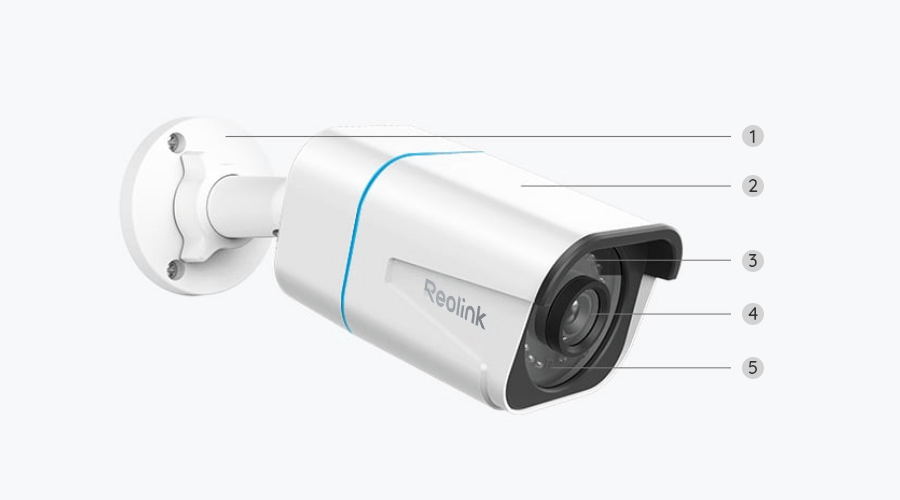
This example is arithmetic, not a specification for the RLC-810A pictured above. Product consumption and power standards must be checked independently. TP-Link’s surveillance-switch guidance explains the relationship between device requirements and aggregate power planning.
Cable distance, materials and outdoor installation
For ordinary standard Ethernet arrangements, plan around the supported channel length, commonly up to 100 meters between appropriate devices. Longer installations require a properly designed extension rather than joining random cables and hoping the power remains adequate. Device-specific extended modes may change performance and should not be assumed universal.
Use suitable cable, termination and environmental protection for the location. Outdoor connectors need the specified gland or enclosure; a weather-resistant camera body does not protect an exposed coupling automatically. Do not run cables through unsafe routes or share spaces with electrical wiring contrary to local requirements.
Between detached buildings, grounding, surge exposure and the appropriate communication medium deserve professional consideration. A long copper cable outdoors is not merely a bigger version of the short lead behind your desk.
Compare installed cost using actual line items
A fair quotation separates camera hardware, storage, network equipment, power work, mounting and labor. Otherwise a Wi-Fi quote may omit new outlets while a PoE quote includes every cable run. One apparently cheaper total can simply describe less work.
| Cost line | PoE installation | Wi-Fi installation |
|---|---|---|
| Camera | Exact lens and model | Exact powered or battery model |
| Storage | Card, NVR disk or other supported destination | Card, hub, recorder or cloud plan |
| Connection | Cable, termination, switch or injector | Existing coverage or additional access point |
| Power | Compatible centralized source | Approved local adapters, outlets or charging arrangement |
| Installation | Cable routing, mounts and weather protection | Mounts, power routing and weather protection |
| Maintenance | Central equipment and camera servicing | Network upkeep plus any separate batteries and adapters |
For a one-camera illustration, assume a $65 PoE camera, a $25 injector, a $20 cable allowance and a $20 card: $130 before labor and taxes. A hypothetical $55 plug-in Wi-Fi camera with the same $20 card is $75 only if safe power and adequate coverage already exist. These are invented planning figures, not current product prices.
For four card-recording cameras, the same assumptions give PoE hardware of $260, cards of $80, a hypothetical $100 switch and $140 of cable materials: $580 before installation. Wi-Fi hardware of $220 and cards of $80 starts at $300, but four hypothetical $40 power-accessory allowances and a $90 network improvement bring it to $550 before labor. The point is not that either total is typical; it is that missing infrastructure can erase an apparent advantage.
Recording length is not decided by Ethernet versus radio
A powered Wi-Fi camera can record continuously when its model and storage support it. A PoE camera can still be configured to save only events. The recording schedule is a separate choice from how data travels.
Compare the stored bitrate, channel count and retention period. Four streams at a hypothetical 4 Mbps each generate about 172.8 GB per day before overhead when recorded continuously. The storage requirement is the same arithmetic whether those streams reach the recorder by suitable wired or wireless paths.
Our data calculator lets you change the assumptions. Our storage comparison covers the difference between where footage lives and how it travels there.
What happens during an outage?
PoE makes it possible to back up camera power centrally when the switch or recorder supplies it. You still need the recording destination powered, and remote access may additionally need a router and broadband equipment. A UPS protecting only one box may not protect the entire recording path.
Plug-in Wi-Fi cameras can have separate local adapters scattered around the home. Backing up the router alone does not keep those cameras operating. Battery cameras may stay awake while the network or hub they need has stopped.
For broadband failure without power loss, either technology may support local recording. See our offline-function guide and backup-power plan before choosing based on a vague claim that wired cameras always work.
Security and privacy still need attention
Wired data avoids reliance on a Wi-Fi radio link, but neither arrangement removes account, firmware or network responsibilities. Use supported software, unique credentials and appropriate permissions. A recorder should not be exposed directly to the internet as a shortcut to remote viewing.
Check camera placement, audio and retention independently of the connection type. An Ethernet cable does not make an intrusive view acceptable, and a wireless camera is not automatically a privacy problem simply because it uses radio.
For a managed or mixed-brand installation, verify actual capabilities instead of assuming every ONVIF label exposes all analytics and controls. Our mixed-brand NVR guide explains that compatibility ladder.
Which would I choose for these homes?
A single indoor camera near power: start with a suitable Wi-Fi model and test local recording. The simplicity can outweigh the benefit of new cabling.
A house being renovated: obtain a PoE quote while cable paths are accessible. Leave documentation and sensible expansion capacity rather than buying the maximum number of cameras immediately.
A detached outbuilding: assess distance, power, environmental exposure and network design before choosing either category. A professional link may be more important than the camera’s wireless label.
A renter needing temporary outdoor event coverage: a permitted battery setup may fit, but check safe mounting, charging and what the lease allows. Do not describe event-based recording as an identical replacement for a continuous system.
Commissioning checklist
Test the original recording in daylight and darkness, retrieve a clip and verify the expected schedule. For PoE, confirm the supported power budget and cable path. For Wi-Fi, test at the final position under normal network use. For both, record who owns the account and how faults will be noticed.
A successful installation is one that meets the defined viewing and recording task without repeated intervention. The best technology is the one that fits the building and remains maintainable after the installer leaves.
Frequently asked questions
Does PoE need an internet connection?
Not for every local function. A compatible camera and recorder can operate locally, while remote viewing and online services need a suitable connection.
Is Wi-Fi always less reliable?
No universal claim fits every installation. Signal conditions, power and configuration matter, just as cable and switch quality matter for PoE.
Can I use both types together?
Often, with a compatible recorder and network design. Confirm the specific camera and feature support rather than assuming every IP camera integrates fully.
Which is cheaper?
Price the complete installation. Existing outlets favor some Wi-Fi setups; accessible cable paths and centralized power can favor PoE, particularly across several fixed cameras.