How to Keep Security Cameras Running During a Power Cut: UPS Sizing and a Complete Backup Plan
A UPS under the router can keep the Wi-Fi network alive while every plug-in camera goes dark. A battery camera can remain powered while the hub holding its recordings has stopped. The common mistake is protecting a convenient socket rather than the whole path that produces a useful recording.
List the camera, its power source, the recording destination and any network equipment needed between them. Back up every required component for the runtime you need. Add the router and broadband equipment when remote viewing or alerts must survive too. Then test the arrangement using the manufacturers’ approved procedures.
Decide what must continue during the outage
Keeping local evidence is a different goal from receiving a notification while away. A system can achieve the first without the second. A monitor displaying the feed may also be unnecessary when the objective is unattended recording rather than live supervision.
| Goal | Equipment likely to need backup | Remaining dependency |
|---|---|---|
| Record locally to each camera card | Camera power; any required control path for that model | Camera’s documented offline recording behavior |
| Record several PoE cameras on an NVR | PoE source, network path and NVR | Compatible recording and adequate storage |
| Receive remote alerts | Camera/system plus router, modem or optical network terminal as needed | Working provider network or supported cellular fallback |
| Watch on a local screen | Recording/viewing system plus display | Compatible display output and controls |
| Keep an intrusion alarm communicating | Alarm’s own approved backup arrangement | Monitoring plan and communication coverage |
The last row is deliberately separate. An alarm base station’s battery does not automatically supply power to cameras elsewhere in the house. Ask what the backup feature actually supports rather than reading one battery-life claim as protection for the entire installation.
Draw the recording path
Needs its specified power source and useful view.
May need a PoE switch, access point or local network.
Card, hub or recorder must remain available.
Router and provider connection are additional requirements for off-site access.
Follow the actual cables and accounts. Some cameras connect directly to an NVR’s PoE ports, while others reach a recorder through a separate switch. A Wi-Fi camera may save to its own card without the router, but only if that behavior is supported and already configured.
Our offline camera guide distinguishes internet loss, wireless loss and power loss. That distinction prevents an outage test from confusing one failure with another.
PoE systems can simplify central backup
When the cameras receive power from one compatible switch or recorder, a properly sized backup at that point can cover several devices. Include the recorder separately if it is not the power source. Also include any intermediate network device essential to the camera-to-recorder route.
Do not double-count camera power when measuring the wall consumption of a PoE recorder that already supplies those cameras. Conversely, do not read the recorder’s idle consumption and forget the powered cameras connected to it.
A centralized layout is often easier to document, but its shared power source remains a common point of failure. Our PoE comparison explains why connection technology and redundancy are different decisions.
Plug-in Wi-Fi cameras may need distributed backup
Each camera adapter must remain powered if the camera has no suitable internal battery. Backing up only the wireless router does not accomplish that. Several small backup units may be necessary when adapters are spread around the property, or a different wiring architecture may be more practical.
Keep electrical equipment within its approved environment. An indoor UPS should not be placed outside in an improvised box to serve a porch camera. Follow ventilation, temperature and installation requirements and obtain professional help where permanent electrical work is needed.
Do not replace an adapter with an arbitrary battery lead because its connector fits. Voltage, polarity, current capability and supported power methods matter. An incompatible supply can damage the camera or create a hazard.
Battery cameras and alarm batteries have limits
A charged battery camera may keep capturing events when mains power fails, but its storage hub, router or cloud connection may be unavailable. Check whether it saves locally and whether the intended recording mode remains active. Solar support is not an immediate substitute for a charged battery during darkness.
Ring’s Alarm outage guidance describes the base station’s battery behavior and the subscription requirement for cellular backup. It does not promise that every separately powered Ring camera continues operating from that base station battery.
Specialized products can combine router, alarm and backup functions, but the supported configuration and plan still matter. Read the exact system’s documentation instead of applying one brand’s advertised alarm runtime to unrelated video equipment.
Measure the load you want to protect
Use supported device specifications or a suitable approved measurement method. A safely used plug-in power meter can help assess equipment connected through ordinary compatible plugs; do not open electrical equipment or improvise measurements on exposed wiring.
Record normal and demanding conditions. Infrared illumination, spotlights, moving lenses, disk activity and other features can alter consumption. The power adapter’s maximum output rating is not necessarily the device’s typical consumption, but it also should not be ignored when assessing requirements.
| Illustrative component | Assumed load |
|---|---|
| Four hypothetical cameras at 8 W each | 32 W |
| Switch electronics, excluding those camera loads | 8 W |
| Recorder and disk | 18 W |
| Router | 10 W |
| Broadband terminal | 6 W |
| Total assumed equipment load | 74 W |
These are invented planning figures, not typical ratings promised for your devices. They illustrate a complete inventory. If you measure the switch’s total wall draw with the cameras attached, do not add the same 32 W again.
Watts, VA and watt-hours are not interchangeable
A UPS has limits on the load it can support. Watts describe real power, while VA is a different electrical rating. Both applicable limits need to be satisfied. Neither is the same thing as stored battery energy or guaranteed runtime.
Schneider Electric’s UPS buying guide explains these distinctions and the need for load headroom. Use the exact model’s ratings and supported-load guidance rather than selecting only the largest VA number on the shelf.
A 1,500 VA label does not mean 1,500 watt-hours of energy. Two UPS units with similar load ratings can have different batteries and runtime curves. Capacity to handle a device and time available to keep it running are separate questions.
Estimate runtime, then verify it against the manufacturer’s curve
A simplified energy calculation is usable watt-hours divided by load watts. If a hypothetical system can deliver 120 usable Wh to a 60 W load, the idealized result is two hours. That does not mean a battery labelled 120 Wh delivers all of that energy through an inverter to your equipment.
Conversion losses, battery discharge behavior, temperature, age, cutoff and the UPS’s own consumption affect real performance. For a purchase, use the manufacturer’s runtime curve at the relevant load and allow for the conditions that matter to your installation.
CyberPower’s CP900AVR specification, for example, publishes different full-load and half-load runtimes and notes that its curve assumes charged new batteries under stated conditions. Do not extrapolate a headline five-minute result or a light-load demonstration to every setup.
Choose the correct region and output arrangement
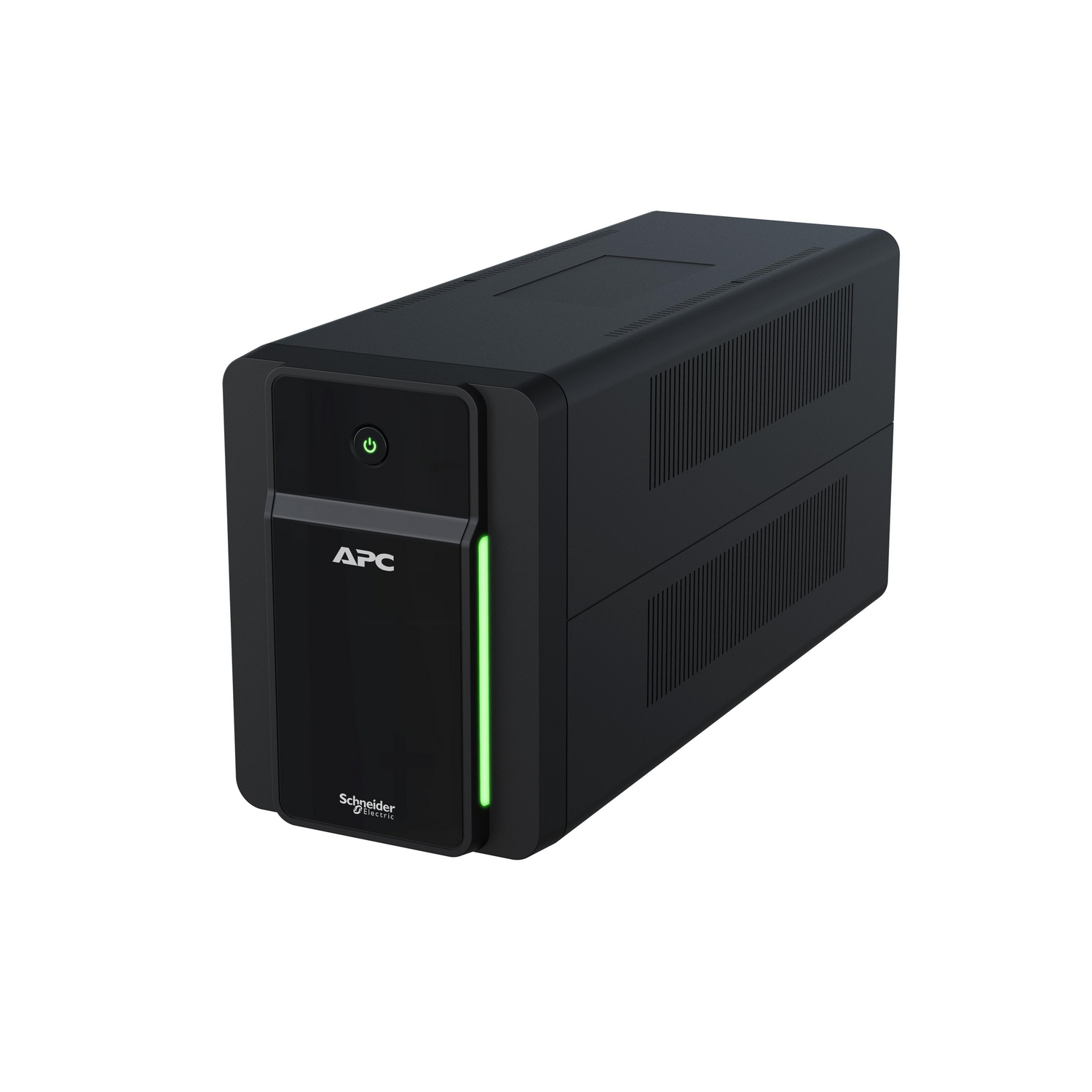
Check input voltage, frequency, plug and outlet types, output characteristics and the equipment’s compatibility. A US product photograph is not a recommendation to use that electrical variant in a 230 V installation.
Some UPS outlets provide surge protection only, while others provide battery-backed output. Plugging the recorder into the wrong bank can leave it unpowered during the test even though it works normally on mains. Label essential connections clearly.
Review automatic restart and supported shutdown functions. A recorder that stays off after power returns may leave a longer gap than the outage itself. Test the actual recovery sequence rather than assuming every device restarts together.
Keep the display off the essential load unless it is needed
For unattended recording, a TV or monitor may be unnecessary. Leaving it on the backup reduces available runtime for cameras and storage. If a person needs live supervision during an outage, that is a legitimate requirement and should be included explicitly.
Do not put unrelated high-power equipment on the camera UPS because a spare socket is available. Follow the product’s restrictions and avoid inappropriate chained power arrangements. More connected devices can turn a planned recording backup into a short-lived general power strip.
A simple label listing the protected devices helps stop later household changes from silently altering the load calculation.
Internet backup is a separate project
Keeping the modem and router powered does not guarantee the provider’s outside network continues operating. A local outage and a wider service failure can produce different results. The local recorder may remain useful even when remote viewing is unavailable.
A supported cellular fallback can restore certain online functions where coverage and service permit, but it has data and subscription implications. Continuous video can use much more data than alarm status messages. Use our data calculator before assuming a small mobile allowance covers several camera streams.
For a remote property, our cellular-camera guide compares integrated devices with a router-based approach. Do not describe an alarm’s cellular backup as unlimited video internet unless the actual product and plan provide it.
Short interruptions versus long outages
A compact UPS can be suitable for brief interruptions or a controlled shutdown, depending on load and battery. Hours or days of operation may require a substantially different professionally designed energy arrangement.
Compare the consequence of a gap with the cost and maintenance of extended runtime. You might prioritize one entrance camera and local recorder rather than every light, display and secondary view. That is a deliberate service-level decision, not a failure to buy the biggest battery.
Do not improvise battery packs, bypass protective circuits or feed building wiring through an unsuitable connection. Use approved equipment and qualified electrical advice for larger systems. A security upgrade should not create a fire or electrical hazard.
Test without disrupting critical household systems
Coordinate with anyone responsible for monitored alarms, business equipment or other essential services. Save important footage and follow the UPS and recorder manufacturers’ approved test procedure. A self-test button and a full controlled outage test may answer different questions.
- Confirm normal live view and a recent saved recording.
- Check that the required devices are on battery-backed outputs.
- Perform the supported transition test and observe device status.
- Record a controlled event during backup operation.
- Check local storage and remote alerts separately.
- Restore normal supply and verify automatic recovery.
- Export the test clip and document the observed runtime or test duration.
Do not assume success because the UPS beeped and the router light remained on. The useful test is whether the intended camera event was actually recorded and available afterward.
Maintain the backup as part of the camera system
Follow the manufacturer’s battery inspection, testing and replacement guidance. Runtime can change as batteries age or the equipment load grows. A new camera or added disk should trigger a review of the original calculation.
Keep the unit ventilated and within its environmental limits. Respond to a failed self-test or battery warning rather than silencing it indefinitely. Use only approved replacement batteries and the servicing process appropriate to the model.
Record installation and battery dates, tested load and the contact responsible for maintenance. If the system protects a business or shared property, that responsibility should not disappear when one employee leaves.
A purchasing worksheet
| Decision | Write down before ordering |
|---|---|
| Required outcome | Local recording, remote alerts, live display or a defined combination |
| Essential path | Every camera power source, network component and recording device |
| Load | Documented or safely measured normal and relevant peak demand |
| Runtime | Required duration and exact model’s curve at that load |
| Compatibility | Regional electrical specification, outlets and supported equipment |
| Recovery | Shutdown, restart and connection behavior after supply returns |
| Maintenance | Battery replacement, testing and responsible owner |
The most useful backup is the one you can explain and test end to end. Buying a reputable UPS is only the beginning; connecting the correct devices and maintaining the battery are what turn it into a recording plan.
Frequently asked questions
Will a router UPS keep my security cameras running?
Only if the cameras and recording path retain their own required power. A protected router cannot supply an unrelated plug-in camera adapter.
How long will a 1,000 VA UPS last?
The VA rating alone cannot answer that. Use its actual runtime curve, connected load, battery condition and environment.
Can local recording continue when internet fails?
On supported powered systems, yes. Internet loss and power loss are different events and should be tested separately.
Do I need a backup for the monitor?
Only if displaying the feed during the outage is part of the requirement. An NVR can often record without its viewing screen powered.