Reolink vs. Tapo: Which Is Better for a Subscription-Free Home Camera Setup?
For a simple plug-in camera, compare the exact Tapo and Reolink models rather than choosing a brand first. For a permanent multi-camera installation, compare the entire recorder, power and storage arrangement before committing. Both brands offer useful local-recording products, but free features, third-party integration and power modes differ within their own ranges.
The practical question is not which logo is universally better. It is which model and system let you record, find and export the event you need without paying for unwanted services. This comparison uses manufacturer documentation checked on November 5, 2026. It does not claim comparative laboratory testing or declare one app easier for every user.
A Tapo plug-in indoor camera and a Reolink PoE outdoor camera solve different installation problems. A price difference between them says little about brand value. Likewise, a battery model recording clips should not be compared with a powered continuous recorder as though both retain the same timeline.
| Your requirement | What to compare | What to avoid |
|---|---|---|
| One indoor room | Powered indoor models, privacy controls, local playback and alerts | Using a professional outdoor kit as the price benchmark |
| One exterior entrance near power | Outdoor-rated powered cameras and safe accessory costs | Assuming a camera housing makes its adapter weatherproof |
| Several permanent views | Exact recorder, cameras, cabling and backup power | Choosing from individual camera prices alone |
| No practical power cable | Battery models with an acceptable event and charging workflow | Expecting continuous video from every solar kit |
| Existing third-party NVR | Documented model, protocol and feature compatibility | Treating live video as proof of full integration |
Once the task is fixed, compare the useful differences. For an indoor camera, a physical privacy feature may matter more than an extra resolution tier. For a distant entrance, optical coverage and recording quality may dominate.
Indoor example: Tapo C225 V2
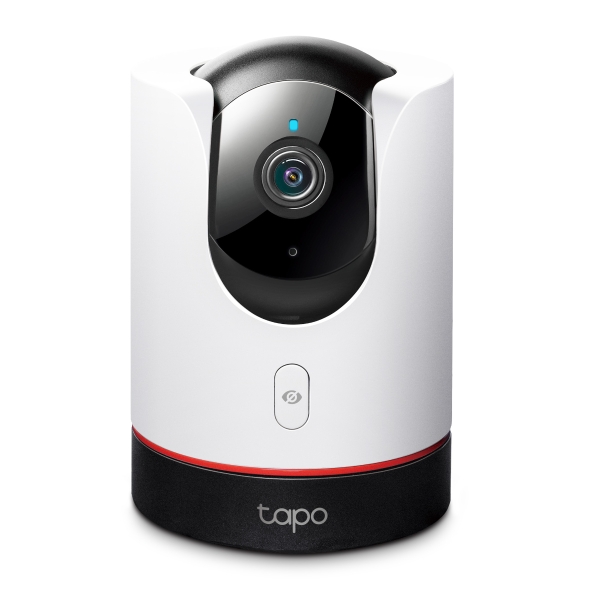
The US V2 specification lists a 4MP image, 2.4 GHz Wi-Fi, local microSD capacity up to 512 GB and RTSP/ONVIF support. It includes a physical privacy function and supported smart detection; snapshot notifications are distinguished from ordinary notifications through Tapo Care.
I would consider this category when the priority is a compact indoor device with local video and an understandable privacy control. Check the operating environment and viewing angle before buying. An indoor camera does not become an outdoor model merely because an eave keeps direct rain away.
The useful comparison is whether it records the room entrance or pet area adequately and whether the people living there are comfortable with the camera’s operation. A physical control is valuable only when its behavior and access are understood.
Indoor example: the current Reolink E1 Zoom
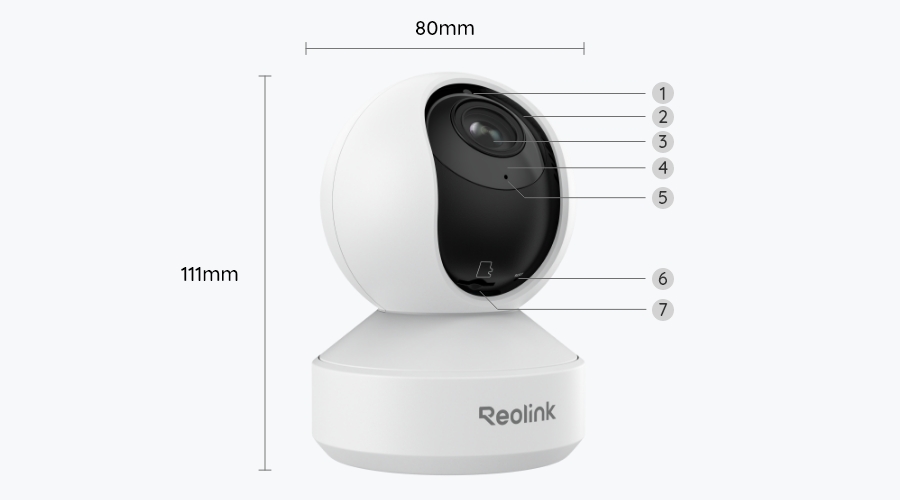
The current 4K E1 Zoom page documents 3× optical zoom, dual-band Wi-Fi 6 and local person, pet and crying detection without a required cloud subscription for those functions. It also describes compatible local recording destinations. Older stock or reviews may refer to a different revision.
Optical adjustment can be useful where the important part of a room is farther from the mounting point. It is not permission to assume that every distant face will be identifiable. Test the lens position and recorded movement under the actual lighting.
Both examples move their view. A moving camera can track an object away from the doorway you intended to watch. For a fixed evidential view, a stationary camera or an appropriate home-position routine may be more straightforward.
Useful differences between these indoor examples
| Decision | Tapo C225 V2 example | Current E1 Zoom example |
|---|---|---|
| Main buying question | Does its view and privacy workflow fit the room? | Is optical zoom and the selected local system worth the difference? |
| Wireless specification | Check the documented 2.4 GHz arrangement | Check the documented dual-band arrangement |
| Local recording | Compatible card and supported third-party paths | Compatible card and supported recorder paths |
| Paid features | Review Tapo Care history and richer notifications | Review the exact optional service and regional eligibility |
| Proof of suitability | A saved and exported event after any trial | The same real-world recording and export test |
This is not a head-to-head image-quality score. The resolution and lens differences identify what to investigate; they do not establish a winner without comparable recorded tests.
What subscription-free should mean
List the features you intend to keep: event recording, continuous history, person filtering, phone alerts, local playback and clip downloads. Check each after any trial expires. A free live stream is not an archive, and a motion notification is not necessarily a playable clip.
Both brands have products with local storage, but that statement is too broad to choose a model. Some cloud features are optional conveniences; others may be the exact capability you assumed was included. Review the current regional feature table rather than relying on a retailer’s no-monthly-fee badge.
Our subscription-free camera guide compares specific approaches, including other brands. Use it as a function checklist rather than treating this comparison as a reason to exclude a better-fitting alternative.
Local recording does not settle offline operation
A camera may save to its card during a broadband outage while remote access stops. A router can remain active locally without internet, and a recorder can have a different path from a phone app. Test the exact function you need.
A product requiring online activation can still record locally after setup; those are different stages. Conversely, a card slot does not prove that every feature works with the router removed. Ask the manufacturer what remains available in your intended architecture.
Our offline-operation guide provides a controlled outage test. Do not unplug all power and call it an internet test, because that changes several dependencies at once.
Recorder integration: avoid the old brand stereotype
Reolink has well-documented recorder configurations, but you still need to confirm the camera, recorder hardware and firmware combination. Tapo also documents local protocol support for suitable models; a simple app-oriented product is not automatically restricted to cloud storage.
The current Tapo integration guide requires a separate camera account for third-party access and describes limits on simultaneous storage paths. It also identifies battery and dual-lens exceptions. Those details are more useful than an unsupported claim that every Tapo works with every NVR.
Reolink’s third-party-camera guide likewise does not guarantee complete mixed-brand compatibility. If you plan to combine ecosystems, use our NVR compatibility checklist and test required functions before ordering several cameras.
Compare notification quality in your own scene
Accurate detection is not a brand-wide constant. An entrance with passing cars, a pet climbing furniture and a dark side path create different challenges. A menu offering person detection does not guarantee the same result across models or mounting positions.
During a trial, save genuine and nuisance events and note the labels. Check which filters control recording versus only notifications. A quiet phone can mean better filtering or missing coverage; the saved timeline distinguishes them.
Use our false-alert guide to make controlled changes. Avoid comparing a carefully tuned camera with another brand left at unsuitable defaults.
Outdoor cameras: match the power architecture
For an outdoor entrance near safe power, compare powered models with appropriate environmental specifications. For a permanent multi-camera layout, price PoE and recorder arrangements where cabling is practical. For a temporary mount, a battery option may be more convenient but has separate recording and maintenance limits.
Do not compare a Tapo C120 with a Reolink RLC-810A solely as two outdoor cameras. The former’s plug-in Wi-Fi path and the latter’s PoE path imply different installation components. One may be simpler for a single porch; the other may fit an existing cable-and-recorder system.
The PoE-versus-Wi-Fi comparison includes complete cost worksheets. Choose the architecture first, then compare equivalent models within it.
Privacy and household control
Check whether a privacy mode physically changes the view, stops recording or only masks an area. Confirm the result through both live viewing and saved video. Household members should understand when the camera is active, especially indoors.
Review account roles, shared users, recovery information and the ability to remove old access. Do not give every temporary visitor the owner’s password. A supported integration can expose another path to the video, so include it in the review.
Neither local storage nor a familiar manufacturer name removes these responsibilities. Our privacy guide distinguishes placement, audio, retention and sharing rather than reducing privacy to where the card sits.
Storage media and retention
Use a card explicitly suitable for the camera and workload. Supported capacity can vary by hardware revision, and sustained video writing is different from occasionally saving photographs. Do not buy solely by the largest or fastest number on the package.
Calculate a preliminary retention estimate, then check actual oldest playable footage after normal use. Bitrate, activity and recording schedules can change the result. Export an important event before loop recording replaces it.
Our microSD comparison and storage calculator provide a better basis than a generic claim that a card holds a month.
Installed cost and long-term cost
Compare hardware, storage, mounts, network improvements, approved power and any service you intend to retain. A cheaper camera may need an extra accessory, while an expensive camera’s advanced feature may be unnecessary for the job.
For illustration, two hypothetical $55 cameras and two $20 cards total $150 before installation. Two $85 cameras with the same cards total $210. If the cheaper arrangement needs an otherwise unnecessary $80 network or mounting improvement, the initial comparison changes. These are planning figures, not current prices for the models pictured.
For several cameras, include the recorder’s channel limits, disk, backup power and any software licenses. Do not assume a brand’s attractive single-camera price predicts the cost of an entire maintained system.
Support, updates and hardware revisions
Find the exact hardware revision’s support page before buying, particularly from clearance or marketplace listings. Confirm the seller’s return terms and who handles a defective unit. A review of last year’s revision can be useful history without describing the product delivered today.
Use supported firmware and check important functions after an update. A changed app layout is not necessarily a lost capability; equally, a familiar product name does not prove compatibility remains unchanged with every recorder revision.
Keep a record of models and settings so support can reproduce a problem. Avoid making permanent decisions from isolated forum reports without checking the configuration involved.
Buy one representative camera before committing to a system
Where practical, test one camera in the actual location before ordering several. Record a daylight approach, a nighttime approach and the quiet intervals required by your use. Verify notifications and original exports with the intended subscription state.
Test the network at the final mount, not beside the router. For an NVR, check the specific features you need through the recorder itself. Audio, event search and camera controls can work differently from the manufacturer’s own app.
A small pilot is more informative than a brand argument. It also gives you a concrete return decision while the product is still eligible, rather than discovering a system-wide mismatch after permanent installation.
My practical selection approach
For one indoor camera, I would compare the exact C225 and E1 Zoom features that matter in that room, including privacy and optical framing. I would not pay for optical zoom that the scene never uses, nor choose a lower price that fails the required detail test.
For a permanent several-camera installation, I would obtain a complete supported system specification and price the infrastructure. For a mixed-brand recorder, I would insist on a successful pilot before expanding. Neither brand deserves an automatic win across those different situations.
Frequently asked questions
Which brand is better without a subscription?
Both have suitable local-recording models. Compare the exact free functions, storage and retrieval workflow after a trial, not just the brand name.
Can Tapo cameras work with a Reolink NVR?
Some combinations may provide basic integration under documented conditions, but full compatibility is not guaranteed. Verify the exact models, protocols and required features.
Does 4K automatically beat a 2K camera?
No. Optics, distance, exposure, compression and placement determine how much useful detail reaches the recording. Compare actual saved clips.
Can I mix the two brands in one home?
Yes as separate supported systems, and sometimes through a compatible recorder. Decide whether the additional accounts and feature differences are manageable before expanding.