Security Camera False Motion Alerts: Fix Rain, Bugs, Shadows and Headlights
A camera that sends fifty unnecessary alerts every night can become a camera nobody checks. Turning the sensitivity down may make the phone quieter, but it can also remove the visitor you wanted to capture. The better fix starts with the saved clips: what actually triggered the notification, and which setting controls that particular event?
Motion detection, object classification, recording and push notifications are separate stages on many systems. A rainstorm can create ordinary movement in the image without producing a useful person event. A camera may record that movement while only certain event types should notify you. This guide helps reduce nuisance alerts without treating silence as proof of success.
First identify the alert you received
Open the event and record its time, label and camera. Was it labeled motion, person, vehicle or animal? Did the clip show the supposed object, a reflection or nothing obvious? Check several examples rather than changing settings after one unexplained notification.
There may also be two alert sources. A camera app and a recorder or smart-home automation can both announce the same event. Changing the camera’s push settings will not necessarily change an independent automation. List the services involved before concluding that the device ignored your changes.
Ring’s alert documentation distinguishes motion alerts, device-specific settings and smart-alert options. Use the current instructions for the exact model rather than expecting every brand to present one universal sensitivity control.
Match the symptom to the first useful check
| What appears in the clip | Likely concern | First change to investigate |
|---|---|---|
| Rain or snow bright near the lens | Illumination and close moving objects | Clean the cover, inspect nearby reflections and review classification |
| A large blurry insect or web | Movement extremely close to the camera | Safe cleaning and a better illumination or mounting arrangement |
| Branches move repeatedly | Ordinary scene motion in the monitored area | Reframe or exclude irrelevant vegetation without excluding the approach |
| A sweeping headlight beam | Lighting change rather than a relevant object | Zone, angle and model-supported object filtering |
| A person outside your property | A real detection that is irrelevant to your purpose | Narrow the monitored scene or alert zone |
| No obvious movement | Brief trigger, delayed recording or an unintended alert source | Inspect preceding context and compare the full event log |
A correctly detected passing car is not a technical false positive just because you do not want the alert. That distinction matters: classification accuracy and the usefulness of your chosen coverage are different problems.
Understand the detection method
Image-based motion analysis responds to changes in the scene. Light, rain and moving vegetation can therefore create legitimate image changes without representing an intruder. Smart classification attempts to distinguish relevant object categories, but it is not infallible.
Battery devices often use PIR sensing as part of their wake-up process. Its geometry and environment differ from image comparison. Some products combine methods. Check the manufacturer’s description for the exact camera instead of assuming that all AI cameras detect in the same way.
Reolink’s false-alarm guide explains why detection area, supported classification and installation angle deserve attention. It does not justify disabling every generic-motion event before considering what you still need recorded.
Set the purpose of the alert
For a front-door camera, a useful alert may mean someone entered the approach to the threshold. For a driveway, you may want vehicles entering your parking space but not every car on the road. Write the requirement before drawing a zone.
Then decide whether you need ordinary events retained even when they do not trigger your phone. On a supported continuous recorder, you may keep the full timeline while restricting notifications to people. On an event-only camera, filtering can influence what footage exists later, depending on implementation.
Do not copy another person’s configuration without knowing which function it controls. Our missed-motion guide is the counterpart to this article: any nuisance-alert correction should be checked against the risk of missing the event you care about.
Draw zones around the actual approach
Exclude portions of the view that are irrelevant, such as the upper canopy of a tree or a public road beyond the driveway. Leave enough space for a normal visitor to enter the detection area before reaching the door. An excessively narrow strip may create a late or missed trigger.
Check the zone after moving the camera or changing its zoom. What used to cover a path can become an arbitrary rectangle elsewhere in the scene. For a pan-and-tilt device, verify whether zones behave differently at saved positions or during tracking.
An activity zone is not necessarily a privacy mask. It may suppress alerts without preventing recording of the rest of the image. Use our privacy guide when the problem is unnecessary collection rather than simply too many notifications.
Use object-size filters carefully
Some supported cameras let you reject objects outside a specified size range in the image. That can help with certain misclassifications, but the threshold is not a real-world measurement in centimeters. A small insect close to the lens can occupy more of the image than a person at the gate.
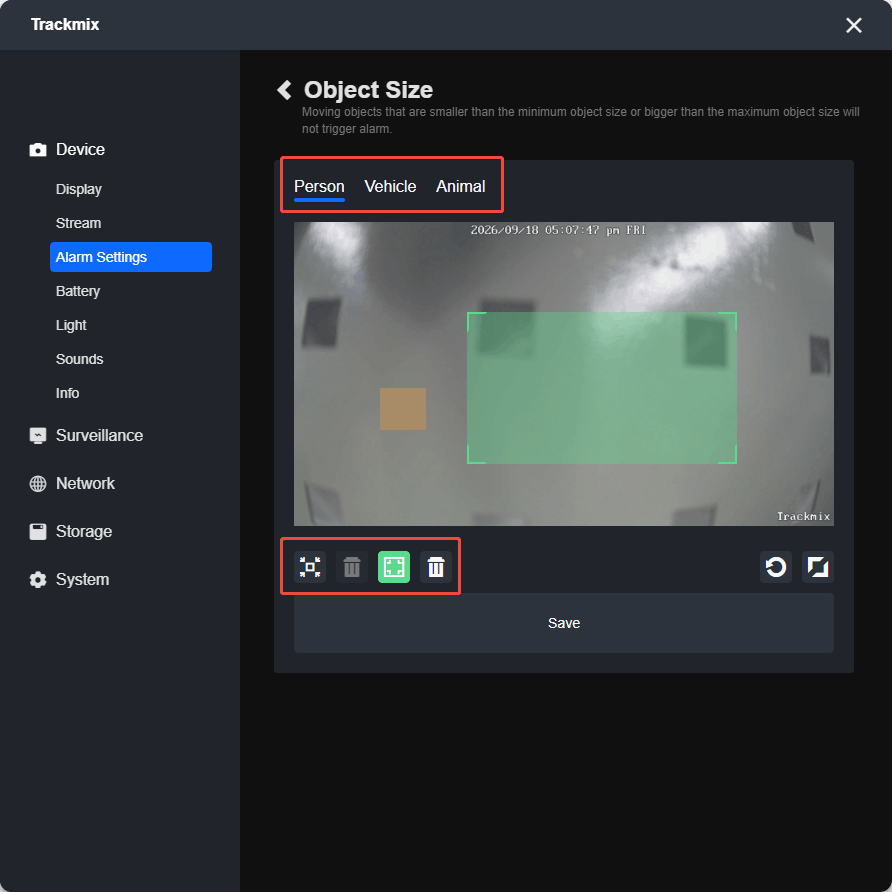
Reolink’s instructions describe separate object categories and minimum and maximum image sizes on supported models. Before setting a minimum, observe an authorized person at the farthest important point. Before setting a maximum, check somebody close to the lens. An aggressive threshold can exclude either one.
Save the original settings and test after each adjustment. Do not assume the illustrated manufacturer scene resembles your doorway, or that a threshold appropriate for adults also preserves the specific animal or vehicle events you want.
Rain, snow and insects: improve the scene first
Inspect the cover for webs, dirt and water marks using a safe position and the manufacturer’s cleaning instructions. Bright close objects under onboard illumination can dominate a night image. Cleaning and appropriate aiming can address the source rather than merely suppress its notifications.
Do not spray pesticides, solvents or oils onto the camera or fill gaps with unapproved materials. You can damage coatings, seals or electronics and create exposure for people or animals. Maintenance should preserve the product’s intended weather protection.
Consider whether nearby lights attract activity close to the lens or whether the camera sits beneath a surface that reflects its illumination. A supported separate lighting arrangement or modest repositioning may help. Our nighttime image guide explains glare and close reflections.
Headlights and moving shadows
A beam sweeping across the driveway can change many pixels at once. Increasing the minimum object size is not necessarily the correct response because the change may cover a large part of the frame. Inspect the event label and whether ordinary motion or a mistaken object classification generated the alert.
Reframe away from irrelevant bright sources where practical, then test supported person or vehicle filtering. Do not exclude the entrance itself merely because headlights pass over it. The camera still needs to capture a real person arriving under those conditions.
For a driveway, test with an authorized vehicle approaching normally and a person crossing after it. That catches a common failure of over-tuning: the system becomes quiet during traffic but also misses a visitor illuminated by the same headlights.
Delay settings trade sensitivity for time
Some systems require a detected object to remain present for a configured period before generating a particular event. This can reduce brief nuisance triggers but also delay genuine ones. A narrow doorway traversed quickly is different from a large yard where subjects remain visible longer.
Check exactly what the setting delays: notification, object confirmation or the start of a recording. A pre-event buffer may preserve earlier context on supported hardware, while an event-only sleeping camera may not have that footage available.
Do not turn a duration control to its maximum without a walk test. The correct setting is the one that rejects the unwanted event while still meeting your purpose, not the one that produces the fewest notifications.
Use schedules without forgetting the unexpected visitor
A schedule can mute routine activity during predictable hours, but it can also silence an important event outside the usual pattern. Separate working hours, overnight monitoring and periods when the property is empty deliberately.
Review phone quiet modes and app notification schedules together. A camera recording normally with a silent phone is not the same as a detector failing. Household members may also have different account preferences, so test the actual recipient’s device.
If repeated alerts are legitimate but low priority, a quieter notification mode may be more appropriate than disabling the recording. Choose the least disruptive control that solves the problem.
Create a small before-and-after log
Save several representative nuisance clips and note the current zone, classification and sensitivity. Then change one setting and observe comparable conditions. A calm dry afternoon cannot prove you fixed alerts that occur only in heavy rain at night.
| Record | Example |
|---|---|
| Problem | Nighttime notifications labeled person during rain |
| Baseline | Zone includes road and nearby reflective wall |
| Single change | Re-aimed to exclude the wall while retaining the path |
| Nuisance result | Compare a later rainy period |
| Positive test | Person walks the full path at normal speed |
| Evidence check | Event recorded, alert delivered and original clip exported |
This log is also useful for manufacturer support. An exact timestamp, model, firmware and sample event are more actionable than a complaint that the AI is terrible.
Do not confuse software updates with a guaranteed cure
Updates can alter detection behavior and fix documented problems, but they cannot remove a web or change an unsuitable viewing angle. Follow supported release and update procedures, and keep power stable during installation.
After an update, repeat the same test rather than assuming the old settings still behave identically. If a problem began immediately afterward, record the version and preserve a representative clip for support. Avoid unofficial firmware or a complete reset before collecting useful evidence.
A factory reset can erase zones, schedules and pairing. It is a later diagnostic step when the manufacturer recommends it, not the default answer to every inaccurate event.
When the camera is the wrong tool for the event
If the real requirement is knowing when a particular door opens, a compatible contact sensor may complement video more directly than refining motion settings indefinitely. The camera can supply context while the sensor reports the specific opening.
If recording every event matters, a suitable continuous recording system may avoid relying entirely on detection for footage. It does not eliminate notification errors, but it can preserve the timeline for later inspection.
When a camera repeatedly misclassifies ordinary conditions despite appropriate setup, compare alternatives for that particular environment. Do not replace it solely with a higher-resolution model; resolution is not a guarantee of better event filtering.
Final acceptance test
- Verify the intended person, vehicle or other event in daylight.
- Repeat under normal nighttime illumination.
- Check the beginning and end of the saved clip.
- Confirm every required phone or monitoring recipient receives the correct alert.
- Review nuisance events under the conditions that caused the original problem.
- Document the final configuration and any remaining limitation.
The goal is fewer irrelevant notifications without losing useful coverage. A silent phone is not success if the next genuine visitor also goes unrecorded.
Frequently asked questions
Should I lower sensitivity first?
First identify the trigger and its event label. Sensitivity may be relevant, but placement, zones and alert categories can solve a different underlying problem.
Why does an insect trigger person detection?
Classification is imperfect, and close objects can occupy a large, unclear portion of the image. Inspect illumination and the optical surface before relying only on size filters.
Can I record everything but receive only person alerts?
Some configurations support separate recording and notification rules. Verify the exact model and confirm the full timeline or unwanted-event clips remain available if that is your intention.
Will a privacy zone stop false alerts?
Its behavior depends on the product. Use the intended detection controls and verify privacy masking separately rather than assuming those functions are identical.