House Alarm Keeps Beeping? Read the Warning Before Silencing the Panel
.sl-alarm table{border-collapse:collapse;width:100%;margin:24px 0}.sl-alarm th,.sl-alarm td{border:1px solid #bccbd0;padding:12px;text-align:left;vertical-align:top}.sl-alarm th{background:#edf4f2}.sl-alarm .table-scroll{overflow-x:auto}.sl-alarm figure{max-width:800px;margin:28px auto}.sl-alarm img{display:block;max-width:100%;height:auto;margin:auto}.sl-alarm figcaption{font-size:14px;line-height:1.6;color:#435b62;padding-top:10px}
The house is quiet except for a short beep every minute. It is tempting to remove a battery, unplug the panel or turn every sound off until morning. That can silence the symptom while leaving the alarm unable to report a fault—or disable a different safety device that was actually making the noise.
Identify the device and read its current warning before deciding how to silence it. An intrusion-panel trouble tone, an entry countdown, a door chime and a smoke or carbon-monoxide alarm are different signals. This guide is for a home security panel or base station, not for dismissing an emergency warning.
First establish where the sound comes from
Listen from a safe position and identify the panel, separate keypad, external siren, camera recorder or another device. Sound can reflect around a hallway and seem to come from the wrong place. Do not remove a ceiling alarm’s battery simply because the security keypad is nearby.
If there is smoke, a CO warning, signs of intrusion or any immediate danger, follow the relevant emergency instructions and move to safety. Do not diagnose a potentially serious alarm by counting tones from memory.
For a noise coming from an NVR or DVR, use our recorder-beeping guide. Its storage and camera-loss warnings need a different path from an intrusion panel’s battery or sensor trouble.
Read the whole message, including the device name
Open the system’s normal status or trouble display using the authorized controls. Photograph or write down the exact text, zone name, time and whether it is a current fault or an event in history. Check for multiple warnings rather than stopping after the first one.
A message identifying a bedroom sensor battery points to a different component from system battery failure. Replacing the keypad batteries will not necessarily address either of those. The location name and hardware model are essential parts of the diagnosis.
If you do not have legitimate access or cannot identify an inherited system, contact the owner, installer or provider. The alarm takeover guide explains how to establish ownership and service details without wiping the configuration.
Common categories and the right first question
| Message or pattern | First question | What not to assume |
|---|---|---|
| Entry or exit countdown | Which mode and designated route are active? | Every repeating tone is a fault |
| Chime when a door opens | Is the normal door-chime feature enabled? | The system has detected an intrusion |
| AC loss or power failure | Has the approved normal supply stopped? | The backup battery has already failed |
| System battery warning | Which backup supply and condition are reported? | Any battery with the same shape is compatible |
| Named sensor low battery or offline | Which exact device needs attention? | The whole panel needs replacement |
| Communication failure | Which reporting path is unavailable? | A sounding siren proves monitoring still works |
| Tamper | Which cover, mounting or supervised condition changed? | A person must have interfered deliberately |
The display and manual take precedence over this general map. Manufacturers assign tones, light colors and acknowledgement sequences differently, even between generations of the same brand.
When beeping is normal operation
A door chime is often a convenience feature when the system is not armed. An entry or exit countdown signals a timed part of the arming routine. If that routine is confusing the household, correct the configuration or instructions rather than silencing every warning.
Check the intended Home, Away or Night state and the actual sensor assignment. A late arrival through an instant-response opening may not receive the delay expected at the main entrance. Our mode guide explains those distinctions.
Change a convenience sound only after identifying it. A chime-volume setting is different from the control for critical trouble notifications or an active siren.
A SimpliSafe example: a trouble tone is a prompt to read the error
SimpliSafe’s beeping guide describes a three-tone trouble warning and a flashing yellow indication for supported firmware. It directs the owner to the keypad or app for the actual issue and explicitly distinguishes muting the sound from fixing the underlying fault.
Use the warning screen to identify the affected component. A battery failure, unresponsive device and reporting problem are not interchangeable. A firmware-specific sound pattern should not be used to diagnose another manufacturer’s panel.
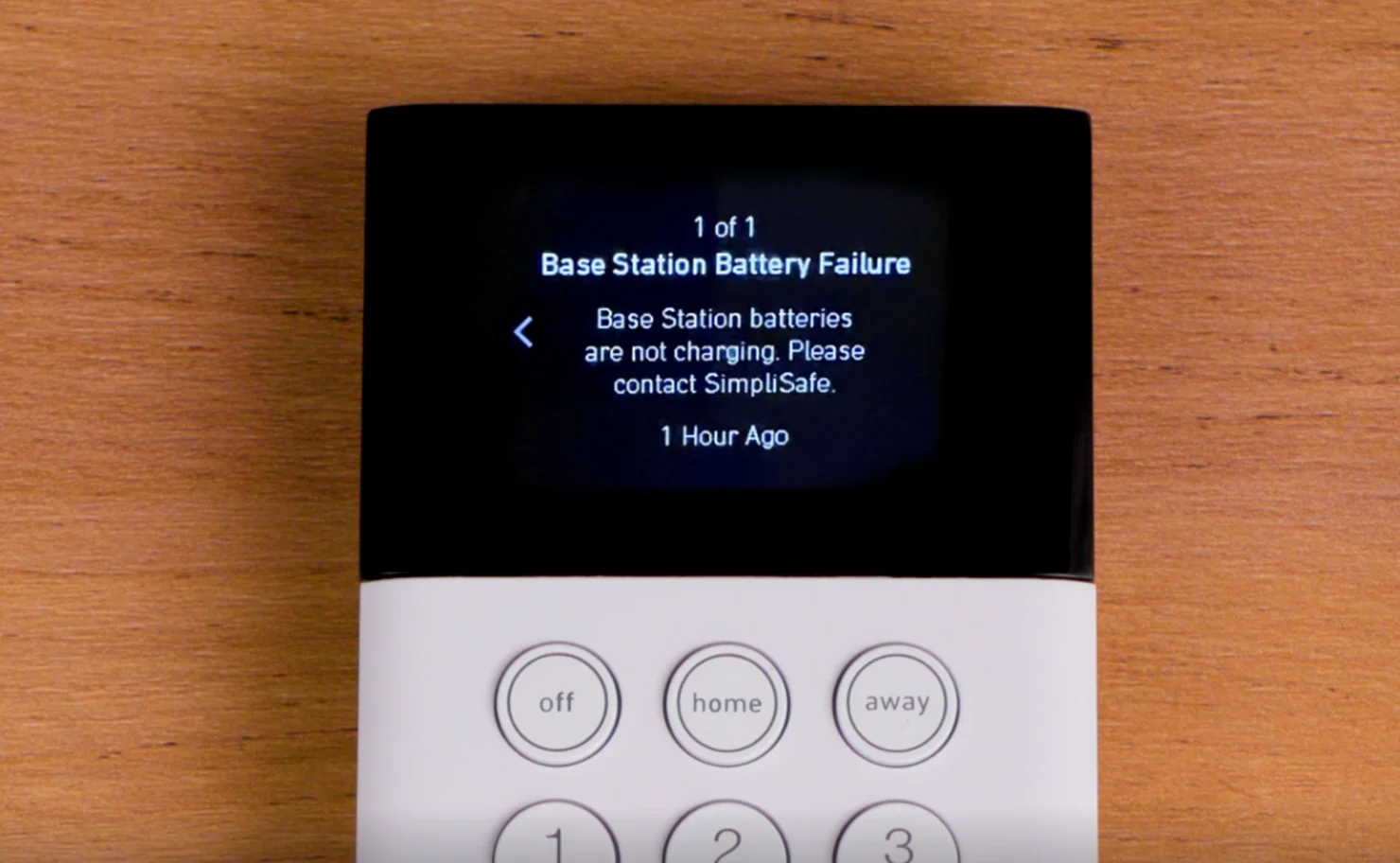
Keep a record before acknowledging the message. It is useful to know whether the warning returned immediately, after a power change or only when a particular sensor reported again.
A Yale example: the same sound can have several causes
Yale’s HSA 6400 support page discusses periodic beeping with an amber indication and directs users to identify the fault, including power, battery and tamper conditions. It also distinguishes confirmation and entry sounds from fault reporting.
This illustrates why there is no universal thirty-second-beep remedy. The appropriate user action depends on the named model and the message in its fault list. Do not apply an HSA reset sequence to a newer Yale hub or another brand.
If the product is older and its service arrangement is unknown, establish those details before disconnecting it. An external sounder or backup component can behave differently when the main panel loses power.
Check normal power without opening electrical enclosures
Inspect accessible approved plugs, the intended outlet and any accidentally switched supply. A power strip turned off while cleaning can cause an alarm to use backup even though most of the house still has electricity. Record recent outages or electrical work.
Do not open a mains-connected cabinet, remove fuses or disconnect internal wiring as a generic way to stop the sound. Follow the user procedure for the model, or arrange a competent technician when the supply is not safely user-serviceable.
Our outage guide explains why local detection, app access and monitoring can have different dependencies. A powered display does not establish that normal supply and backup are both healthy.
A low-battery message needs component identification
Determine whether the warning concerns the system backup, keypad, contact, motion detector or another accessory. Check the approved chemistry, voltage and part specification before buying. A rechargeable base and a battery-operated keypad may deliberately use different cells.
Consider the timing. A depleted backup following a genuine outage is different from a repeated charging failure while normal power is present. Follow the manufacturer’s charging and service guidance rather than setting an arbitrary wait time for every product.
Visible swelling, heat, leakage or corrosion requires an appropriate safety response and professional or manufacturer assistance. Do not keep handling a damaged pack simply because the panel continues working.
Offline sensors and loss of supervision
A panel may warn when it no longer receives expected communication from a device. Check the named sensor’s battery status, location and recent changes such as a moved cabinet or newly closed metal door. Do not immediately delete the device to clear the warning.
Deleting a sensor can remove the fault message by removing the monitoring responsibility, not by restoring protection. Use the approved communication test and repair or replace the device where needed.
For a contact whose connection is healthy but position is wrong, see incorrect open-status troubleshooting. A reported open door and an offline sensor are different observations.
Communication warnings are not just annoying sounds
A reporting fault can mean that an event may not reach the monitoring provider or remote account through the intended path. Local operation may continue, but it is unsafe to infer full service from the siren or keypad alone.
Check whether internet service, router credentials, phone service or the subscription arrangement changed. Use official provider support to confirm the actual reporting path and its status. Avoid opening router ports or disabling security settings as a generic repair.
After correction, arrange a provider-approved signal test. A warning disappearing from history is weaker evidence than a successful current test received by the intended service.
When acknowledging or muting is appropriate
A documented acknowledgement can be reasonable once the cause is understood and a repair plan exists. It may reduce noise without changing the fault. Keep the visible status or another reliable reminder so the problem is not forgotten.
Do not mute emergency warnings or disable life-safety protection to improve convenience. For a business, shared property or monitored household, communicate any temporary limitation to the responsible people.
The right end point is normal protection, not silence. A quiet panel with a failed communicator or excluded sensor still needs attention.
What to give the service provider
Provide the panel or hub model, exact warning, affected zone, sound pattern and recent changes. Include whether mains is present, which functions still work and whether the warning returns after an approved acknowledgement.
Use a known official contact route and do not publish access codes or account recovery details in a public help request. A short video of the visible indicator can help support, provided it does not reveal private credentials.
Ask what work is required and how the repair will be verified. If a replacement battery or device is proposed, confirm compatibility and whether any account or zone reconfiguration is included.
Verify the repair and restore normal use
Check the live fault list, relevant device status and the intended armed mode. Use the planned alarm-test procedure to verify the repaired function, including external reporting where that was affected.
Remove any test hold or temporary exclusion through the approved process. Document the correction and check the relevant operating condition again, especially if the original fault followed an outage or occurred at a recurring time.
Frequently asked questions
Can I unplug the panel to stop the beeping?
Do not use that as a generic remedy. It can change protection and activate backup or other warnings without resolving the cause.
Does every periodic beep mean a low battery?
No. Power, communication, tamper, device supervision and normal chimes can all produce sounds. Read the actual model’s message.
Why is it still beeping after I changed a battery?
You may have changed the wrong component, fitted an unsuitable battery or left another fault unresolved. Check the current message rather than repeating the replacement.
For the related setup and maintenance guides, use the alarm directory. Identify the condition first, silence only what you understand, and finish by verifying that the protection works.