Home Alarm Backup Battery Replacement: Identify the Battery and Verify the Repair
.sl-alarm table{border-collapse:collapse;width:100%;margin:24px 0}.sl-alarm th,.sl-alarm td{border:1px solid #bccbd0;padding:12px;text-align:left;vertical-align:top}.sl-alarm th{background:#edf4f2}.sl-alarm .table-scroll{overflow-x:auto}.sl-alarm figure{max-width:800px;margin:28px auto}.sl-alarm img{display:block;max-width:100%;height:auto;margin:auto}.sl-alarm figcaption{font-size:14px;line-height:1.6;color:#435b62;padding-top:10px}
A low-battery warning can tempt you to order the first alarm battery that looks right. That is a poor shortcut when one system uses rechargeable cells, another uses a specified battery pack and a third has a technician-serviced supply inside a mains-connected enclosure. Shape and connector fit are not a complete compatibility check.
Identify the affected component and its exact approved battery before opening anything or buying a replacement. Then confirm who is permitted to service it and how the system should be put into its maintenance state. This guide concerns alarm backup supplies, not a universal wiring procedure for every control panel.
System battery and sensor battery are different warnings
Read the complete message and device name. A front-door contact’s low battery, a keypad warning and a base-station backup fault can require different parts and procedures. Replacing the easiest battery to reach does not necessarily address the reported condition.
Keep the old message or a photograph before acknowledging it. If several warnings are present, make a separate record for each. A quiet keypad afterward is not proof that every affected device has recovered.
Our beeping-panel guide explains how to find the source and interpret the fault category before changing hardware. Establishing that category is the quickest way to avoid purchasing the wrong component.
Was there a recent power outage?
A backup supply that has just supported the system through an outage may need its documented recharge period. A charging fault while normal power is present is a different situation. Check the supply state and the manufacturer’s expected behavior before deciding that age alone explains the warning.
Repeated power interruptions can also produce an apparently persistent battery problem. An outlet controlled by a light switch, a loose approved adapter or another supply issue may repeatedly force the alarm onto backup. Correct the supply fault rather than replacing batteries indefinitely.
Do not assume that one fixed waiting period applies to every panel. The model’s instructions and support diagnosis should establish when a warning should clear and when the charging arrangement needs assessment.
Identify the complete system, not just the keypad
The keypad may be only the user interface for a control panel elsewhere. Record the panel or hub model, generation and battery identifier through the legitimate documentation or accessible labels. Do not open a hazardous enclosure merely to complete the shopping list.
Look for the original installer record, official owner manual or provider account. If the alarm is managed, leased or installed in a shared building, establish who is responsible for servicing and whether user replacement is allowed.
The existing-alarm guide helps with systems inherited from a previous owner. A brand logo on the wall is not enough to determine which battery or maintenance process applies.
A useful replacement specification
| Detail | Why it matters |
|---|---|
| Panel or hub model and generation | Selects the correct manufacturer’s procedure |
| Approved battery or pack identifier | Reduces ambiguity between similar-looking replacements |
| Chemistry and nominal voltage | Must suit the device and charging system |
| Capacity and physical dimensions | Need to meet the approved specification and enclosure fit |
| Connector or terminal arrangement | A physical connection is not safe to improvise |
| Service requirements | Determines whether the owner or a qualified technician performs the work |
Send this information to the provider or supplier and ask for a written compatibility confirmation where uncertainty remains. A listing saying suitable for alarms is not equivalent to approval for your exact system.
A concrete example: SimpliSafe Gen 3 uses rechargeable NiMH cells
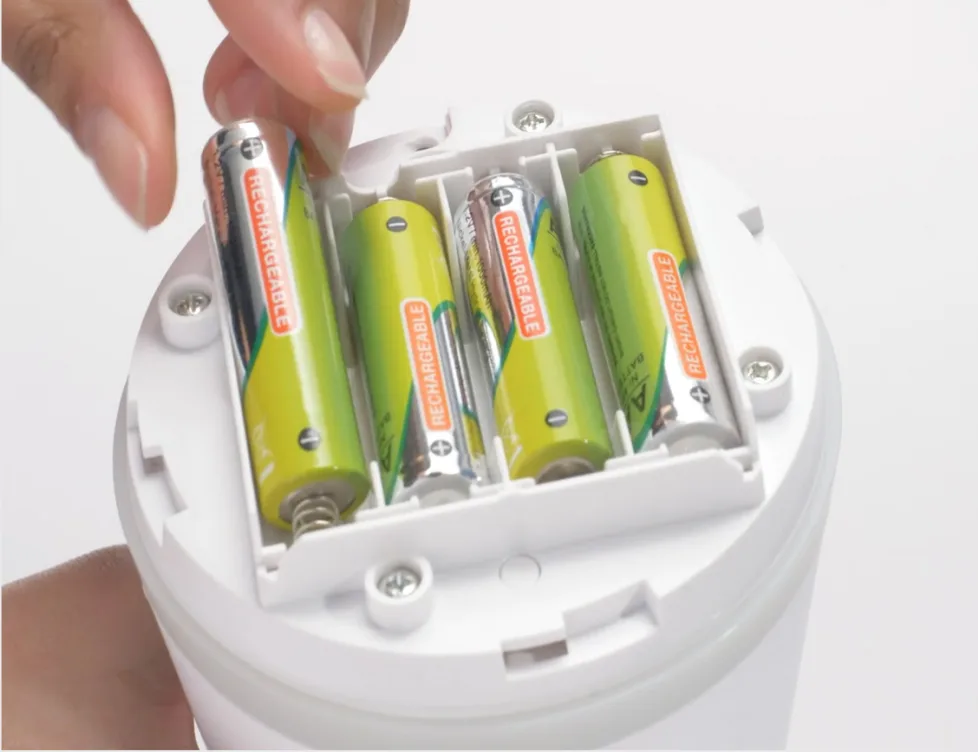
SimpliSafe’s Gen 3 replacement instructions specify four 1.2 V, 1300 mAh NiMH rechargeable batteries and warn against inserting ordinary alkaline batteries. This is a useful example of why familiar AA-shaped cells are not automatically interchangeable.
The documented procedure includes disarming, removing the approved external supply and accessing the designated battery compartment. Follow the complete official sequence for that model. Do not transfer it to a wired panel with different electrical construction.
Its battery-failure guidance also directs owners to support where corrosion is present. Fitting fresh cells is not a complete response to a damaged compartment or unresolved charging problem.
Other panels may use a pack or a different battery technology
Do not convert a specified pack into a loose-cell arrangement or adapt a different connector. The charging and protection design may depend on the approved component. A larger capacity is not automatically an upgrade the panel supports.
Provider instructions are commonly model-specific. For example, ADT maintains separate replacement guidance for Lynx Touch panels and Simon 1 and 2 panels. Match the system before following either sequence.
If the compartment contains unfamiliar wiring, exposed mains parts or a non-user-serviceable pack, stop and arrange a qualified technician. Low-voltage battery terminals do not make the entire enclosure safe to work inside.
Coordinate the monitoring arrangement first
Contact the provider or use its documented maintenance workflow before opening equipment that may generate a tamper or trouble event. Confirm the duration and scope of any test hold. A local disarm command and a provider-side maintenance arrangement can do different things.
The alarm testing guide explains why Test Mode is not a universal promise that every signal is ignored. Panic, duress and life-safety functions must not be treated as harmless test controls.
Tell the household what is temporarily affected and how normal protection will be restored. Do not leave the system on an indefinite test hold while waiting for parts without an agreed plan.
Recognize conditions that require assistance
Heat, swelling, leakage, corrosion, damaged insulation or a burning smell are reasons to stop ordinary replacement work. Do not squeeze a damaged battery into place, puncture its casing or continue charging it to see whether the warning clears.
Keep children and pets away from removed batteries and small components. Store and transport used batteries through an appropriate local collection arrangement and follow the supplier’s handling guidance. Do not leave loose cells beside conductive tools.
Where there is an immediate hazard, prioritize safety and appropriate emergency assistance. A routine alarm-maintenance article is not a substitute for responding to an electrical incident.
Do not confuse charging trouble with a worn battery
The panel needs a working approved power source and charging circuit. A warning that the batteries are not charging may reflect the batteries, their connection or the device itself. Repeated replacement without checking the cause can waste money while leaving backup unreliable.
Record whether normal mains power is recognized, how long the warning has been present and whether it began after a particular outage or repair. Support can use that pattern to choose the next diagnostic step.
A keypad continuing to function does not prove the backup is healthy. The ordinary supply may be keeping the system alive while the battery problem remains concealed until the next interruption.
Plan the work so the system is not left incomplete
Have the confirmed replacement, exact procedure and support contact ready before starting authorized user maintenance. Keep removed screws and covers together, and avoid interrupting the job halfway through with the enclosure open.
Use only the designated access points and approved tools. Do not remove internal boards, probe live circuits or alter the enclosure to accommodate a different battery. The correct part should fit the intended arrangement without improvised pressure or wiring changes.
On a professionally serviced system, ask the technician to document the installed part and date. A receipt that simply says battery changed provides less useful maintenance history than an identified component and verified result.
After replacement, verify charging and the fault list
Restore the system exactly as the manufacturer specifies, including covers, mounting and the normal supply. Check for tamper messages as well as the original battery warning. A cover left slightly displaced can create a second fault even if the battery is correct.
Allow the documented charging or status-update period where appropriate. Do not repeatedly restart the panel to force the message away. If the warning persists beyond the maker’s expected behavior, seek support with the replacement details and observations.
Then verify the intended local control and reporting functions through the approved test. A missing warning alone is weaker evidence than a successful current check of the affected operation.
What a service quotation should include
| Ask about | Useful confirmation |
|---|---|
| Diagnosis | Which battery or charging fault is being addressed |
| Replacement | Exact compatible part and any warranty |
| Labor and call-out | Whether both are included in the quoted amount |
| Disposal | How the removed battery will be handled |
| Verification | Faults cleared, normal service restored and approved testing completed |
Costs vary by equipment, location and service arrangement, so compare like-for-like work rather than a bare online battery price against a complete service visit. A technician’s diagnosis can matter more than the replacement component’s retail cost.
Keep a record without inventing a universal replacement interval
Record the installation date, battery specification and any relevant service recommendation. Follow the manufacturer’s maintenance and condition guidance rather than assuming every alarm battery must be changed on the same calendar interval.
Review after long outages or repeated power trouble. Battery performance and the required backup period should remain part of the household’s plan, not something considered only when the siren starts beeping.
Our outage guide explains the distinction between powering the hub and preserving external reporting. A fresh battery does not activate a cellular service or keep an unrelated router powered.
Frequently asked questions
Can I replace the backup battery myself?
Only where the exact product provides an appropriate owner procedure and you can perform it safely. Otherwise use the provider or a qualified technician.
Can I use alkaline cells instead of rechargeables?
Not in a device designed to charge the specified rechargeable cells. Follow the approved chemistry and part requirements, not just physical size.
Why is the low-battery warning still present?
Possible reasons include the wrong component, an unsuitable replacement, required charging time or a charging-system fault. Use the model’s diagnosis rather than repeatedly clearing the display.
Does a new battery guarantee full outage protection?
No. The supported runtime, communication path and other powered equipment still matter. Verify the complete arrangement you intend to rely on.