Garage Door Vacation or Lock Mode: What It Blocks and What It Does Not
.sl-garage table{border-collapse:collapse;width:100%;margin:24px 0}.sl-garage th,.sl-garage td{border:1px solid #bdcbd0;padding:12px;text-align:left;vertical-align:top}.sl-garage th{background:#eef4f2}.sl-garage .table-scroll{overflow-x:auto}.sl-garage figure{max-width:760px;margin:28px auto}.sl-garage img{max-width:100%;height:auto;display:block;margin:auto}.sl-garage figcaption{font-size:14px;line-height:1.6;color:#425c63;padding-top:10px}
A padlock symbol on the wall console can stop a handheld remote from operating the garage door. It does not necessarily slide a physical bolt into the door, remove a former user’s app invitation or erase a missing remote. The names lock mode, vacation mode and Sure-Lock describe features whose behavior depends on the actual opener and control.
Read the exact wall-control instructions, then verify which authorized inputs are blocked. Do not assume every garage lock mode leaves the wall button working, disables every keypad or blocks cloud access. This guide helps distinguish those functions and plan temporary absence without creating an accidental lockout.
Four different things commonly called a garage lock
A powered garage can have a remote-control lockout, an automatic physical lock, a manual slide bolt and app-based access permissions. Those functions can coexist, but they do not replace one another. Identify the item you are actually changing.
| Function | What it changes | What not to assume |
|---|---|---|
| Wall-console lock or vacation mode | Blocks specified control commands temporarily | Every other input and account is blocked |
| Integrated automatic physical lock | Secures the door through a compatible mechanical arrangement | It is the same feature as a radio lockout switch |
| Manual bolt or padlock arrangement | Restrains the door when correctly installed and used | The motor can safely operate while it is engaged |
| Account or credential removal | Revokes particular authorized access through its supported system | A temporary lock mode already performed that removal |
The practical consequence is straightforward: choose the function matching the problem. Preventing accidental remote use during an absence is different from removing a stolen credential or reinforcing a damaged entrance.
Identify the opener and the wall control
Find both model numbers through their labels or installation records. A replacement wall panel may have different controls from the one shown in the original sales photograph. Similar padlock symbols do not establish identical behavior.
Use the manufacturer’s current instructions for that combination. Record what the indicator means when the mode is active, which button changes it and how normal operation is restored. Avoid holding the opener’s Learn or programming button as an experiment; some actions erase existing credentials.
Where the installation is managed by a landlord, workplace or building association, confirm authority before changing controls. Other users may depend on access that you are about to interrupt.
A Chamberlain example: handheld remotes can be blocked
Chamberlain’s wall-control guidance describes supported lock modes that prevent handheld remote operation and indicate the mode through the wall control. It also explains that some flashing indications can serve a different position-monitoring purpose.
That is why the observation wall light flashing is not enough to diagnose every opener. Read the exact display and check whether the symptom started after somebody pressed a lock button. Do not replace the remote battery repeatedly while its commands are intentionally blocked.
The documented behavior for a particular wall control does not establish what every external keypad, retrofit smart controller or integrated app can do. Those inputs require their own model-specific check.
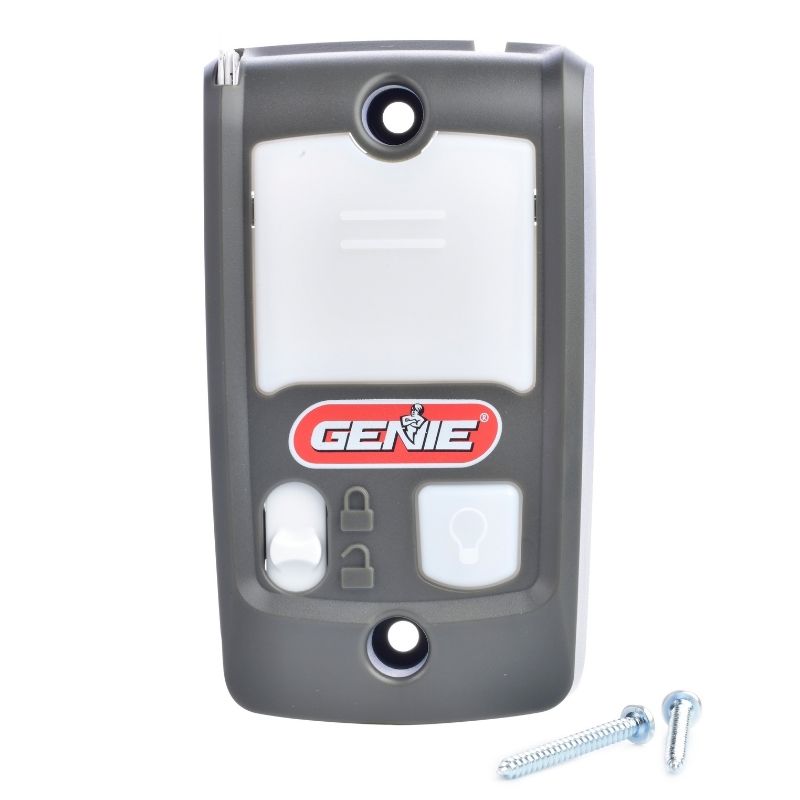
The 39165R Series II instructions state that, once the door is fully closed with Sure-Lock active, activation from the wall console or a remote is prevented. Its open/close button can close the door under the described conditions, rather than providing normal opening from the fully closed position.
This differs from the simplistic claim that vacation mode only blocks outside remotes. Check the actual instructions and keep another legitimate way to reach the control. Do not close the only accessible entrance and assume a remembered generic tip guarantees re-entry.
The console’s backlight is also described in its instructions. Use that documentation rather than importing another brand’s green, red or flashing-light meanings.
What happens to the wireless keypad?
A keypad sends a credential or command through a particular supported path. Some lock modes block that path along with handheld remotes; other arrangements differ. A keypad being outside does not itself determine whether it will remain available.
List it explicitly in your test. If you plan to give a neighbor temporary entry while away, confirm their intended method works in the selected mode before departure. A mode that blocks the only authorized caretaker can defeat the purpose of sharing access.
Do not respond by leaving a broad permanent code available to everyone. Choose a supported temporary permission or another appropriate access arrangement and record when it should end.
Smartphone control is a separate access path
Integrated apps and retrofit hubs can command the opener differently from a handheld remote. A radio lockout may therefore have different effects on different controllers. The safe answer is the exact documented behavior plus a controlled test, not an assumption that the app icon proves the garage is locked.
The smart-controller compatibility guide distinguishes wired and wireless retrofits and separate position sensors. A displayed closed state is a position report, not proof that every command path has been disabled.
Review the owner account, invited users and enabled services. myQ’s role documentation shows that shared access can carry different permissions. A co-owner or an old installation account may retain capabilities unrelated to the temporary wall-console mode.
Temporary blocking is not revoking a missing remote
When normal operation is restored, a remote still enrolled in the receiver can become usable again. A vacation switch should not be treated as proof that a lost or stolen device has been removed. Use the manufacturer’s credential-removal process for that problem.
Chamberlain’s remote-memory guidance explains that erasure is a separate operation and that removing electrical power does not erase the enrolled controls. Exact procedures and which other controls must be re-enrolled depend on the model.
Prepare working local access before making a broad memory change. Do not accidentally strand other authorized occupants because a temporary security measure was mistaken for a one-device deletion.
Do not confuse vacation mode with a mechanical bolt
A manual door bolt can prevent movement physically, but activating the motor against it can damage equipment or create a hazard. Follow the door and opener’s approved arrangement rather than relying on a handwritten reminder beside one remote.
An integrated automatic lock is designed to coordinate with its compatible opener. That does not mean it can be fitted to any system or operated safely through an unrelated retrofit. Check the actual package and installation requirements.
Our mounting-style comparison discusses integrated accessories. Whether the motor is on the wall or ceiling does not answer the separate question of which locks and controls are approved.
Is unplugging the opener a better absence plan?
Removing mains power can interrupt normal operation, but it does not necessarily disable a battery-equipped opener. It also does not clear its memory, secure another entrance or preserve remote monitoring. Treat power control as its own system decision.
A supported battery can keep the motor available even when the wall plug is disconnected. Before service, isolation instructions can therefore require attention to every supply. Our backup-power guide explains those dependencies.
Do not make the household’s emergency access more difficult without a plan. A power-down arrangement should be documented, compatible with the system and understood by the people who may need entry.
Test the mode before the trip, not during departure
Choose a quiet time with the door clear and another authorized access route available. Read the instructions, close the door normally and activate the intended mode. Confirm the indicator, then test only the controls you are authorized to use.
Record the result for the wall console, handheld remote, keypad, vehicle-integrated control and app. Restore ordinary operation through the documented procedure and verify those controls again. This identifies accidental lockout risks while help and access are still available.
Do not test with people under the moving door, jam safety sensors or hold an override to make a failed test appear successful. A required safety function that fails needs repair, irrespective of the vacation setting.
A departure record that is actually useful
| Item | Record before leaving |
|---|---|
| Door condition | Normal closure and no unresolved mechanical or safety fault |
| Selected mode | Exact control and expected indicator |
| Blocked inputs | What was documented and verified, not assumed |
| Authorized access | Who can enter and by which supported method |
| Account permissions | Unneeded users or temporary access reviewed separately |
| Return procedure | How normal operation is restored without erasing unrelated settings |
Store the record privately rather than posting an absence plan online. It should explain the arrangement to authorized users without exposing PINs or owner credentials.
Keep the rest of the garage in the plan
Check pedestrian entrances, accessible windows and any door into the house. A disabled radio receiver does not repair a failed side-door latch. Secure tools and portable valuables appropriately and avoid leaving remotes visible in vehicles.
The whole-garage checklist treats those as separate jobs. The home inspection guide helps record defects and assign work before an absence rather than adding gadgets around an unresolved fault.
For a long-unoccupied property, arrange a realistic authorized inspection and response plan. A garage app showing closed is not a complete check for water damage, other entrances or equipment failures elsewhere.
What to do when nobody remembers activating it
Start with the current indicator and model instructions. A family member may have touched the control while operating the light, or a replacement panel may have unfamiliar buttons. That is a reason to verify, not to blame someone or erase all remotes.
If the documented mode is off and the fault persists, investigate the actual control path. A failed remote, interference or wiring problem can produce a similar symptom. Keep the working wall button and other evidence intact during diagnosis.
When controls behave unpredictably or the door operates without an understood command, arrange appropriate service. Do not rely on repeatedly toggling a lock switch to conceal an unresolved electrical or mechanical issue.
Frequently asked questions
Does vacation mode physically lock the garage door?
Not necessarily. Many versions block specified commands rather than add a physical restraint. Identify the actual function on your system.
That is model-dependent. The Genie Series II example has different behavior from the common assumption that inside operation always remains available.
Does it remove a stolen remote?
No general assumption is safe. Temporary blocking and erasing enrolled access are separate operations. Follow the receiver’s authorized removal procedure.
Should I use it while away?
It can be useful when its documented behavior fits the household’s access plan. Verify all relevant inputs and do not let it substitute for repairing the door or reviewing other permissions.