Pet-Friendly Motion Sensors: Reduce False Alarms Without Leaving Security Gaps
A motion detector described as pet-friendly can still trigger when a small cat jumps onto a cabinet close to it. The weight printed on the box is not a promise that every animal below that number is invisible in every room. Position, distance, furniture and the detector’s actual design all affect the result.
The objective is not simply to stop alarms. It is to keep the intended human-detection coverage while allowing normal pet movement under the product’s supported conditions. That requires identifying the exact sensor, arranging the room sensibly and testing both nuisance resistance and genuine detection.
Pet-tolerant does not mean it measures your animal on a scale
A common passive infrared sensor responds to changing thermal patterns within its detection field. It does not directly weigh the animal. Manufacturers can design lens patterns and processing to reduce responses to supported pet movement, but apparent size and position still matter.
A pet close to the detector or above the floor can present a different pattern from the same animal crossing the room normally. Two animals moving together and a person carrying a pet can also create different conditions. Do not calculate compatibility by adding pet weights and assuming that one threshold predicts every event.
Use the exact manufacturer’s pet guidance as a starting requirement, then test your room. Avoid claiming that a successful test proves the sensor can never false-alarm; the environment and pet behavior can change.
Identify the sensor generation first
Different generations within the same brand may require different mounting and sensitivity settings. Advice to invert an older detector should not be copied onto a newer model unless the manufacturer expressly directs it. The sensing pattern and software may have changed.
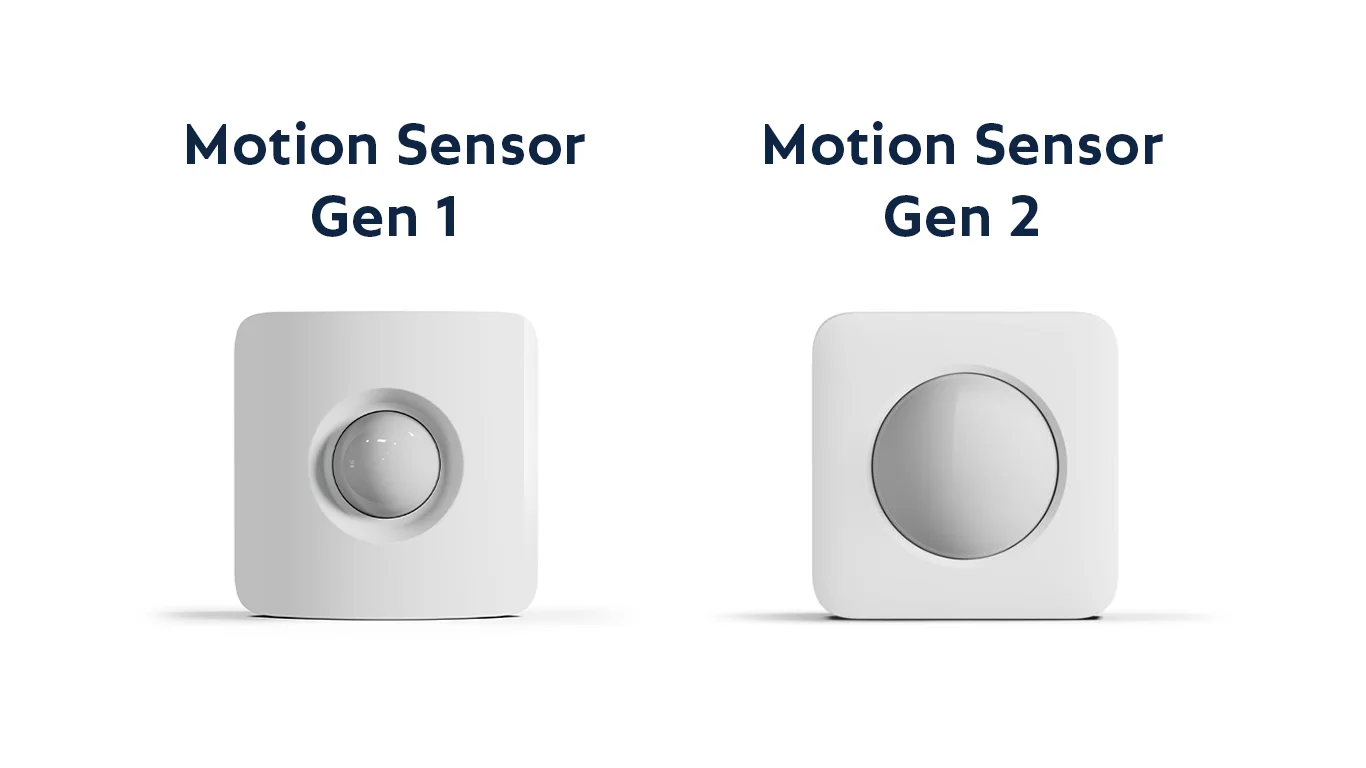
SimpliSafe’s pet guidance explicitly distinguishes Gen 1 and Gen 2. Its current Gen 2 documentation describes Pet Mode, an up-to-60-pound suitability claim and a recommended six-foot mounting height. Those figures are product-specific and should not become universal advice for Ring, wired professional sensors or older SimpliSafe hardware.
Record the model and current settings before moving it. If the identification is uncertain, use the maker’s support process rather than guessing from a similar-looking white plastic enclosure.
Map how the pet actually uses the room
List the floor routes and elevated surfaces the animal can reach. A dog that usually sleeps on the floor may jump onto the sofa when someone approaches outside. A cat can travel along shelves or climb curtains close to a detector.
Observe ordinary behavior rather than staging only the easiest test. Include the room with blinds or curtains in their usual positions and furniture arranged as it will remain after installation. A temporary empty room can give a misleading impression of compatibility.
| Room feature | Why it matters | Possible response |
|---|---|---|
| Sofa directly below a detector | Pets can enter a closer or higher part of the field | Reposition the sensor or furniture within supported guidance |
| Cat shelves beside the sensor | Small pets may approach the lens closely | Choose a different detection location or strategy |
| Sunlit window and moving curtain | Changing heat and movement can complicate sensing | Avoid the unsuitable direct view |
| Heating or cooling outlet | Environmental changes may contribute to nuisance events | Use the manufacturer’s placement limits |
| Shared route to several rooms | People and pets use the same path | Test both and consider perimeter coverage where appropriate |
The practical fix may be changing the coverage plan, not endlessly reducing sensitivity. A detector cannot be expected to ignore every close animal while preserving every desired event under an unsuitable installation.
Start with the manufacturer’s mounting instructions
Use the specified height, orientation and bracket arrangement. Mount on a stable surface with a clear view of the intended area. Do not tilt, tape over or partly cover the lens to create an undocumented detection pattern.
A shelf installation may be permitted for one model and unsuitable for another. Check whether the device must sit at the edge, remain level or have clearance around its field. The test button’s position is not a universal guide to which way every sensor should face.
After fitting, verify that the device remains firmly attached during normal room use. A mount that slowly slips can change the pattern even though the battery and wireless connection remain healthy.
Heat and sunlight can be mistaken for a pet problem
Do not assume the animal caused every alarm simply because it was home. Record the event time and consider direct sun, heaters, moving curtains and recent room changes. A pet camera can sometimes provide context if its use is appropriate and it captured the same time.
SimpliSafe’s Gen 2 false-alarm guide identifies environmental triggers and warns about pets getting close or jumping onto furniture in the view. That is stronger diagnostic evidence than a blanket statement that animals below the advertised weight can never trigger the detector.
Reposition according to supported guidance, then repeat the test. Do not disable heating, safe ventilation or another essential household function as a permanent workaround for poor sensor placement.
Choose the arming mode deliberately
Home or stay mode often allows people to move inside while selected perimeter sensors remain active. Away mode may activate additional motion coverage. The actual behavior depends on the configured system, so inspect the sensor list rather than relying on the mode name.
For a household with free-roaming pets, decide which rooms can use reliable interior detection and which need another strategy. A pet-tolerant sensor can be part of the answer, but it may not fit every open-plan or climbing-heavy environment.
Document any sensor intentionally excluded from a mode. An exclusion should be a conscious coverage decision, not a forgotten temporary setting left after a nuisance event.
Perimeter contacts can reduce dependence on room motion
A suitable door or window contact reports its monitored opening without trying to classify the pet moving across the floor. That can be useful while people and animals remain inside. It does not report every possible glazing event or prove a lock is engaged.
Use a layered plan rather than declaring one type a complete substitute. Our sensor comparison explains contact, acoustic glass-break and room-motion roles, including glazing compatibility.
Physical repairs come first. A sensor on a window with a broken latch can report activity without retaining the window. The window-security guide helps separate mechanical protection from detection.
Alarm motion sensors and camera AI are different
A camera may label pets and people in video while an alarm detector uses a different sensing method and communications path. A camera’s successful animal classification does not prove an alarm sensor will ignore the same animal.
Likewise, muting pet notifications in a camera app may not alter any alarm behavior. Identify which device and service generated the alert before changing settings. A linked automation can create an additional path that needs review.
Our camera false-alert guide covers video-specific tuning. Keep that diagnosis separate from the installed alarm detector’s documented pet mode and walk test.
Test without sending an unnecessary emergency request
Follow the alarm provider’s test-mode procedure and coordinate with professional monitoring before deliberate sensor tests. Make sure the authorized contact understands what is happening. Do not assume disarming one app automatically suppresses every linked response.
SimpliSafe provides a Gen 2 test guide. Use the instructions for your system and restore its normal configuration afterward. Other brands can have different cooldown and test behavior.
A connection button proves a communication function, not full room coverage. A proper commissioning process includes the manufacturer’s supported detection test and checks the actual alarm or notification path.
Test the pet and the intended human route
Begin with normal pet movement under supervision without distressing or forcing the animal to perform unsafe actions. Include its usual permitted furniture and route. Note any nuisance response and the conditions in which it occurred.
Then verify ordinary human movement through the intended coverage using the supported walk test. Do not stop at the finding that the pet no longer triggers. Reduced sensitivity can also create a gap for the event you are trying to detect.
Repeat after relevant changes rather than conducting one trial and assuming the result is permanent. New furniture, a growing animal or a moved heat source can change the environment.
Keep a useful false-alarm record
| Record | Example question |
|---|---|
| Sensor identity | Which exact device, not merely which room? |
| Time and mode | Was the system in the intended home or away configuration? |
| Pet position | On the floor, furniture or close to the detector? |
| Environment | Sun, heating, moving curtains or open windows? |
| Single change | What was altered before the next comparison? |
| Positive coverage test | Did the intended human route still register afterward? |
Do not record a conclusion such as pet too large when you only know an alarm occurred. Specific observations help the installer or manufacturer distinguish mounting, environmental and equipment problems.
Several pets, larger dogs and unusual rooms
Ask the manufacturer about your actual configuration rather than assuming a published single-pet limit covers every combination. Large animals, multiple moving pets and elevated routes can exceed the assumptions behind a household detector’s design.
For a complex room, a qualified installer may recommend different detectors or a perimeter-led approach. A dual-technology product is not automatically a universal cure; its configuration and intended environment still require assessment.
Do not restrict an animal’s safe access to water, ventilation or needed movement simply to preserve a poorly planned alarm layout. Choose a security arrangement compatible with responsible care of the household.
Do not put an indoor sensor outside
A garden, unheated shed or exposed porch can have environmental conditions beyond an indoor detector’s specification. Weather protection, operating temperatures and radio installation need to match the location.
A plastic bag or improvised cover does not create a certified outdoor enclosure and may alter sensing. Use equipment explicitly intended for the setting or change the coverage plan.
For outdoor alerts involving wildlife, consider a suitable camera or purpose-designed detector with a clear response requirement. Our backyard plan keeps physical access, lighting and monitoring distinct.
When to replace a sensor
Replacement can be appropriate when the installed generation cannot meet the room’s needs, the device is damaged or supported troubleshooting identifies a hardware fault. Do not assume a newer model is compatible with an older hub without checking.
Ask whether replacement changes battery type, mounting instructions, radio region or available modes. Preserve current coverage until the new device is installed and tested. A shopping-cart compatibility badge is less useful than the exact manufacturer’s list.
For an inherited system, our takeover guide helps identify ownership, panel and sensor generations before spending on expansion.
Professional monitoring does not remove placement responsibility
A monitoring center can act on a received alarm, but it cannot make an unsuitable detector understand the room. Repeated nuisance events can create costs and undermine confidence in the system. Fix the cause rather than relying on the operator to guess which alarms are real.
Keep authorized contacts, cancellation information and local requirements current. Ask the provider how test mode and false-alarm handling work. Do not assume every country or service follows the same escalation process.
Our monitoring comparison explains where professional response adds value and where the owner still needs to maintain the equipment.
Acceptance checklist for a pet household
- Confirm exact sensor generation, hub compatibility and stated pet conditions.
- Mount at the supported height and orientation with stable attachment.
- Map furniture and elevated animal routes inside the detection field.
- Enable the intended supported pet mode and save the setting.
- Use the approved test procedure without generating an unnecessary dispatch.
- Observe normal pet activity and verify the required human route.
- Document modes, remaining limits and maintenance responsibility.
The installation is successful when the alarm remains useful, not merely quiet. A transparent limitation is better than a claim of pet immunity that nobody has tested in the actual room.
Frequently asked questions
Will a pet under the advertised weight never trigger the alarm?
No such universal guarantee follows. Distance, elevated surfaces, configuration and environmental conditions matter. Follow the exact product’s instructions and test the room.
Should I turn the sensor upside down?
Only where the manufacturer directs that orientation for the specific model and scenario. Advice for one generation can be wrong for another.
Can I tape over the lower lens area?
Do not create an undocumented detection pattern. Use supported settings, placement or a more suitable sensor rather than hiding an untested gap.
What is the safest alternative when motion detection is unsuitable?
Plan compatible perimeter and other appropriate detection with the provider, while preserving physical security and safe household use. No single replacement covers every event automatically.