
Best Home Security Systems Without Monthly Fees: What Works After the Trial?
A security kit can operate without a subscription and still fail the one test you care about: notifying your phone while you are away. Some systems retain only their keypad and siren when paid service ends. Others preserve remote controls but remove event history, automation or camera recordings. Calling all of them no-monthly-fee systems without explaining the difference is not a useful recommendation.
For a new self-monitored alarm with phone control, Abode and eufy’s five-piece alarm kit are worthwhile starting comparisons. Do not assume Ring Alarm or SimpliSafe provides an equivalent free alert experience. This guide compares documented functions and complete setup requirements, not claimed hands-on testing. US service information and storefronts were checked on November 8, 2026; other countries and later plans can differ.
Define what you expect the free system to do
Write down the sequence: detect an opening, sound locally, notify a phone, identify the relevant area and let an authorized user respond. Then add any camera history, automation or backup connection you require. A free live camera view is not the same as saved evidence or an alarm notification.
Keep professional monitoring separate. You can have useful owner-operated alerts without a staffed center, but somebody still needs to receive and act on them. Our monitoring comparison explains that responsibility rather than treating the absence of a bill as the only decision.
| Function | What to ask |
|---|---|
| Local alarm | Do enrolled sensors still activate the intended siren? |
| Remote controls | Can I arm and disarm through the app without a plan? |
| Notifications | Which actual alarm alerts reach my phone? |
| History | Is there a retained event timeline, not merely a current status? |
| Camera recording | Where is footage saved and how do I retrieve it? |
| Backup communication | Does cellular service require a paid tier? |
| Automation | Will configured routines continue after cancellation? |
Check the answer after trials are inactive. A demonstration during the free month may temporarily provide exactly the features you would otherwise have to purchase.
My starting shortlist
| Option | Best reason to compare it | Main no-fee limitation to understand |
|---|---|---|
| Abode Security Kit | Free basic app control and generic push alerts, with optional paid expansion | Free service excludes retained timeline, video clips and running automations |
| eufy 5-Piece Home Alarm Kit | A straightforward keypad, contacts and motion-sensor package with advertised no-fee app alerts | Confirm exact HomeBase, camera compatibility and outage behavior separately |
| Ring Alarm without a subscription | Possible local keypad-and-siren use for compatible existing equipment | Current US guidance does not include digital alarm notifications or app arming at this tier |
| SimpliSafe without a suitable service plan | Assess retained functions of an existing installation | Its current US support guidance requires an active subscription for push notifications |
The last two rows are boundaries, not equivalent top picks for free remote monitoring. A smaller shortlist with clearly verified functions is more useful than ten products padded with exceptions.
Abode: compare the free account with the exact hub
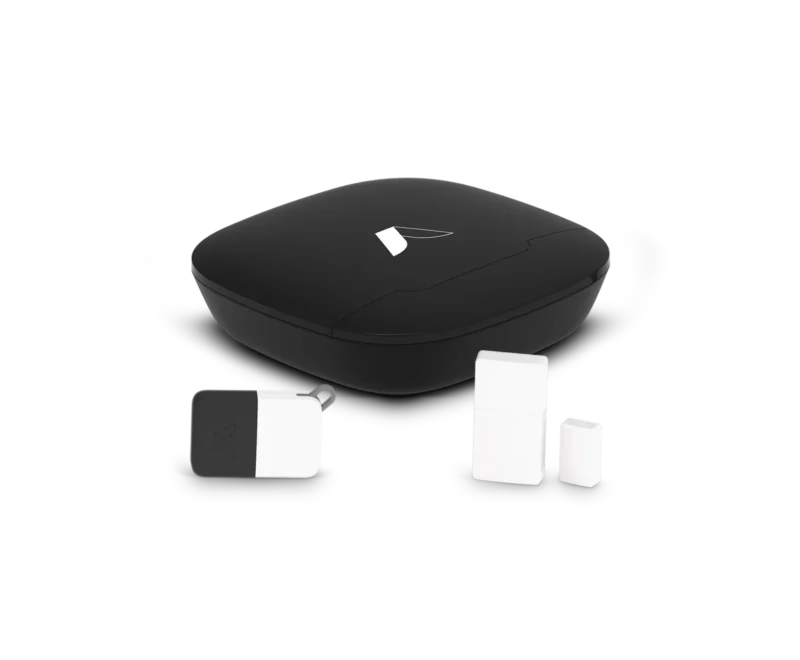
Abode’s current plan FAQ lists basic remote control, live video and generic push notifications at the free tier. It excludes the timeline, stored video clips, rich notifications and running automations. Cellular backup belongs to the paid Pro arrangement. This gives you a concrete feature boundary rather than an ambiguous claim of free monitoring.
The entry Security Kit lists a hub, one entry sensor and a keyfob. It does not support HomeKit, despite broader brand-level integrations elsewhere on the site. Its displayed $75 promotion required the monthly Pro plan when checked; removing that plan removed the discount, leaving the listed $150 hardware price. Do not count the subsidized price as an unconditional no-fee purchase.
I would compare this option for a small installation that needs remote alarm awareness but not a rich free event archive. For more elaborate integrations, inspect the other hub models and their supported protocols. A free integration in the account cannot add a radio or platform capability missing from the selected hardware.
eufy: a larger starter package with a different ecosystem
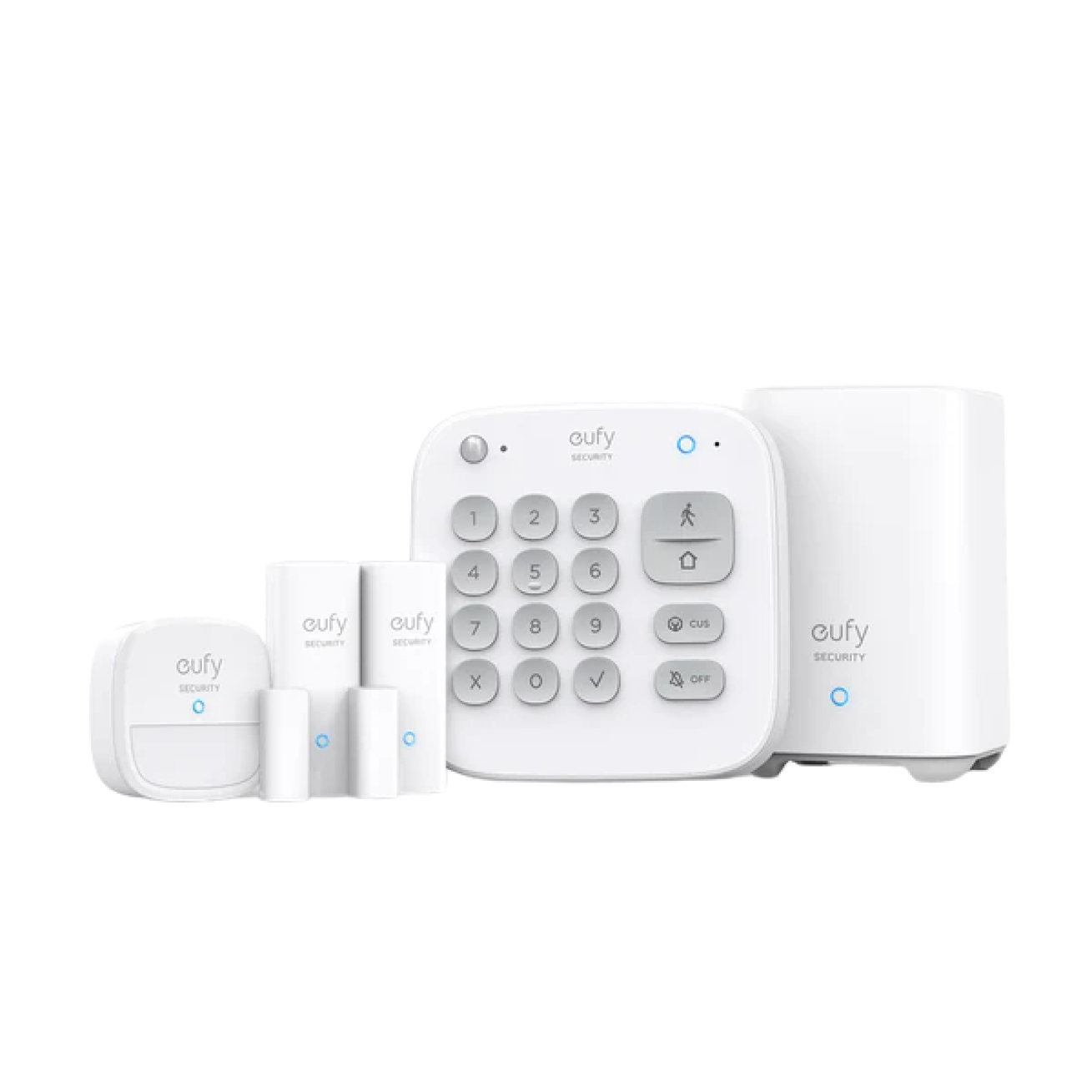
The US five-piece kit listing showed $259.99 and included HomeBase 2, a keypad, one motion detector and two entry contacts. It advertised app alerts and arming without a monthly fee. Check the exact bundle and current stock because other eufy systems use different hubs and service arrangements.
The included keypad makes the daily household routine less dependent on everyone using an app. The two contacts can cover two suitable openings, while the motion detector requires an appropriate location. Neither the piece count nor the brand alone proves sufficient coverage for the whole house.
For cameras, confirm the specific model-to-HomeBase compatibility and recording features before ordering. A general eufy ecosystem statement does not guarantee every camera works with the hub in this particular kit. Our subscription-free camera guide treats the recording purchase separately.
Why Ring is not my first choice for free remote alarm alerts
Ring’s current US plan explanation states that no-subscription operation uses the keypad and siren, without digital alarm notifications or requested emergency response. App arming and related functions need a compatible subscription. That is not equivalent to an alarm that alerts you remotely for free.
This may still suit an owner who already has the hardware and intentionally wants local-only operation. It is a poor match for a new buyer whose nonnegotiable requirement is receiving an alarm on their phone without paying monthly.
Read regional and account-specific terms directly. Do not rely on an older review or the free live-view features of a Ring doorbell to infer the alarm hub’s current no-plan capabilities.
Apply the same test to SimpliSafe
SimpliSafe’s US notification support page says push notifications require an active monitoring subscription. Therefore I would not present it here as an equivalent free phone-alert package merely because some local functions remain usable without professional monitoring.
Check the current service menu for the features you need and the exact system generation. A paid self-monitoring option is still self-monitoring, but it is not a no-monthly-fee solution. Similar terminology does not make two plans identical.
Someone with an existing installation has a different decision from someone buying from scratch. Compare the incremental cost of suitable service or replacement rather than discarding working hardware based on a headline.
Build the kit around the property
Count relevant doors and windows and decide where interior motion detection is appropriate. One contact protects its configured opening or group; it does not automatically detect every route into the room. Glass-break and motion sensors have different purposes.
For a small apartment, one entrance contact and suitable additional detection may be a reasonable starting design after inspecting accessible windows. For a house, a starter kit can leave several routes uncovered. Use our sensor comparison instead of choosing by the largest-looking box.
Pets, regular nighttime movement and alternate entrances change the configuration. A motion sensor permanently excluded because it triggers on the cat should not remain counted as active protection. Choose and test a supported layout.
Compare complete one-time costs
Include every required sensor, keypad, additional siren, mount and installation task. Account for batteries and eventual replacement. No subscription does not mean no maintenance or that the household’s internet service becomes unnecessary.
For a transparent example using eufy’s checked listing, a hypothetical six-contact, two-motion-detector layout would need four more contacts and one more motion detector beyond the kit. At the page’s listed $29.99 per add-on, $259.99 plus five times $29.99 equals $409.94 before tax, delivery and other work. Verify those exact add-ons and prices at checkout.
Do not apply that total to every home. It illustrates how a $259.99 starter kit and a complete layout can be different purchases. For a quote, list locations beside devices so missing coverage is visible.
Understand what stops during an outage
A battery-backed hub can retain local operation without keeping the router, broadband connection or cloud notification path alive. Ask which devices have backup power and which communication route sends owner alerts when normal internet fails.
Where cellular backup is offered only with a subscription, a zero-fee configuration does not obtain it simply because a SIM is physically installed. Do not count a future paid upgrade as a current free capability.
Camera backup is another task. A hub sending an alarm over cellular does not necessarily transmit continuous video. Our backup-power guide explains the separate dependencies.
Choose camera storage independently
You can combine an alarm with a suitable independently managed camera if the operational routine is clear. They do not have to share an app merely for branding consistency. The tradeoff is maintaining two accounts and understanding how their information relates.
Check timestamps and export before relying on video to investigate an alert. Local recording can reduce recurring fees, but it needs suitable storage and a process for preserving important clips before overwrite.
The storage comparison explains what happens when the camera is stolen, the internet fails or the service plan expires. Alarm event history and video history are not interchangeable.
A no-fee system still needs a response plan
Agree who checks alerts when the primary owner is asleep, driving or away. Give authorized contacts enough information to understand the location without sharing administrator credentials unnecessarily. Use supported individual permissions where available.
Do not ask a neighbor to enter a suspected break-in. Appropriate response may mean contacting authorities or a responsible service rather than going to the property. A phone notification has value only when its recipient knows what to do safely.
For medical or life-safety needs, obtain equipment and services appropriate to that function. An ordinary intrusion kit must not be described as a substitute for required smoke alarms or a contracted medical response.
Test after the trial really ends
Confirm the account is on the intended free tier, not merely within a promotional period. Then coordinate a permitted test without generating an unintended emergency response. Check local arming, the siren, notification delivery and any expected status or history.
Use another authorized phone and a mobile-data connection for a remote test. A setup that works only on the same Wi-Fi while the owner app is open has not established the intended away-from-home experience.
- Confirm each installed sensor reports its actual opening or event.
- Test the normal keypad and app routine available at the free tier.
- Check what the notification says and whether it identifies the useful area.
- Verify which logs or recordings remain accessible.
- Review low-battery and lost-connection warnings.
- Document who responds and where account recovery information is kept.
Keep a note of the result and the plan terms checked at purchase. Service features can change, so review significant provider notices rather than assuming the original free tier remains identical indefinitely.
When paying can be the better decision
A paid plan may be worth considering when it supplies a function you actually need, such as cellular backup or staffed response. Choosing no fees is not a reason to accept a system that cannot report the events that matter.
Compare the complete multi-year cost with the expected service, not a fear-based sales pitch. A smaller compatible system with a suitable paid response can be more appropriate than a large free kit whose alerts nobody can reliably handle.
For a home with existing equipment, first investigate reuse. Our alarm takeover guide can help avoid buying an entire starter system when a controlled service change would meet the requirement.
Frequently asked questions
Can I get genuine alarm alerts without monthly fees?
Yes, on suitable systems and current plans, including the documented Abode and eufy examples here. Verify the exact region, hub and free-tier functions.
Does no professional monitoring mean every app feature is free?
No. Remote arming, notifications, history and backup communication can be separate paid features.
Will the police automatically receive my free-system alarm?
Do not assume so. Self-monitoring normally requires you or an authorized contact to take the appropriate reporting action.
Are these hands-on recommendations?
No. They are based on checked manufacturer documentation and a defined feature comparison. Test the actual household setup within the return period.


