Will a Smart Garage Door Controller Work With Your Opener? A Compatibility Guide
.sl-garage table{border-collapse:collapse;width:100%;margin:24px 0}.sl-garage th,.sl-garage td{border:1px solid #bdcbd0;padding:12px;text-align:left;vertical-align:top}.sl-garage th{background:#eef4f2}.sl-garage .table-scroll{overflow-x:auto}.sl-garage figure{max-width:760px;margin:28px auto}.sl-garage img{max-width:100%;height:auto;display:block;margin:auto}.sl-garage figcaption{font-size:14px;line-height:1.6;color:#425c63;padding-top:10px}
A smart controller can be a useful way to check whether the garage is closed without replacing a healthy opener. The awkward surprises usually appear during setup: the wall control uses an unsupported protocol, the new kit cannot use an older position sensor, or the garage has enough Wi-Fi for an occasional phone message but not a dependable installed connection.
Compatibility depends on the exact opener, controller generation, door arrangement and required safety equipment—not simply the opener’s brand or age. Check those items before buying, then test opening, closing, status reporting and access permissions separately. This guide is for adding supported smartphone control to an existing system, not overriding a faulty or incompatible opener.
Identify what you already own
Record the opener’s model, serial information where relevant, manufacturing date and the wall-control model. Take a clear photograph of the labels from a safe position. Do not remove electrical covers or work beside moving door components just to obtain a number.
Also establish whether smart control is already built in. A connected opener may need account setup or a compatible network accessory rather than a separate retrofit hub. Adding another controller without understanding the existing one can leave confusing duplicate accounts and commands.
The manufacturer’s compatibility checker should be matched to the product being considered. myQ’s setup guidance directs users through opener and sensor compatibility rather than treating the year alone as the answer. Keep the result with the quotation or order confirmation.
Understand the four jobs in a retrofit system
A controller sends a command to the opener, but another component may determine whether the door is actually open or closed. The controller also needs communication with the app or service. Required warning and safety equipment supports appropriate unattended operation.
| Function | Possible component | Compatibility question |
|---|---|---|
| Command the opener | Supported wired connection or radio interface | Does this controller support the exact opener protocol? |
| Report door position | Paired position sensor or integrated reporting | Is the sensor supported by this controller generation? |
| Reach the app | Wi-Fi, router and online account | Are the network and service requirements satisfied? |
| Support unattended closing | Required warning devices and operational safety system | Are the approved components present and functioning? |
These functions can fail independently. An app accepting a command does not prove the door moved, and a fresh position notification does not necessarily prove a remote-close command is supported.
Some controllers use an approved low-voltage connection associated with the opener’s wall control. Others communicate differently. Two visible wall wires do not prove that the opener accepts any generic contact closure; they may carry a model-specific communication signal.
Genie’s wired Aladdin Connect compatibility guidance distinguishes supported control arrangements and, for some Series III equipment, an additional approved adapter. That information belongs to the specified wired retrofit system. It is not an instruction to bridge terminals on every Genie opener.
Use the exact wiring diagram and accessory list, with appropriate installation help where needed. Never connect a controller to safety-sensor terminals to create a workaround, and do not copy wire colors from a different brand’s installation photograph.
Wireless retrofits still need exact-model checks
A wireless command path can reduce control wiring, but it does not remove compatibility requirements. The hub must support the opener’s radio system and its own pairing process. A product described as universal can still exclude specific generations, commercial equipment or certain door arrangements.
Check whether the controller needs to be enrolled as a remote and whether the opener has capacity for another authorized device. Preserve the existing working setup while following the documented procedure. A long press of an unfamiliar programming button can erase existing controls on some systems.
When a listing and support article disagree, ask the manufacturer which applies to the product being shipped. Do not assume a familiar name means the contents and setup method have remained unchanged.
A current example: older and newer Aladdin Connect kits differ
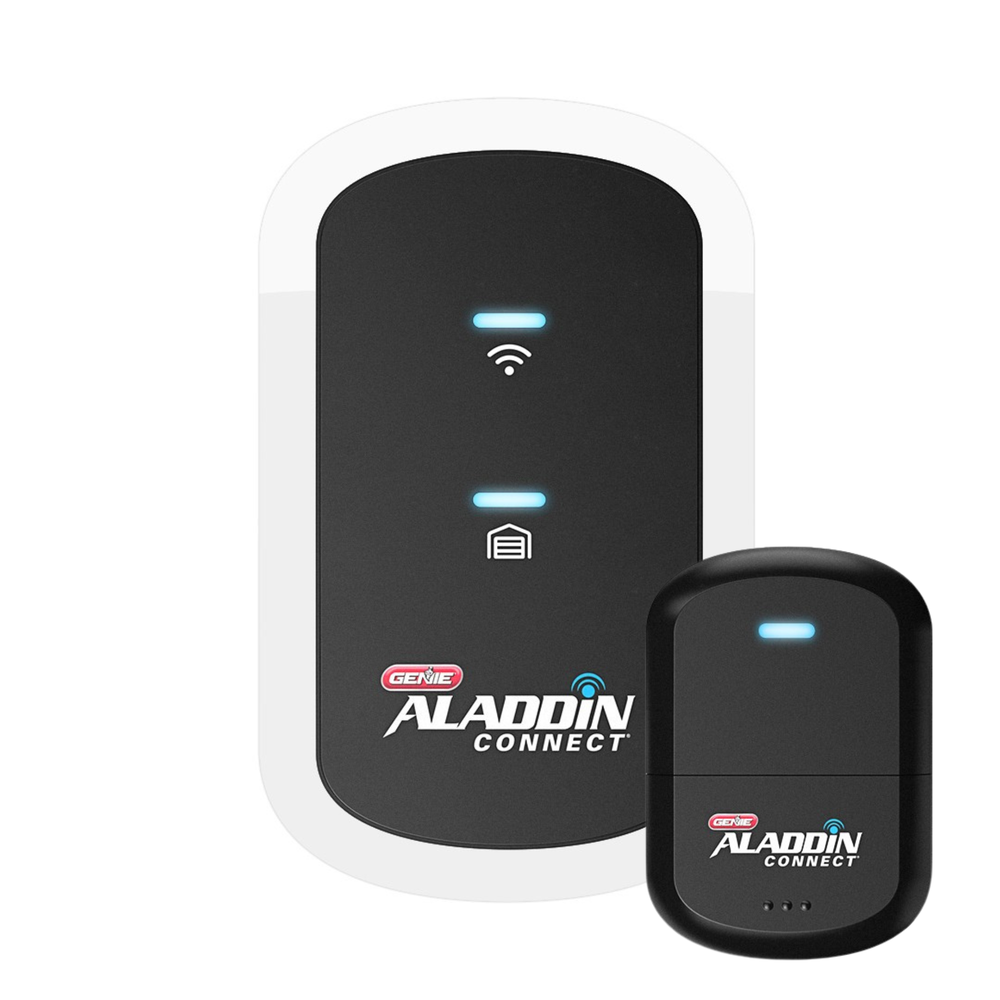
The single-door retrofit listing checked for this guide describes a redesigned wireless setup and states that an older ALDPS-R sensor is not compatible with that kit. Meanwhile, Genie’s support material separately identifies the older three-door wired retrofit arrangement.
The practical lesson is not that one generation is universally better. It is that a tutorial for the three-door wired product can be the wrong tutorial for a newly purchased single-door product. Match the manual, compatibility result and replacement sensor to the actual package.
Do not buy two older sensors to expand a kit documented for one door. Establish how additional doors are supported before assuming an accessory will add capacity.
The door must already operate safely
A smart controller cannot repair a door that binds, reverses unexpectedly or has unreliable photoelectric sensors. Correct those faults before adding remote commands. A heavy door with damaged springs, cables or brackets needs a qualified door technician, not a stronger remote-control signal.
Compatibility can also depend on door type. The current single-door Genie example excludes one-piece doors and requires the specified modern safety arrangement. Those are product-specific conditions, not a universal definition of what every controller supports.
Do not bypass safety sensors or silence a required warning to make remote closing work. The US CPSC’s entrapment-protection guidance explains why automatic-door safety systems and manufacturer-directed tests are consequential, not optional convenience settings.
Check warning-light and sound placement
Some retrofit hubs need to be installed where their closing warning can be seen and heard. Tucking the unit into a cupboard because the cables look untidy can defeat that function. Follow the manufacturer’s mounting instructions rather than choosing solely for Wi-Fi signal.
Remote warnings are not permission to close on an unsafe scene. Keep normal household procedures clear, particularly around children, visitors and animals. Never use a person or body part to test reversal.
For certain wall-mounted Chamberlain systems, a paired remote light also affects supported unattended-close functions, as described in the manufacturer’s diagnostic guidance. A separate ordinary ceiling lamp is not automatically an equivalent accessory.
Test the network at the mounting position
Check the controller’s supported Wi-Fi band and security mode. A phone showing a signal beside the garage door does not establish stable communication at the final hub position, especially behind metal or masonry. Test the actual device before permanently mounting it.
Follow the router and controller’s supported setup procedure. Combined-band networks are not inherently incompatible, but enrollment instructions vary. Do not remove the Wi-Fi password, disable the firewall or create broad inbound port rules as a generic troubleshooting shortcut.
Our home-network guide explains controlled compatibility checks. Account authentication, local wireless access and the controller reaching its service are separate stages, so record where setup fails.
Decide who owns the account
The long-term owner should control the main account and its recovery information. An installer can help with setup without retaining the only administrator login. Check existing ownership when taking over a used device rather than assuming reinstalling the app transfers it.
Use individual invitations where supported and review what each role permits. myQ’s user-role documentation distinguishes the owner, co-owners and other access arrangements. A co-owner may have much broader control than someone who merely needs occasional entry.
Keep physical remotes, keypad PINs and app invitations in the same access inventory, but do not confuse them. Removing a cloud user does not automatically erase a radio remote from the opener’s memory.
Verify what happens without internet
A healthy opener’s existing local controls may remain usable when an added controller loses internet, but the exact system must be checked. Remote app commands, notifications and account changes can become unavailable while the door itself still operates normally.
A mains-power failure is another case. A charged opener backup battery may move the door while a separate controller and router are unpowered. Do not infer that battery-powered motor operation preserves the entire online service.
Keep a supported local access method and document the limitations for other users. The household should not discover its only entry route depends on a flat phone while standing outside during an outage.
Compare the total retrofit cost
Include the controller, required adapter, sensor arrangement, electrical access, network improvements and installation. Check whether ordinary app control, particular integrations or recording features have different service terms. A hardware price alone does not establish the long-term cost.
For illustration, a hypothetical $80 kit plus a $30 approved adapter and $90 installation totals $200. A $110 wireless kit could be cheaper overall if it fits the opener without that work, but not if it cannot support the door or the required household access. These are example calculations, not market quotations.
If the opener is already due for replacement, compare a suitable integrated smart model with retrofitting the old one. The drive comparison and mounting comparison help keep the mechanical purchase separate from app features.
Run an acceptance test before relying on the app
Complete the manufacturer’s prescribed safety and control checks with the opening clear. Verify the controller reports a genuine open and closed state after normal use. Check whether delayed notifications are being mistaken for the current door position.
| Test | Useful result |
|---|---|
| Existing wall control and remote | Normal authorized local operation remains available |
| App command | The intended door responds through the supported workflow |
| Position reporting | Observed state and app state agree after the expected update |
| Unattended closing | Required warnings and safety functions operate as documented |
| Shared user | Only intended doors and permissions are available |
| Recovery and outages | The household knows the supported fallback and its limits |
Do not call the job complete because pairing produced a success message. The useful outcome is a dependable control and status workflow that the authorized occupants understand.
Frequently asked questions
Does an opener made after 1993 automatically work?
No. Date ranges in compatibility guidance are only part of the check. Exact models, protocols, safety equipment and product generations still matter.
Can I use an older sensor with a new hub?
Only when the manufacturer explicitly supports that combination. Some newer kits have different sensors and door-count limits.
Will smart control make the garage physically more secure?
It can improve awareness and access management, but it does not repair the door or secure other entrances. Use the whole-garage security checklist alongside it.
What should I check first?
Identify the opener and controller generation, confirm the manufacturer’s compatibility result, and correct any existing door or safety fault before installation.