Alarm Tamper Warning Won’t Clear? Check Covers, Mounting and the Actual Fault
.sl-alarm table{border-collapse:collapse;width:100%;margin:24px 0}.sl-alarm th,.sl-alarm td{border:1px solid #bccbd0;padding:12px;text-align:left;vertical-align:top}.sl-alarm th{background:#edf4f2}.sl-alarm .table-scroll{overflow-x:auto}.sl-alarm figure{max-width:800px;margin:28px auto}.sl-alarm img{display:block;max-width:100%;height:auto;margin:auto}.sl-alarm figcaption{font-size:14px;line-height:1.6;color:#435b62;padding-top:10px}
You replaced a sensor battery, put the cover back and now the app says tampered. The door itself is closed, the magnet looks aligned and acknowledging the message does not make it disappear. That is a different problem from an ordinary open-door warning, even though the same device may report both.
A tamper message reports a monitored condition involving the device or installation; it does not, by itself, prove that someone deliberately interfered with it. Identify the named device and current fault, follow its authorized maintenance procedure and correct the physical or electrical cause. Do not tape down switches, alter wiring or delete the sensor simply to make the dashboard look normal.
First distinguish tamper, open and offline
A magnetic door contact can report that the door is open while its enclosure remains intact. It can also report a displaced cover while the door is closed. If communication stops, the panel may display another warning entirely. These observations need different tests.
Read the complete message and location name, then check whether it describes a present condition or an older event retained in history. Acknowledging an event may change how it appears without repairing a condition that still exists.
| Reported condition | Question to investigate | Wrong shortcut |
|---|---|---|
| Tamper on a contact or motion detector | Is the correct cover and mounting arrangement seated normally? | Moving only the door magnet repeatedly |
| Door open | Do the sensor and magnet meet the model’s alignment requirements? | Assuming the cover switch is the cause |
| Device offline | Can the hub communicate with the named device? | Assuming the opening is physically unsecured |
| Low battery | Which exact device and approved battery are involved? | Replacing a different accessible battery |
| Panel or external-siren tamper | What does the installed system monitor at that location? | Opening a powered enclosure to investigate without authorization |
Use the incorrect door-status guide when the primary issue is the magnetic opening state. Use the beeping-panel guide when the source of the warning is not yet clear.
Do not assume disarming makes every maintenance action harmless
Follow the exact system’s service instructions before opening a device. Some tamper conditions are supervised independently of ordinary intrusion arming, and a provider may need to put the account into an appropriate maintenance state. A local disarm command and a monitoring-service test hold are different actions.
ADT Australia’s troubleshooting guidance specifically calls for coordination before work that can generate a tamper event and recommends qualified servicing for its relevant systems. Those conditions belong to the named provider and installation, not every alarm sold worldwide.
Keep emergency and life-safety devices outside an improvised intrusion test. The alarm testing guide explains why a feature named Test Mode does not universally suppress every response.
Look at what changed immediately before the warning
A recent battery replacement points toward the battery compartment, cover and mounting fit. Decorating may have disturbed the mounting plate. A door adjustment can change how a sensor sits or whether another fitting now presses against it.
Record the timing without assuming it establishes the cause. A warning after a storm may involve an outdoor device, a power interruption or a separate communication problem. Keep the actual device name and event type in the investigation.
For a system inherited from another occupant, establish the equipment and service arrangement first. The existing-alarm takeover guide helps find the responsible owner and documentation without wiping useful settings.
A Ring example: covers and mounts vary by generation
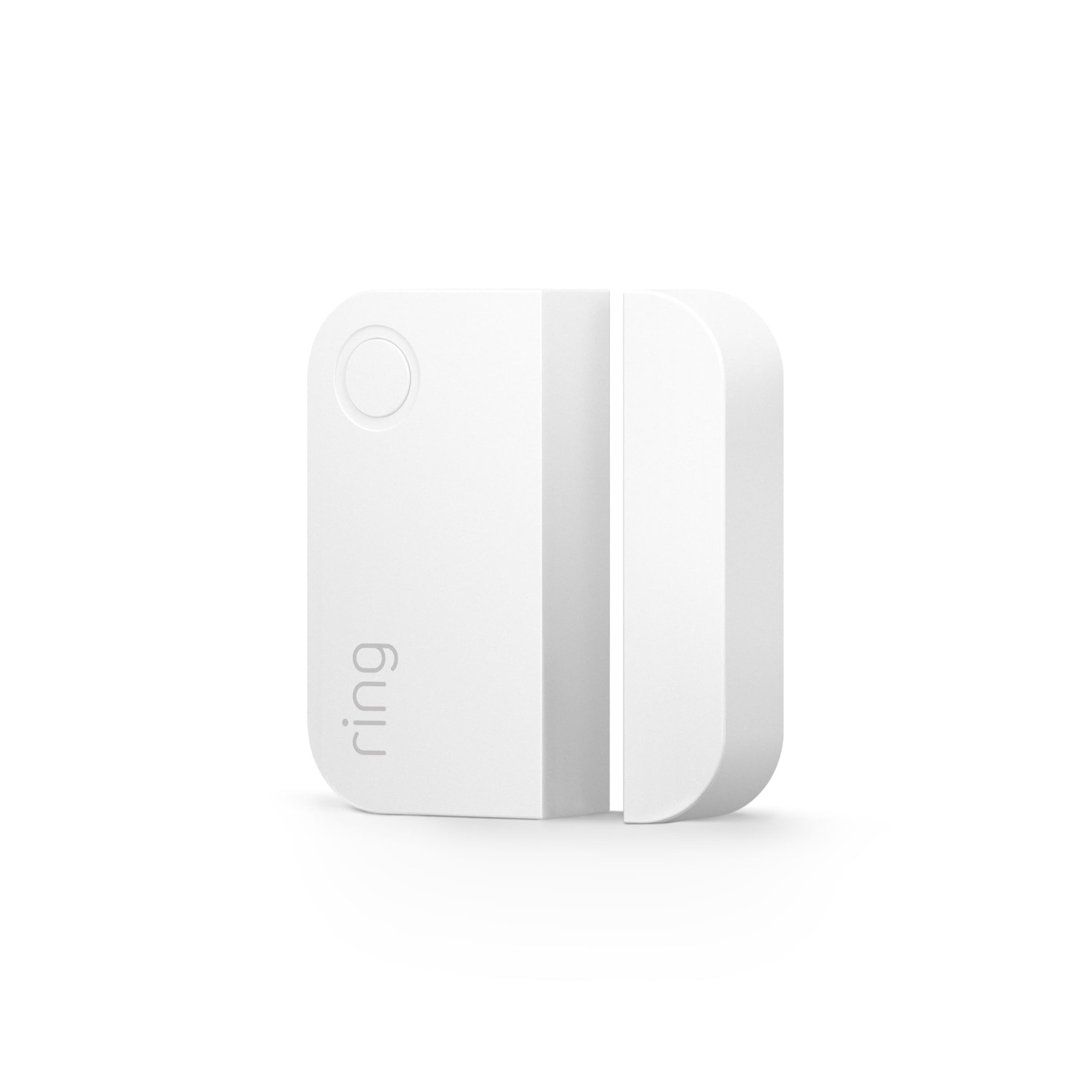
Ring’s tamper guide explains that a shifted cover, housing or mount can create the warning. It gives separate instructions for different contact generations and outdoor models, including designs with a secured battery-cover screw.
Use the sequence for the actual sensor and verify both online status and cleared tamper afterward. Do not adapt a first-generation button instruction to a newer housing just because the app uses the same word. If the supported reseating process does not resolve it, preserve the result for support before attempting more disruptive reconfiguration.
Check normal cover fit without forcing it
Inspect accessible user-serviceable parts for a displaced gasket, damaged clip, trapped material or a cover not sitting evenly. Follow the manual’s closure method. More pressure or a tighter screw is not automatically better if the mount or housing is distorted.
Check that the replacement battery is the approved size and type and sits in its intended compartment. A part that prevents the cover closing normally is not a compatible solution merely because the sensor briefly powers on.
If a clip or mounting feature is broken, ask for the correct replacement part or device. Adhesive over a damaged cover may hide the symptom while making later servicing harder and leaving the designed monitoring function ineffective.
Inspect the supporting surface and mounting plate
An uneven surface or twisted bracket can keep the device from sitting as intended. A screw head, thick paint layer or improvised spacer may change the relationship between the housing and mount. Look for those ordinary installation problems before concluding that the electronics have failed.
Do not drill new holes into a rated door or unknown frame just to flatten a small sensor. Use the approved mounting arrangement and obtain permission where required. The contact installation guide covers fit, servicing clearance and controlled final tests.
A temporary hand-held test can be useful only where the manufacturer permits it and it remains safe. The finished device still needs to work on its actual secure mount; a warning that clears only while someone holds the housing in a particular position has not been repaired.
Outdoor contacts need an environmental check
Inspect whether a permitted outdoor sensor has shifted on its gate or whether its enclosure has been damaged. Weather exposure, repeated movement and a poorly supported mount can change the fit. An indoor contact placed outside does not gain an outdoor rating from an added wrap of tape.
Use the specified weather seals and fixings. Do not trap water inside a damaged enclosure or remove a seal to make a cover fit more easily. If corrosion or water is visible where it should not be, stop routine battery experiments and obtain appropriate support.
Also check the gate’s ordinary movement separately. A loose gate can affect the opening state while a damaged enclosure creates tamper; repairing one may leave the other unresolved.
Panel, siren and hardwired tamper faults need different expertise
A warning from the main panel or an external sounder is not a reason to open a mains-connected cabinet or climb to a siren. The installed system may monitor conditions beyond a simple wireless sensor cover. Identify the named location and contact the responsible technician.
Do not bridge terminals, substitute resistors or disable a supervision setting to clear a message. Those changes alter the protective arrangement and can conceal a real fault. They are not equivalent to an approved owner procedure for closing a battery cover.
For a managed or insured installation, ask what documentation the service visit will provide. The useful result is an identified repaired condition with normal protection restored, not an unexplained programming change that merely removes the warning.
Current fault versus retained event
Some displays show an event history after the underlying condition has been corrected. Others continue showing a present fault until the device reports normally or an authorized acknowledgement is completed. Read the exact model’s distinction rather than assuming every visible word means the same thing.
Check the device’s current status and the event timestamp. A fresh recurring message after a cover is fitted is different from an old entry that remains in the log. Do not erase history just to avoid making that distinction.
Where support asks you to perform a documented acknowledgement, do it only after the underlying checks. Clearing a screen should be the final administrative step, not the substitute for repair.
Why removing and re-adding the sensor is not the first universal fix
Re-enrollment can be appropriate in a specific manufacturer’s diagnostic sequence. It can also remove the device from its old zone, mode assignments or automation rules. Preserve those details before following a procedure that changes them.
If the cause is a broken clip or distorted mount, re-enrollment does not repair it. A temporarily clean dashboard after deleting the device says nothing about whether the opening is protected.
After any authorized re-addition, verify the correct location name, intended modes and detection. Our mode guide explains why a device appearing online is not enough if it is excluded from the household’s normal armed state.
A practical diagnosis log
| Record | Example of useful detail |
|---|---|
| Exact device | Model and location named by the panel |
| Event timing | Warning started after battery replacement |
| Physical observation | Cover sits unevenly on one side |
| Approved action | Correct cover reseated according to the identified manual |
| Current result | Tamper cleared and device remains online |
| Final protection check | Opening test passed in the authorized workflow |
Keep credentials out of the log and share sensitive device information only through official support channels. A clear record helps avoid repeating the same disruptive steps on each service call.
What to verify before calling the job finished
Check that the warning is no longer current, the device remains online and its ordinary detection function works. For a contact, verify open and closed reports; for a motion detector, use the appropriate walk test. A cover repair should not leave the magnet misaligned or the view obstructed.
Confirm that any monitoring hold, temporary exclusion or maintenance mode has ended. Restore the intended settings and let household members know that normal operation has resumed. Record any remaining limitation instead of quietly treating it as acceptable.
If the tamper returns with normal door use or after a temperature change, keep those observations for the technician. An intermittent housing or mounting fault may not show during a short stationary demonstration.
Frequently asked questions
Does a tamper message mean someone tried to break in?
Not by itself. A loose cover, mounting problem or other monitored condition can produce the message. Assess actual evidence and prioritize safety if there are signs of intrusion.
Can I tape the tamper switch down?
Do not defeat the supervision function to hide the fault. Use an approved physical repair or the correct replacement component.
Why does the warning remain after the door is closed?
Door position and enclosure status are separate. Check the cover, mount and current reported condition rather than moving the magnet without a diagnosis.
Should I factory-reset the whole alarm?
Not as a general response to one tamper warning. It can erase useful configuration without correcting a damaged cover, mounting problem or wiring fault.
The alarm directory links the related setup and maintenance guides. Restore the designed protection instead of merely removing the message that tells you something needs attention.