How Far Can You Run a PoE Camera? Cable Limits, Extenders and Outbuilding Options
.sl-poe table{border-collapse:collapse;width:100%;margin:22px 0}.sl-poe th,.sl-poe td{border:1px solid #bdcbd0;padding:12px;text-align:left;vertical-align:top}.sl-poe th{background:#edf4f2}.sl-poe .table-scroll{overflow-x:auto}.sl-poe figure{max-width:760px;margin:28px auto}.sl-poe img{max-width:100%;height:auto;display:block;margin:auto}.sl-poe figcaption{font-size:14px;line-height:1.6;color:#425c63;padding-top:9px}
The camera looks close enough from the kitchen window. Then the measured route goes up a wall, through the roof space, along a boundary and around the garage, and the cable allowance suddenly becomes a design problem. Straight-line distance is not the figure your network must support.
For an ordinary standards-based copper Ethernet channel, plan around a maximum of 100 meters, or about 328 feet, subject to the complete cable and equipment requirements. Longer connections need an explicitly supported approach: an extender, another powered switch, fiber or a suitable wireless link. A coupling or higher category label does not automatically extend the limit.
What the 100-meter figure includes
The channel is the complete connection between the relevant network devices, not just the longest cable reel. Patch leads, installed cabling and permitted connections belong in the total. A conventional structured design commonly uses up to 90 meters of fixed link with the remaining allowance for cords.
Fluke Networks’ testing guidance explains that distinction. Specialized cabling configurations have their own requirements, so do not turn the general rule into permission to add unlimited short extension leads around a nominal 100-meter cable.
Measure along the proposed route and include sensible service allowance. If the result is near the limit, have the design checked rather than assuming a few extra meters are harmless because the camera stream is small.
Data reach and usable camera power are separate checks
A cable may establish a link while power delivery becomes unreliable under the camera’s full load. Conductor resistance, connections and the powered equipment’s requirements affect the result. A camera preview working with lights off is not proof that night illumination or a heater will operate correctly.
NETGEAR’s PoE cabling guidance discusses cable selection and the normal distance limit. Use the actual camera and power-source specifications together; do not assume a fixed safe distance from a camera’s resolution alone.
The camera cable guide covers conductors, terminations and environmental suitability. Those details remain important on a short route and become especially consequential when you are already stretching the design.
Why passive couplers do not restart the distance allowance
A passive coupler joins cables. It is not an active Ethernet device regenerating the connection or a new power source. Two 60-meter leads joined together do not become two independent compliant 60-meter channels merely because the packaging lists them separately.
Every connector also adds an installation point that must be suitable and protected. A mid-route coupling exposed to weather can create a maintenance failure even before total length becomes the limiting issue.
Use couplers only within a properly specified arrangement. Where a route genuinely exceeds the intended reach, select a supported network design rather than accumulating adapters until the app briefly connects.
Four ways to reach a distant camera
| Approach | What it changes | What you still need |
|---|---|---|
| Compatible PoE extender | Adds a documented active stage | Enough downstream power, supported segments and protected access |
| Switch near the camera group | Creates new network links from a local device | Suitable local power, enclosure and uplink design |
| Fiber to the remote area | Provides a different data medium | Compatible optics and power for equipment at the remote end |
| Wireless bridge | Moves data without that long copper link | A suitable radio path, powered endpoints and tested capacity |
Choose for the whole route. A feature that solves data distance does not necessarily provide power, outdoor suitability, recording compatibility or a convenient place to perform maintenance.
Option 1: a PoE extender
A suitable active extender can form part of a longer supported design. Check its upstream PoE requirement, consumption, downstream power capability and the permitted cable segments. Do not assume a small box consumes no power or can be chained indefinitely.
Place it somewhere accessible and within its stated operating conditions. An indoor extender hidden in an outdoor junction is not automatically weather-rated, and a failed device buried in an inaccessible route can be awkward to service.
Ask the supplier to document the exact end-to-end arrangement, including the camera’s maximum requirements. A claim of an additional 100 meters is incomplete without the power, cable and model conditions attached to it.
Option 2: a remote powered switch
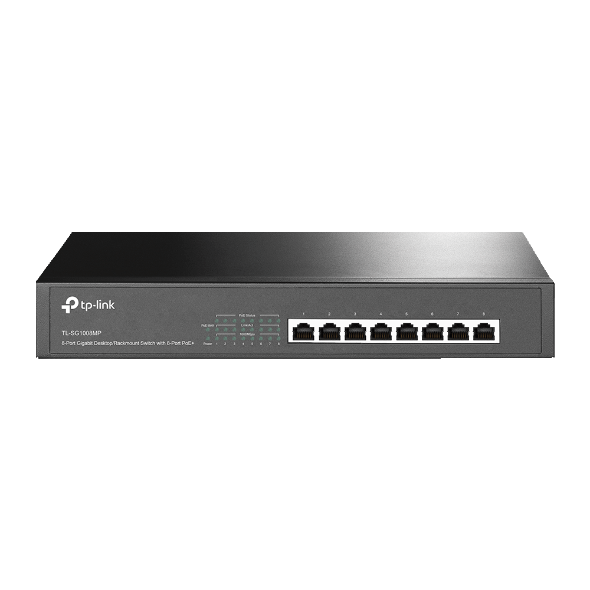
A detached workshop with several cameras may justify a suitable switch inside the building. Each camera then has a shorter local run. The connection back to the main building still needs to be designed, whether copper, fiber or a supported wireless bridge.
Count the switch’s power supply, ventilation, mounting and backup needs. A remote switch solves little if the socket is regularly switched off or the equipment sits in a damp shed outside its specified temperature range.
Our switch-sizing guide covers the local port and power calculations. Do not forget that several streams may share one uplink even though the individual camera cables are short.
Option 3: fiber between locations
Fiber can be a useful choice for longer data links and for situations where conductive inter-building cabling introduces additional concerns. The fiber type, optical modules, connectors and equipment must match. Select an appropriate installed system rather than buying arbitrary adapters with similar sockets.
Fiber carries data, not the PoE power required by an ordinary copper-connected camera. The remote end still needs a suitable powered switch, converter arrangement or other approved source. Its power and environmental protection belong in the budget.
For separate buildings, get competent advice on the complete installation and local requirements. Optical separation can address the data link, but it does not remove every electrical or environmental responsibility associated with the remote equipment.
Option 4: a point-to-point wireless link
A wireless bridge may be practical where a suitable cable route is difficult. It still needs an adequate radio path, mounting, power at both ends and compatible network configuration. A useful view from one window does not prove there is sufficient radio clearance through trees or seasonal foliage.
Test the expected number of camera streams under ordinary conditions before relying on the link. Include latency, packet loss and maintenance access rather than judging only a one-time speed result.
This is different from expecting an ordinary indoor camera to connect through a distant building. The PoE-versus-Wi-Fi comparison helps separate camera power from the medium carrying data between network locations.
Extended mode: longer reach can mean lower speed
Some switches support a manufacturer-defined extended-distance mode. Read its conditions closely. TP-Link’s Extend Mode guidance describes supported configurations reaching up to 250 meters while limiting the applicable port to 10 Mbps.
That does not make every PoE switch, cable or camera a 250-meter system. It is also not a free performance gain. A stream near the reduced link capacity, extra audio or an additional viewer can make a design unsuitable even if the camera connects.
Record which ports use the mode and why. A forgotten low-speed setting can later be mistaken for a faulty camera when its quality profile is increased. Test the required stream, not a low-quality preview chosen simply to make the demonstration succeed.
A worked remote-garage decision
Imagine the measured route from the house to a garage is 140 meters and four cameras will surround the garage. Running four ordinary long copper channels is not automatically a suitable design. An alternative is to bring a correctly designed data link to the garage and power the four local camera runs from an appropriate switch there.
Suppose the four configured recording streams total 32 Mbps before other traffic. A shared link constrained to 10 Mbps would not meet that example’s requirement. You would need a different supported path or a deliberately revised recording design, not a hopeful assumption that cameras rarely use their settings.
These are illustrative distances and bitrates, not a recommendation for a particular property. The example shows why you should choose the connection architecture before buying one long reel and an extender at the last minute.
Outdoor copper needs its own protection plan
Check weather exposure, cable jacket, camera connections and building entries. A long exterior run may need a different protective arrangement from a short indoor patch lead. Equipment ratings must apply to the installed assembly, not only to one component.
Axis’s surge guidance explains its recommendations for exposed Ethernet and compatible protection. Bonding and surge installation should follow the device instructions and appropriate local professional advice. Do not improvise an earth connection or assume a surge accessory guarantees survival of a direct lightning strike.
A route that is protected from casual damage can still be difficult to service. Identify every active component and junction on the plan so repairs do not require guessing where the network disappears underground.
Test the entire path under the intended load
Start with a baseline using a short known-good lead and compatible power. After installation, use the same camera and settings on the long route. This makes the comparison meaningful and helps isolate what the route added.
Check night-mode operation, recording continuity and an original exported clip. Review switch errors and power status where supported. A successful ping or a link light is not proof that every high-load condition has been tested.
For recordings that disappear despite a live picture, follow the recording troubleshooting guide. A storage failure should not be diagnosed as a cable-distance problem simply because the camera is far away.
What to ask before accepting a long-run quotation
Request the measured route, proposed media, exact powered devices, supported segment lengths and expected traffic. Ask where active equipment will be mounted, how it is powered and who will maintain it. Include the camera’s maximum requirement and any planned expansion.
Ask what evidence will establish completion: suitable cable tests, stable device status and retrieved recordings under representative conditions. An installer should explain the design rather than just promise that a particular adapter goes farther.
Frequently asked questions
Does Cat6 automatically let PoE go beyond 100 meters?
No. A higher category is not a blanket extension of ordinary Ethernet reach. Use an explicitly supported design for longer distances.
Will an injector reset the cable-distance limit?
Do not assume so. Adding power and regenerating a data link are different functions; check the actual product and total channel.
Can fiber power my camera?
Ordinary optical fiber does not supply a camera’s PoE power. Include a suitable local power arrangement at the remote end.
What should I do before buying an extender?
Measure the route and identify power, data and environmental requirements. Then compare an extender with a remote switch, fiber or another appropriate topology.
The PoE installation guide brings those decisions together. A long link is complete when it reliably saves the intended footage, not merely when the camera first appears online.