Ring Doorbell Battery Draining Fast? Find the Cause Before Buying Another Battery
A Ring doorbell that suddenly needs frequent charging is not automatically suffering from a dead battery. It may be waking for passing traffic, struggling to reconnect to Wi-Fi or operating through a colder spell. A wired charging connection can also be supplying less energy than the device uses without being a completely failed supply.
Start by measuring what changed. Check the exact model, current power arrangement and recent event history, then adjust one relevant variable at a time. The aim is to restore useful recording with a manageable charging interval—not to switch off every feature until the battery lasts but the entrance goes unmonitored.
Distinguish drain from failed charging
Rapid drain means the battery loses charge while the device is operating. Failed charging means the intended charging process does not restore it. An inaccurate or stale displayed percentage is another possibility. Those symptoms deserve different tests.
Inspect the app’s current device and power information. Record whether it reports battery, hardwired or another supported arrangement, and whether the status changes after the documented charging and reinsertion process. Do not conclude that wiring works solely because two wires are attached to the terminals.
| Observation | First branch | Useful evidence |
|---|---|---|
| Charge drops quickly during busy days | Activity and live-view demand | Event counts and enabled recording features |
| Drop coincides with repeated offline periods | Wireless connection or power stability | Device Health and connection history |
| Battery will not charge indoors as instructed | Charging supply, cable or battery condition | Approved charging indicators and a compatible comparison |
| Hardwired battery still declines | Net charging balance and environmental limits | Model-specific power status and activity |
| Problem starts with cold weather | Temperature effects on operation and charging | Conditions during the measured period |
| Percentage seems unchanged after charging | Status refresh or battery seating | Recheck after the supported reinsertion sequence |
If there is swelling, leakage, unusual heat or visible damage, stop using or charging the affected battery and seek the manufacturer’s safety guidance. Ordinary settings changes are not an appropriate response to a damaged lithium-ion pack.
Identify the exact Ring model
Ring product names and battery arrangements vary. Some models have a removable pack, others require charging the device, and wired-only products have different power requirements. Find the model in the app and use its current charging instructions.
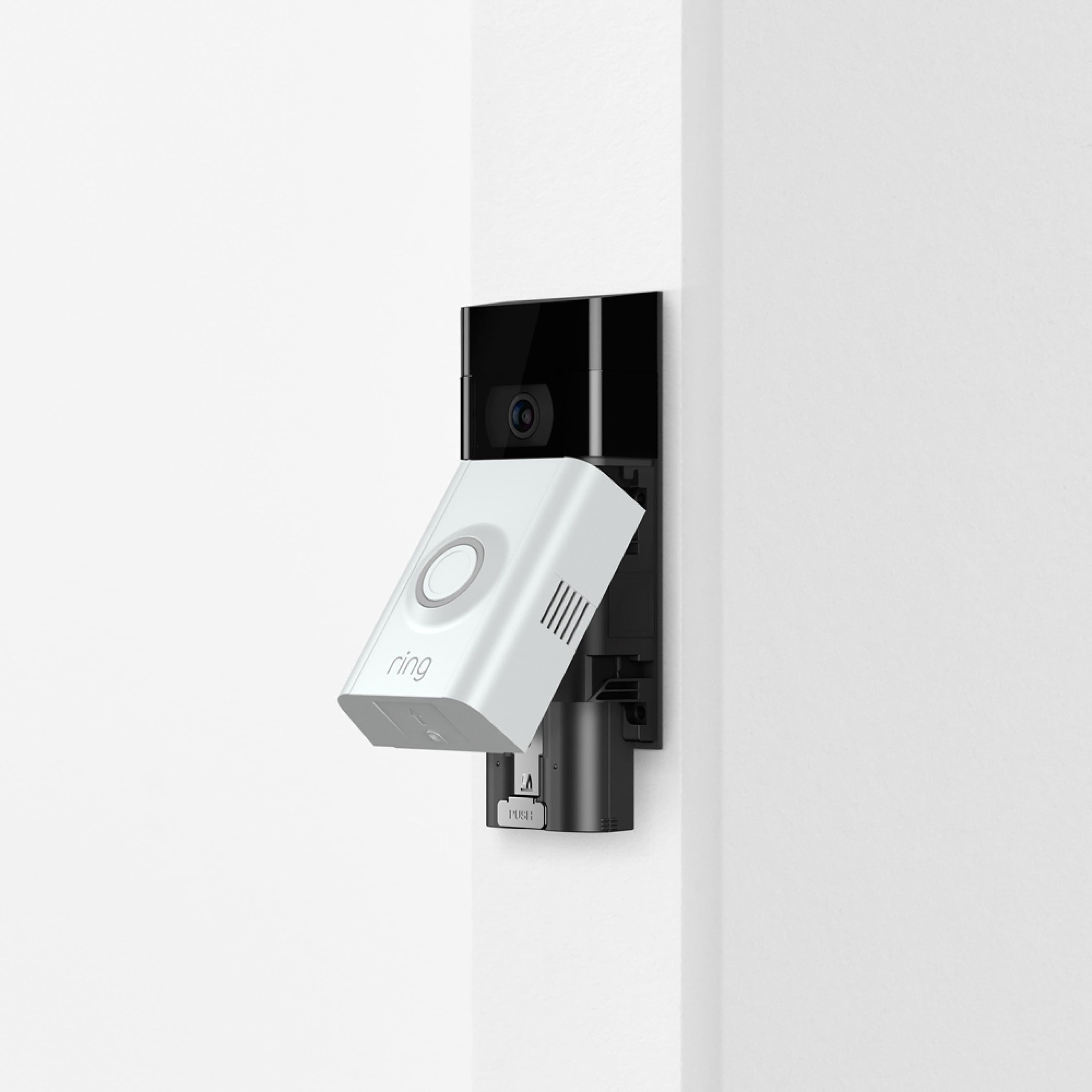
Use approved batteries and charging equipment. Do not open a sealed pack, substitute cells or fit a larger-looking battery because a listing claims broad compatibility. A familiar brand logo is not enough to establish that a particular generation accepts the accessory.
Check activity before sacrificing detection
Review several days of events. A new mounting angle, roadworks, moving decoration or seasonal vegetation can dramatically increase how often the camera wakes. Repeated Live View sessions and linked-device actions can add use that is not obvious from the number of visitor presses.
Ring’s battery guide identifies activity, weak Wi-Fi, cold conditions and aging batteries as separate contributors. Use its Power Settings and feature-use information where offered on your model, but do not assume the same menu is available on every generation.
Start by removing irrelevant work. A zone covering the entire street may need to be narrowed around the approach. That is usually a better first experiment than lowering all detection until people near the door disappear from the event history.
Reduce false triggers while preserving visitors
Inspect the clips causing frequent wakes. Is the system seeing actual people outside the area you need, ordinary image motion or incorrect person classifications? Each pattern suggests a different correction.
Adjust the supported zone or event category, then perform a normal visitor walk. Check the beginning of the saved clip and the notification on the intended phone. If the change saves power but misses the approach, it has traded away a required function.
Our false-alert guide explains this process in more detail. A quieter event list can be helpful, but silence is not an acceptable substitute for tested coverage.
Understand motion-frequency tradeoffs
Battery devices can offer settings that influence how quickly they respond again after an event. Changing these may extend the interval between charges, but it can also affect recording of consecutive visitors or a person returning to the door.
Use the model’s documented options and test the actual scenario you care about. A house with frequent deliveries may need different responsiveness from an occasionally visited side gate. Do not choose the most conservative setting simply because it promises the longest battery life.
Separate recording from phone notification. Muting your phone may make the system feel less busy without reducing the camera’s work. Check which setting controls capture, wake-ups or only the notification sound.
Investigate weak Wi-Fi at the actual mount
Review the device’s reported signal and any repeated offline behavior. A connection measured by a phone near the router says little about a doorbell outside a masonry wall. Check with the door closed and normal household use continuing.
Ring explains that repeated connection loss and reconnection can contribute to drain. The appropriate repair may be a better-supported network position or access arrangement rather than another battery. Do not assume an extender placed beside the weak camera can create a strong upstream connection where none exists.
Make network changes deliberately and preserve security. Our home Wi-Fi guide covers supported bands, credentials and recovery. Turning off encryption is not a reasonable way to improve battery life.
Cold and heat can change the charging picture
Battery operation and charging are constrained by temperature. A device may remain operational while refusing or limiting charging to protect the pack. Direct sun can also heat the unit beyond the surrounding air temperature.
Ring’s temperature guidance describes why hot or cold conditions can shorten usable battery life or interrupt charging. Follow the exact product’s limits rather than assuming the same threshold applies to every battery and accessory.
Do not use a heater, oven or improvised insulation around the doorbell. Follow the approved charging procedure and allow equipment to return to a suitable environment naturally where instructed. A recurring seasonal problem may require a different supported power arrangement rather than an unsafe warming workaround.
Why hardwiring may not keep the percentage at 100
On supported Ring battery doorbells, wiring can maintain the battery through a trickle charge rather than bypass it. The device still depends on its battery, and the net percentage reflects both energy supplied and energy used.
Ring’s hardwiring instructions distinguish that arrangement from wired-only models. They also specify compatible installation paths. Do not remove a required battery or substitute a different supply merely to make the app report wired.
A percentage below full is not by itself proof of failure. Ring’s current battery guidance describes charging protection on supported powered arrangements. Focus on whether the charge remains sustainable under normal use, not on achieving a permanently displayed 100 percent.
When the charging circuit needs professional assessment
If a correctly configured powered installation cannot maintain normal operation, have the supply and installation checked against the exact model’s requirements. Transformer rating, wiring condition and incompatible chime arrangements can be relevant, but the answer requires identification rather than guesswork.
Do not bridge unknown wires, work inside mains equipment or keep increasing the power source based on internet anecdotes. Use the product instructions and a qualified installer where required. A doorbell is low voltage at one point in the system, not proof that every nearby component is safe to handle live.
For a property with no suitable wiring, our unwired-doorbell guide compares battery, approved plug-in and new wired options without treating them as interchangeable.
Solar charging requires actual light
A supported solar charger can reduce visits to charge a battery, but shade, mounting angle and seasonal daylight affect the available energy. A sunny product photograph does not describe your recessed porch.
Check the accessory’s compatibility and installation requirements. Keep the panel clean through the approved method, and avoid mounting where the doorbell’s useful view is sacrificed for the panel. Some arrangements allow the panel and camera to occupy different supported positions.
Our winter solar guide explains why operating temperature, charging temperature and recording workload should be considered together. A panel is not a guarantee that maintenance disappears.
Keep a battery-use log for a comparable test
Record percentage at roughly the same time each day, along with event volume, Live View use, weather and the single change made. You do not need a laboratory measurement to detect a meaningful pattern, but do avoid comparing a busy cold weekend with an empty warm weekday as though only one setting differed.
| Day | Start/end charge | Activity and conditions | Change |
|---|---|---|---|
| Baseline example | 90% to 80% | Frequent passing traffic; ordinary weather | None |
| Comparison example | 80% to 76% | Similar conditions and visitor pattern | Excluded irrelevant road area |
| Verification | Record actual readings | Check genuine visitor and nighttime clips | No further changes until result is understood |
The numbers are illustrative, not expected Ring performance. Percentage gauges are estimates and usage varies. A daily percentage-point calculation is useful for comparison, but it should not be presented as a guaranteed remaining runtime.
Check an aging battery without guessing
If the setup and conditions are comparable but one approved pack performs substantially worse than another, that is useful evidence. Follow the manufacturer’s safe swapping and charging procedure and label the test period so you know which pack was fitted.
A new battery will not repair a weak network, excessive event activity or incompatible charging circuit. Likewise, an older pack may genuinely need replacement even when the camera is configured sensibly. Keep the diagnosis tied to observed behavior.
Record purchase date, product details and the checks completed before contacting support. Do not send damaged batteries through an ordinary return process without following the seller’s and carrier’s specific instructions.
Avoid a reset that erases the evidence
A factory reset can remove configuration and pairing without changing the energy balance. Save relevant settings and recordings before considering one. Use it when the manufacturer recommends it for a specific software or enrollment issue.
After an app or firmware update, compare the actual feature settings and behavior. An update may coincide with a seasonal change or a new source of motion, so timing alone does not prove causation. A short log gives support a better basis for investigation.
If the device is repeatedly offline rather than merely draining, use our camera-system guide to separate power, network and app failures.
Choose a sustainable final arrangement
For a busy entrance where frequent maintenance is impractical, a compatible permanent power solution or a different wired model may be more suitable than endlessly lowering useful features. Compare the full installation cost and chime implications before replacing hardware.
For an occasional-use entrance, correcting an unnecessarily broad zone may be enough. Keep a practical charging routine and a supported spare where appropriate. The best result is one the household can maintain without ignoring low-battery warnings.
After the fix, verify saved daytime and nighttime events, actual visitor alerts and the charge trend over representative use. Battery life matters because the camera must remain available for the task, not because the longest number on a settings screen is inherently best.
Frequently asked questions
Why does my hardwired Ring still need charging?
Some battery models receive a trickle charge and still depend on the pack. Activity, supply compatibility and charging conditions can affect whether that input keeps up.
Does turning off notifications save the battery?
Not necessarily. Phone notifications and camera detection or recording are separate functions. Check which setting actually reduces device activity.
Should I buy a replacement battery immediately?
First check charging, activity, connection and temperature. Replacement is more persuasive when a supported comparison identifies the pack as the problem.
How much battery life should I expect?
Use the exact model’s guidance and your measured workload. No single interval fits every entrance, season and feature configuration.