Garage Door Keypad Not Working? Check Batteries, PINs, Buttons and Pairing
.sl-garage table{border-collapse:collapse;width:100%;margin:24px 0}.sl-garage th,.sl-garage td{border:1px solid #bdcbd0;padding:12px;text-align:left;vertical-align:top}.sl-garage th{background:#eef4f2}.sl-garage .table-scroll{overflow-x:auto}.sl-garage figure{max-width:760px;margin:28px auto}.sl-garage img{max-width:100%;height:auto;display:block;margin:auto}.sl-garage figcaption{font-size:14px;line-height:1.6;color:#425c63;padding-top:10px}
A garage keypad can fail in several quite different ways: no light, a rejected PIN, a response only to certain digits, or a door that closes but will not open. Treating all four as a programming problem can erase perfectly good settings while leaving the actual fault untouched.
First confirm that the opener works normally from another authorized control, then identify the keypad model and the exact failed action. Check its power and access settings before resetting it. This guide separates ordinary wireless keypads from connected video keypads and explains why a successful wall-button test is useful but not the whole diagnosis.
Confirm the door operates from another control
With the opening clear, use the normal wall console or an already-enrolled remote. Note whether the door completes both directions, only opens, or does not respond at all. A door that refuses to close safely should not be diagnosed only through the keypad.
Wireless keypads and wired wall controls can use different paths to the opener. Chamberlain’s keypad troubleshooting explains why the wall control can work while keyless entry does not. Its model-specific checks include power, individual buttons, temporary access and mounting-related interference.
If all controls fail or the door has mechanical damage, investigate the shared opener and door condition first. Do not keep commanding an uneven or obstructed door while changing PINs.
Use the symptom to choose the next branch
| Observed symptom | Useful next check | Avoid assuming |
|---|---|---|
| No expected light or response | Specified battery, polarity, contacts and case condition | The PIN needs changing |
| Keypad lights but opener ignores it | Lock mode, enrollment and compatibility | Any light proves the radio transmission is healthy |
| Only some digits respond consistently | Button condition and an authorized controlled test | The whole receiver is broken |
| Closes but will not open | Temporary-code status and documented one-touch behavior | Successful closing proves the PIN is accepted for entry |
| Works nearby but not when mounted | Signal conditions and approved mounting arrangement | A full memory reset will improve the location |
| Video unavailable, local PIN still works | The connected product’s network and power mode | Every keypad function has failed |
Record what happens after one deliberate attempt. Repeated random entries can trigger a supported lockout or make the diagnostic pattern harder to interpret.
Identify the keypad, not only the opener
A replacement keypad can come from a different product generation or manufacturer. Read its own model label and use its manual together with the opener compatibility list. A matching logo does not guarantee the same PIN procedure or battery compartment.
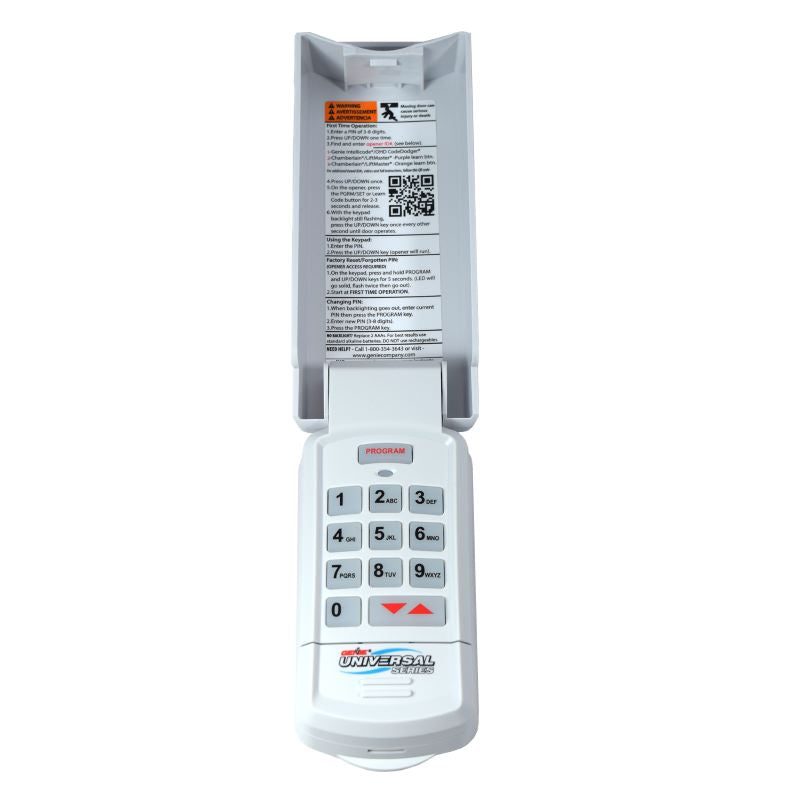
Keep the installation date and any recent changes with the model information. If the keypad never worked, start with compatibility and proper enrollment. If it worked for years before a battery change or opener repair, that history narrows the next investigation.
Fit the actual specified battery
Do not assume every garage keypad uses a rectangular 9 V battery. Some use pairs of cylindrical cells; connected products can have rechargeable packs. Follow the specific voltage, chemistry, quantity and polarity instructions rather than selecting whatever fits loosely in the compartment.
Genie’s GK support page, for example, specifies two AAA cells and states that programming is retained through ordinary battery replacement. That is enough to show why a universal replace-the-9-V-and-reset instruction is unreliable.
Inspect accessible contacts and the compartment for leakage or damage. Do not scrape corroded components with improvised metal tools or force a swollen battery into place. A damaged weather cover or repeated moisture exposure can need replacement or service rather than another set of cells.
A battery change does not always require reprogramming
Retest after installing the correct fresh battery before altering enrollment. Follow the maker’s procedure only if the device actually needs to be paired again. The Genie GK example retains its programming; other devices have their own documented behavior.
If the keypad was inadvertently reset while opening the cover, record exactly what was pressed. Do not assume the opener’s receiver memory also changed. The keypad’s local PIN and its enrollment with the opener can be separate parts of the configuration.
Preserve working remotes while diagnosing this one device. A complete receiver reset can be justified in some recovery procedures, but it should be an informed later step rather than the default consequence of a routine battery replacement.
Check lock mode and access permissions
A wall-console lock or vacation feature can intentionally block supported wireless devices. Check its indicator and manual before treating a keypad as defective. Different opener and controller combinations do not necessarily block the same inputs.
Our lock-mode guide explains these distinctions. In particular, a working app or wall control does not prove that the radio path used by the keypad is enabled.
For a managed property, ask whether access was deliberately changed. Do not undo a legitimate security setting merely because an old guest code no longer operates the garage.
Separate a normal PIN from temporary access
Check whether the code you are entering is permanent, temporary, scheduled or limited to particular uses. A guest may correctly remember a code that has expired. That is an access-management outcome, not necessarily a hardware failure.
Chamberlain documents some keyless-entry arrangements where an expired temporary PIN no longer opens the door while closing remains available. Other products have one-touch closing that does not prove a full entry code has been accepted. Read the actual keypad’s behavior before interpreting the result.
Have the authorized owner restore or create suitable access through the documented process. Do not share the owner’s main credential widely just to avoid maintaining temporary permissions.
Use deliberate presses and the correct final confirmation or door-selection control for that model. Gloves, a damaged cover or a worn key can interfere with entry. Observe the documented feedback instead of entering the same code rapidly several times.
If certain keys appear unreliable, an authorized owner can use the manufacturer’s supported diagnostic or PIN-change process to distinguish them. Keep the replacement code private and avoid obvious repeated digits merely because those buttons still work.
A keypad with damaged or intermittent buttons may need replacement. Do not leave a compromised entry device in service indefinitely by constantly selecting codes that avoid its failures.
Works off the wall but not in its normal position?
The mounting surface and surroundings can affect wireless communication. If the manufacturer permits temporarily removing the keypad for a controlled test, compare operation nearby without dismantling the electronics or leaving the unit exposed.
Check whether metalwork, a new enclosure or another local change coincided with the problem. Use only approved mounting solutions and keep the required height, visibility and safe operating position. Do not relocate the keypad where a user must stand in the door’s travel path.
If several radio controls suffer the same range problem, use the remote troubleshooting guide. The shared receiver or interference deserves attention before every individual device is replaced.
Note whether the keypad works only after the opener’s work light goes out. A recent lamp change can be relevant, but not every light-related symptom has the same cause. Compare the timing without disconnecting internal control wiring yourself.
Chamberlain’s support guidance identifies both light bulbs and control electronics as possibilities for covered systems. That does not establish that all LED bulbs are unsuitable or that every affected opener needs a new board.
Use the approved lamp type and safe replacement procedure. Leave internal electrical troubleshooting to a competent service provider, particularly when mains and battery supplies are both present.
Pair with the correct generation’s instructions
Use the exact keypad and opener setup flow. Chamberlain’s programming overview distinguishes different control generations, including newer app-supported arrangements. A familiar sequence from an older unit may not apply.
Do not hold a Learn button until something happens. An extended press can have a different purpose from starting enrollment and may clear other controls. Establish what will be removed and how it will be restored before any memory-erasure step.
After pairing, test the keypad and the other authorized devices. If each newly added device causes another to stop, ask support about the receiver’s capacity and enrollment history rather than repeating the same process indefinitely.
Connected video keypads have additional failure modes
A camera-equipped keypad may combine local entry with Wi-Fi video, notifications and account-managed PINs. A weak network or power-saving mode can affect those features differently. Identify which part has stopped before deciding that the garage is inaccessible.
myQ’s Video Keypad low-power guidance describes supported circumstances where previously established PIN operation can remain available while connected features are reduced. That is a specific product behavior, not a rule for ordinary wireless keypads.
Use the smart-controller guide for the separate command and position paths. Protect the controlling account and review permissions when replacing or transferring a connected keypad.
When to call for service
Arrange help when the keypad is physically damaged, repeatedly loses reliable operation or fails despite confirmed compatibility and supported setup. If all radio controls are affected, describe that shared pattern rather than asking the technician to replace only the keypad.
Stop routine operation if the door moves unexpectedly, has damaged components or fails required safety tests. A working replacement keypad does not make an unsafe door suitable for use. Springs, cables and other high-tension parts need qualified attention.
For a rental or shared property, report the exact symptom through the responsible manager. Keep temporary access appropriate while repairs are arranged rather than leaving the garage unsecured as a convenience workaround.
Verify the repair and the permissions
| Check | What to confirm |
|---|---|
| Power and case | Correct battery, secure cover and no unresolved damage |
| Normal entry | The authorized PIN operates the intended door |
| Closing | The door closes normally with required safety protection |
| Other controls | Working remotes and wall controls remain correctly enrolled |
| Temporary access | Only intended users and time limits remain active |
| Normal location | Operation is reliable after final mounting, not just beside the receiver |
Wait through the model’s documented illuminated or quick-operation period before judging whether a PIN is required again. Some devices intentionally allow immediate stop or reverse actions after an authorized command; that behavior should be understood rather than mistaken for permanent unlocked access.
Frequently asked questions
Why does the keypad light up but not open the door?
Illumination does not establish correct enrollment, permission or radio operation. Check lock mode, PIN type, compatibility and the documented feedback.
Does changing the battery erase the code?
Not on every model. Some retain their programming, including the documented Genie GK example. Retest before automatically resetting anything.
Why can it close the door but not open it?
Some products support one-touch closing or distinguish expired temporary access from entry permission. Check that specific keypad before concluding the receiver has failed.
Should I replace the whole opener?
Not merely because one keypad fails. Diagnose the individual device and shared radio path first, while addressing any separate mechanical or safety problem promptly.