
PoE Injector vs. PoE Switch for Cameras: Which Do You Actually Need?
.sl-poe table{border-collapse:collapse;width:100%;margin:22px 0}.sl-poe th,.sl-poe td{border:1px solid #bdcbd0;padding:12px;text-align:left;vertical-align:top}.sl-poe th{background:#edf4f2}.sl-poe .table-scroll{overflow-x:auto}.sl-poe figure{max-width:760px;margin:28px auto}.sl-poe img{max-width:100%;height:auto;display:block;margin:auto}.sl-poe figcaption{font-size:14px;line-height:1.6;color:#425c63;padding-top:9px}
You have bought a PoE camera, found a spare Ethernet socket on the router and discovered that nothing happens when you connect it. The router may be providing a perfectly good data connection without supplying the power the camera needs. A suitable injector can solve that specific problem without replacing the router.
A PoE injector adds compatible power to one network connection; a PoE switch connects multiple devices and can power its supported ports. For one camera, the injector may be the neatest addition. For several cameras, the switch can make distribution, wiring and management more practical. First check whether a compatible recorder already supplies the power you need.
The three arrangements in plain language
In an injector setup, an existing network port connects to the injector’s data input, and its powered output connects to the camera. The injector also needs its specified electrical supply. It is not a recorder and does not create storage just because the picture appears.
With a PoE switch, the camera connects to a supported powered port. An uplink connects that switch to the rest of the network when needed. A recorder with built-in PoE combines the camera-port power arrangement with recording functions, subject to its own model limits.
| Device | Power function | Network and recording role |
|---|---|---|
| Single-port injector | Adds supported power to one camera connection | Uses an existing data connection; does not record |
| PoE switch | Powers compatible devices within per-port and total limits | Connects devices; does not automatically save video |
| PoE NVR | May power cameras through its dedicated ports | Records compatible streams when storage and schedules are configured |
These are functions, not universal product categories with identical capabilities. Inspect the actual ports and documentation before assuming a box fulfills all three jobs.
When one injector is the sensible choice
Consider an injector when you already have a reliable network connection, need power for one supported camera and do not require additional ports. This can suit a camera near an existing router or a small standalone recording arrangement.
It can also be useful as a known-good diagnostic power source, provided its specifications match the camera. Testing on a short cable can help separate camera or source compatibility from problems in the installed route.
Check the physical arrangement before ordering. You need space for the injector, its approved power supply or lead and both data cables. A spare router socket is less helpful if the only usable mains outlet is in an unsuitable damp location.
When a switch is the cleaner answer
Several injectors can work in an appropriate design, but their individual power supplies and cables may become harder to label and service. A switch can bring several camera connections together, with one documented shared power budget and, on supported models, useful port diagnostics.
A switch is especially worth considering when several cameras terminate near one another. Rather than sending a separate long cable for each back to an inconvenient cabinet, a suitable network design may connect the camera group locally and provide an appropriate uplink.
That topology still needs local power, environmental protection and enough bandwidth. Our PoE switch buying guide shows how to count ports and power without assuming an eight-port product supports eight fully loaded cameras plus an uplink.
Read active PoE and passive PoE carefully
Standards-compliant active PoE checks for a compatible powered device before supplying power through the supported arrangement. A passive injector can apply a particular electrical output without the same negotiation. Matching the connector shape is therefore not enough.
TP-Link’s PoE troubleshooting guidance identifies active-versus-passive incompatibility separately from insufficient power and cable faults. Do not substitute a passive product because it is inexpensive or because its label includes the word PoE.
Check the camera’s required IEEE standard and the power source’s documented support. For proprietary equipment, use the explicitly compatible source. Stop when the voltage or pin arrangement is uncertain rather than trying combinations until one appears to work.
A real injector example: two sockets do not mean two cameras
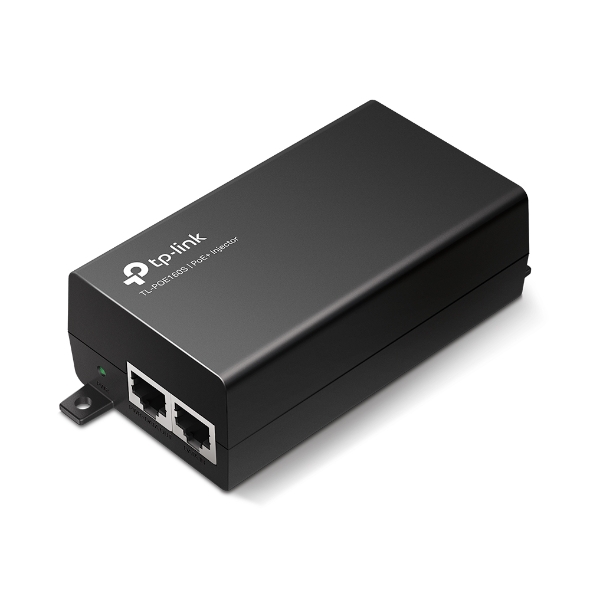
The TL-POE160S specification identifies one Gigabit data-in port and one Gigabit power-and-data output, with 802.3af/at support and a maximum 30 W source output. Those are the roles of this model, not a universal specification for everything called an injector.
Check the hardware revision and local product documentation, including temperature and humidity limits. An injector placed indoors does not need to share the camera’s outdoor housing, but the complete cable path and building entry still need appropriate installation.
Match power, data speed and the cable route separately
The camera’s power class and maximum requirement tell you whether the source can run it. The Ethernet interfaces and stream requirements tell you whether the data path suits the intended use. One favorable specification does not settle the other.
A Gigabit injector will not turn a camera with a lower-speed interface into a Gigabit camera. Conversely, a limited uplink or several streams sharing a path may justify faster network equipment even when each individual stream is modest.
Standard Ethernet distance limits still apply to the intended channel. Adding an injector is not the same as installing an active network extender, and moving the injector along the route does not automatically restart the data-distance allowance. Check any product marketed for extended reach as its own documented system.
Do you already own a suitable power source?
Inspect the NVR before buying extra hardware. Its labeled camera ports may already provide compatible PoE, while its LAN port serves a different purpose. Follow the manufacturer’s topology instead of connecting two powered outputs together as an experiment.
A switch can be added to a supported recorder arrangement, but it does not automatically increase the recorder’s channel licences, maximum number of cameras or recording bandwidth. Those limits need separate verification.
Our recorder comparison explains what each recording category does, while the mixed-brand guide covers compatibility beyond the presence of an Ethernet socket.
Compare complete cost rather than the cheapest box
Count every required power lead, patch lead, mount and protected connection. Several inexpensive injectors can still be sensible when only those locations need power, but the comparison changes if you expect to add more cameras soon.
For a purely hypothetical example, two injectors at €25 each plus €10 of extra patch leads total €60. A €70 switch may appear only €10 dearer, but its usable ports, supported power budget, noise and necessary cabling must also match. These figures illustrate the calculation; they are not current quotations.
Include your existing equipment at its actual incremental cost. There is no benefit in purchasing a new switch solely to replace an injector that already meets a one-camera requirement. The ownership-cost calculator can compare the full arrangements rather than only the powering device.
Different failure patterns help diagnosis
If a single injector loses its supply, its camera may disappear while other devices remain online. If a shared switch loses power or exhausts a budget, several cameras may be affected together. Neither architecture is immune to failure; they concentrate dependencies differently.
Record what the rest of the system is doing when the fault occurs. If the phone cannot load any remote view but the recorder continues saving locally, changing the injector may be irrelevant. If a camera restarts when its illumination activates, power and cabling deserve closer attention.
Use the general camera fault guide to separate the failed stage before replacing hardware. Save the original error and relevant recordings before a reset removes useful context.
Power backup should follow the actual dependency chain
Putting an injector on a UPS can preserve power to one camera, but not necessarily its router, recording computer or NVR. A switch-powered group has the same system-level issue. Write down what must remain powered for the function you want to preserve.
Local recording and remote alerts are different goals. One might continue during an internet outage while the other cannot. The backup-power guide explains how to plan the entire path rather than buying a battery for whichever box is easiest to reach.
Do not overload a UPS or use an unsuitable power strip arrangement. Follow the electrical equipment’s instructions and obtain qualified help for installations beyond ordinary approved plug-in use.
Practical choices for four common situations
One camera beside an existing network outlet
A suitable injector can be a straightforward addition when the existing connection, mains supply and recording destination are already appropriate. Confirm the exact camera standard and test the complete setup before permanent mounting.
Four cameras around one building
A compatible PoE recorder or appropriately sized switch is usually worth comparing against separate injectors. The better arrangement depends on where the cable routes meet and whether independent camera access matters.
Several cameras in a detached garage
A locally powered switch may simplify the camera-side wiring, but the connection between buildings needs its own design. Do not treat a long exposed copper route as an ordinary indoor extension; consider suitable fiber or other professionally planned connectivity.
Existing cameras and one new high-power device
Replacing the whole switch is not the only possibility. A separately specified injector may serve that camera if the overall topology supports it, but confirm power, grounding, management and recording compatibility rather than improvising.
Test before relying on the new arrangement
Use a short known-good cable to confirm power and network access. Configure recording and retrieve a sample file, then repeat through the installed route. Check normal illumination and any supported high-load functions rather than only an idle live picture.
Label the input, output and camera destination so another household member does not unplug the wrong lead later. Keep the model and support information with the system record. A simple documented installation is easier to diagnose than one assembled from anonymous adapters.
Frequently asked questions
Can a PoE injector record video?
A basic injector does not provide video storage. Use the camera’s supported card, an NVR or another compatible recording destination and test playback.
Can I connect two cameras to the injector’s two sockets?
Not on a normal single-camera injector whose sockets are data-in and powered-out. Use a suitable switch or explicitly supported multi-device product.
Does a switch always beat separate injectors?
No. For one addition, an injector can be economical and practical. Compare the complete installation and likely expansion rather than choosing by category alone.
For the remaining design steps, return to the PoE installation guide. Choose the power source to support the recording job, not simply to make an indicator light appear.


