House Alarm Keeps Going Off for No Reason? Find the Trigger Before Disabling Protection
.sl-alarm table{border-collapse:collapse;width:100%;margin:24px 0}.sl-alarm th,.sl-alarm td{border:1px solid #bccbd0;padding:12px;text-align:left;vertical-align:top}.sl-alarm th{background:#edf4f2}.sl-alarm .table-scroll{overflow-x:auto}.sl-alarm figure{max-width:800px;margin:28px auto}.sl-alarm img{display:block;max-width:100%;height:auto;margin:auto}.sl-alarm figcaption{font-size:14px;line-height:1.6;color:#435b62;padding-top:10px}
The siren has sounded twice this week, nobody can see anything wrong and the household is losing patience. Turning every detector down or leaving the alarm disarmed might stop the interruptions, but it also removes the reason you installed it. The useful question is which event actually started each activation.
Find the initiating device and event type, compare the conditions and test one relevant correction at a time. A moving contact, an unsuitable motion-detector view, an entry routine and a tamper fault need different remedies. This guide concerns repeated intrusion-system activations, not a reason to dismiss smoke, carbon-monoxide, medical or other emergency warnings.
Treat an unexplained activation as unverified, not automatically false
First establish whether there may be an actual emergency. Do not enter a property to investigate possible intruders or assume the latest event is harmless because a previous one was accidental. Move to safety and use the appropriate emergency or monitoring response when needed.
Once it is safe, follow the provider’s authorized cancellation and verification process. A silenced siren, a disarmed panel and a canceled request for assistance are not necessarily the same action. Confirm what the actual service requires.
Do not use a universal countdown copied from another brand to decide whether an event reached monitoring. Timing, signal types and local service procedures differ. Keep authorized verification information available privately rather than posting it near the keypad.
Read the first event, not only the final notification
Look for the initiating zone or device, timestamp and event category in the available history. A later message saying alarm canceled tells you about the response, not what caused the alarm. Multiple notifications may describe stages of the same incident.
Check the location label against the physical device. A sensor named hallway may have been moved to another room without being renamed. That small documentation problem can send every later diagnosis in the wrong direction.
Record facts separately from guesses. Front-door contact opened at 02:14 is an observation; wind must have caused it is a hypothesis until the fit and conditions are checked.
Distinguish a siren activation from a trouble beep
| Recorded event | First investigation | Separate issue to avoid confusing it with |
|---|---|---|
| Door or window contact | Actual opening, magnet alignment and mounting movement | A loose sensor cover reporting tamper |
| Motion detector | Required view, ordinary movement and environmental changes | A camera’s image-based motion alert |
| Entry or exit error | Mode, designated route and household timing | A defective sensor merely because it reported an opening |
| Tamper | Named device’s cover, mount or supervised condition | Proof of deliberate interference |
| Power or communication trouble | Failed supply or reporting path | An intrusion activation with the same cause |
| Smoke, CO or another life-safety warning | Relevant emergency instructions and specialized diagnosis | An ordinary nuisance intrusion alert |
For repeating keypad sounds without an intrusion event, start with the beeping-panel guide. For notifications generated by cameras, use the separate camera false-alert guide.
Check the household routine before replacing detectors
An alarm can correctly detect an authorized person using the wrong route or mode. A cleaner entering without the agreed access routine, a family member opening a window after arming or somebody returning through an instant-response door can all explain a genuine sensor activation without a burglary.
Ring’s prevention guide emphasizes appropriate device roles, entry and exit arrangements, secure mounting and making sure authorized occupants can operate the system. Apply those ideas to the actual product rather than copying its response timing to another provider.
Use the mode guide to document normal daytime, overnight and empty-home use. Choose an arrangement that fits actual occupants instead of expecting everyone to improvise under a countdown.
Door and window contacts: look for movement and marginal fit
Check that the door or window closes and latches properly. A loose opening can move after arming, and a sensor mounted near its permitted gap limit may have little tolerance for that movement. Repair the physical fault rather than treating the alarm as the cause.
Inspect both pieces for shifting adhesive, loose mounting or new interference from paint and trim. Confirm the exact model’s allowed orientation and separation. The required measurement differs between products and generations.
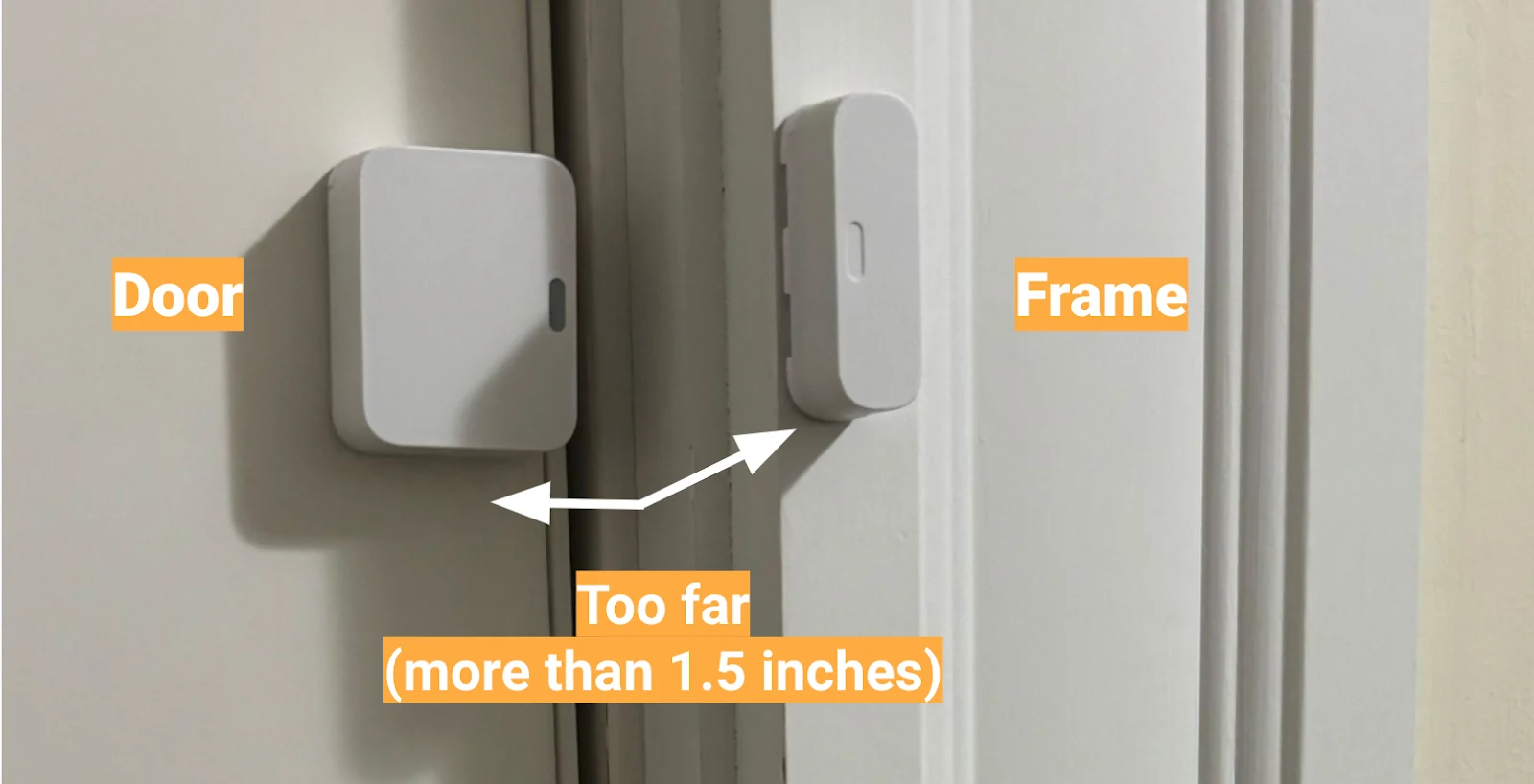
The contact installation guide explains a controlled check of communication and physical opening detection. Do not move the magnet merely until the app says closed without testing normal movement afterward.
Motion detectors: inspect the whole scene
Look at what the detector sees when the room is unattended, not only while you are standing beside it. Consider heating cycles, sunlight at a particular time, curtains, accessible furniture and normal pet routes. An installation that worked in one season may face different conditions later.
SimpliSafe’s Gen 2 false-alarm guidance identifies direct sunlight, nearby heating effects, pets approaching the detector, insects close to it and movement of the sensor among possible causes. Those examples suggest observations to check; they do not prove the cause of a particular event.
Record the time and repeatable condition before changing sensitivity. A recurring alarm when a warm radiator starts beneath moving curtains is a more focused investigation than replacing every sensor in the house.
Generation and placement can matter more than a sensitivity setting
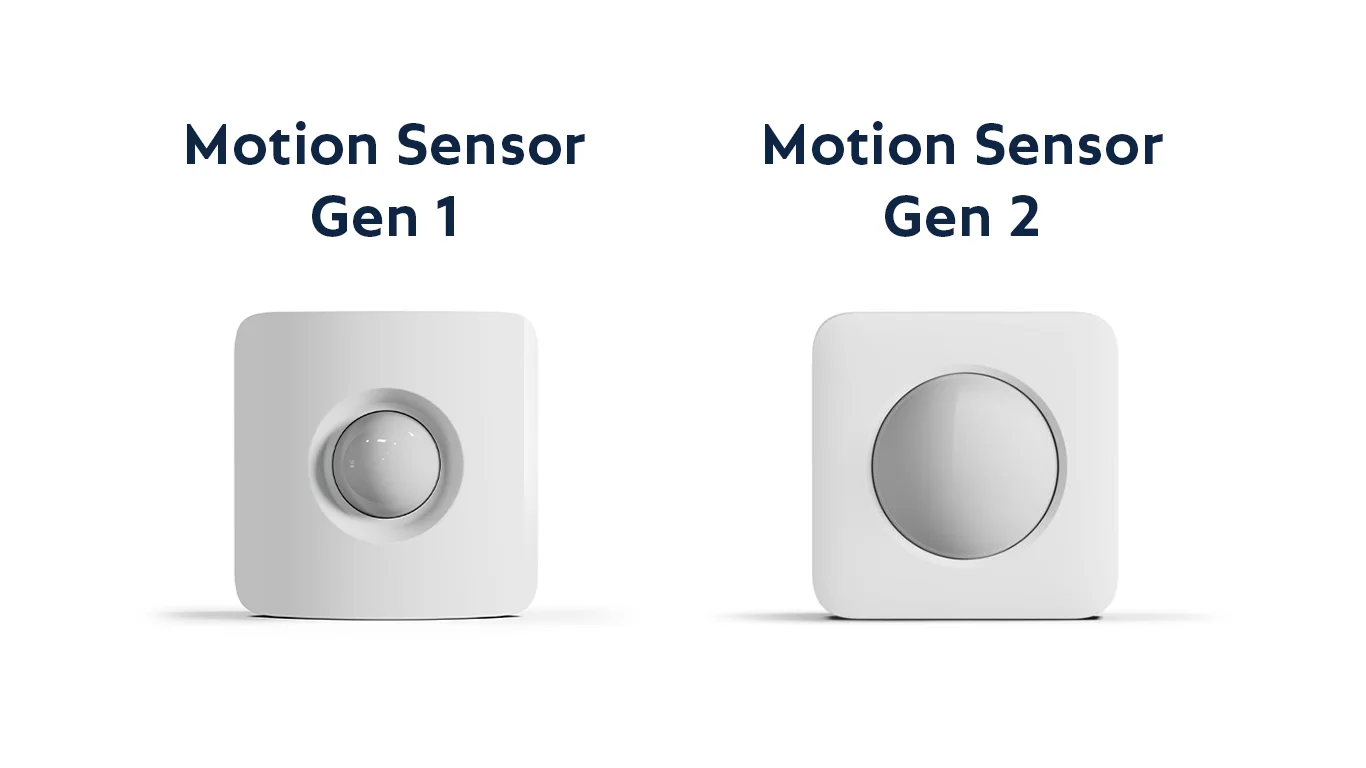
Check the required mounting height, orientation and environment from the current manual. A device hidden behind a curtain or pointed at an unsuitable heat source does not become correctly installed by selecting the lowest sensitivity.
Abode’s Iota troubleshooting guide recommends incremental sensitivity changes with testing rather than an immediate jump to the minimum. The useful principle is controlled adjustment and verification, not assuming the same menu or setting applies to another detector.
After any change, confirm that ordinary human movement in the intended area is still detected. Our missed-motion guide describes that complementary test. Reducing false alarms and preserving required detection are both part of success.
Pets can change the actual geometry
An animal on the floor and the same animal climbing onto furniture are different conditions for a detector’s view. A newly positioned sofa, cat tree or shelf can therefore matter even when the pet’s size has not changed.
Use the exact model’s pet-related instructions and test realistic household behavior without creating uncontrolled alarm events. Do not assume every motion detector is pet-immune, or that a broad weight claim guarantees every placement.
The pet-friendly sensor guide addresses those limits. If the current room cannot meet the required conditions, an installer should assess a better arrangement rather than repeatedly weakening detection until the app becomes quiet.
Tamper, power and communication need their own branches
A poorly seated cover after battery replacement can create a tamper event even when no one enters the room. A power interruption or lost reporting path can generate a trouble warning that people loosely describe as the alarm going off. Read the event category before choosing the remedy.
Use the tamper guide, backup-battery guide or communication-failure guide when the evidence points there. They address different components and verification steps.
Do not bridge wiring, hold switches down or delete the affected device as a permanent way to suppress the symptom. Those actions can remove supervision rather than restore reliable protection.
An automatic arm time can collide with a changing household routine. A guest or contractor may be authorized to enter physically but lack a working alarm credential. Check current user permissions and the actual schedule rather than assuming a recurring event is random.
Give people the appropriate individual access where the system supports it. Explain the legitimate arrival and departure routine without distributing the owner password. Remove temporary access when its purpose ends.
When a scheduled arm excludes faulted devices, review those exclusions as well. Fewer alarms caused by bypassing the troublesome entrance is not evidence that the entrance has been repaired.
Use a one-change investigation log
| Record | Example |
|---|---|
| Initiating event | Living-room motion event at a stated time |
| Observed conditions | Heating active; curtain moving beside the radiator |
| Proposed correction | Installer-approved change to the detector view |
| Controlled test | Required walking route still detected |
| Follow-up conditions | Same heating period observed without the previous trigger |
| Restoration | No test hold or unintended exclusion remains |
This is an illustrative example, not a diagnosis or a claim of hands-on testing. The method makes it possible to identify which correction mattered instead of layering several changes and hoping the problem stays away.
When professional service is the right next step
Arrange service when repeated activations cannot be explained through supported user checks, when wiring or mains-connected equipment may be involved, or when a device has visible damage. A high-mounted external siren is not a suitable casual troubleshooting location.
Provide the event log, exact models, recent changes and tests already completed. Ask the technician to identify the cause and explain how the proposed work will be verified. A quotation for replacing the whole system should be justified by more than the fact that it has sounded unexpectedly.
If a temporary protection gap is unavoidable, agree a proportionate plan with the responsible owner or provider. Do not leave the household believing the system is fully operational when a key zone has been intentionally excluded.
Retest without creating another uncontrolled activation
Use the provider-approved testing arrangement and the device’s documented walk or contact test. Confirm the scope before starting. A local test button does not necessarily prevent every monitored emergency signal.
The alarm testing guide separates detection, local outputs, reporting and return to service. For a repaired intrusion sensor, verify its ordinary function and the mode in which the household actually uses it.
End any test hold and review active faults. Tell relevant occupants what changed, especially if entry timing or the authorized return route is different.
Watch the condition that used to trigger the alarm
A five-minute test in a quiet room may not reproduce an event tied to sunlight, heating or a late-night household routine. Keep an appropriate observation period through the relevant condition without leaving the system in an unprotected maintenance state.
Record whether the original pattern returns and whether the intended detection remains reliable. Absence of a nuisance alarm is useful evidence, but it should be paired with a successful test of the protection you still need.
Review the setup after new pets, building work, changed furniture or a different occupancy schedule. A well-maintained alarm should adapt to ordinary changes rather than accumulate permanent workarounds.
Frequently asked questions
Should I assume another unexplained alarm is false?
No. Check for actual danger and follow the appropriate response. A previous nuisance event does not establish the cause of a new one.
Will lowering sensitivity solve the problem?
Only when it addresses the documented cause and the required detection still passes testing. It does not fix a moving door contact, loose cover or communication fault.
Does disarming cancel every monitoring response?
Do not assume that. Follow the exact provider’s cancellation and verification procedure for the event type and region.
What proves the issue is resolved?
The cause has been addressed, the required detection works and the system remains stable through the conditions that previously caused the unwanted event. A silent but disabled system is not a repair.
Use the alarm directory for the related setup and maintenance articles. Diagnose the initiating event, make a targeted correction and keep the protection that motivated the purchase.