

How to Test Security Camera Placement Before Drilling: A Complete Acceptance Checklist
The moment to discover that your new camera misses the front step is before its cable disappears into the wall. A temporary view on a phone is a useful beginning, but it is not a complete placement test. You need to know whether the camera detects ordinary movement, records enough context and preserves useful detail under the lighting in which the entrance is actually used.
This is a commissioning guide: a practical process for accepting or rejecting a proposed position. For deciding which areas of the property need coverage in the first place, use our camera-location planning guide. Here, the task is to prove that a specific position performs the job before making it permanent.
Write one requirement for each camera
Give the view a job that can be checked. Examples include showing a visitor’s face at the front step, recording someone entering the side gate or confirming a parcel on the threshold. Avoid a vague requirement such as cover the whole property.
Choose the important test points and approximate distances. A camera may provide a useful overview at the end of the driveway and a recognizable close view nearer the house. Record that distinction rather than treating the entire image as equally informative.
Axis’s image-usability guidance emphasizes the purpose of the footage and the conditions affecting it. Use that principle without assuming you need specialist measurement software for a simple household test.
Prepare a safe temporary setup
Use a manufacturer-compatible temporary mount or stable placement that represents the intended angle. Do not balance a camera on a ladder, work at height without appropriate equipment or route an indoor power lead through rain merely to finish a test.
Keep the power, lens and settings comparable between candidate locations. If one test uses a different recording profile or a much brighter lamp, you are no longer comparing position alone. Photograph the setup and save the current settings so the best result can be reproduced.
Obtain permission where installation affects a landlord, shared building or another person’s space. Tell the helper what is being recorded and avoid unnecessary capture of private areas during testing.
Test matrix: what to verify
| Test | What the helper does | What you inspect |
|---|---|---|
| Normal approach | Walks the usual route without posing | Face or activity detail at the relevant point |
| Alternative direction | Uses another legitimate approach | Blind spots and detection consistency |
| Visitor at door | Stands where a caller naturally waits | Framing and backlighting |
| Parcel delivery | Places a normal parcel at the threshold | Ground coverage and event duration |
| Night approach | Repeats the route under normal lighting | Motion blur, glare and useful detail |
| Remote viewing | Creates an agreed event while you use mobile data | Alert, live access and saved playback |
| Export | No additional movement needed | Original clip can be retrieved outside the app |
Make a note of the time for each event. Searching the correct interval is much easier than trying to remember which of several similar clips belongs to a particular test.
Start with normal walking, not a hand waved at the lens
A close hand movement is an easy trigger and tells you little about a person approaching from several meters away. Have the helper walk at an ordinary pace along the actual path. Include a brief pause to separate general softness from movement blur.
Do not ask them to look directly at the lens throughout the route. Real visitors may look at the door, their phone or a parcel. A useful view should capture what is reasonably available during that natural behavior.
Repeat the most important route rather than accepting one lucky trigger. The test does not establish a statistical detection guarantee, but it can reveal an obviously unsuitable angle or an event that starts too late.
Check detection separately from the picture
The live image can show a person while the event sensor fails to wake or classify them. Battery cameras using PIR sensing can respond differently to crossing movement and a direct approach. Supported motion-test tools can help evaluate the intended sensor behavior.
Arlo’s wire-free placement advice specifically discusses the benefit of side-to-side movement for its relevant motion sensors. Do not transfer a distance or angle from one model to every brand, but do test how your own device behaves on the actual route.
If detection is inconsistent, inspect zones, arming mode and model-specific placement guidance before increasing every sensitivity setting. Our motion troubleshooting guide explains the next diagnostic steps.
Decide whether the mounting height is helping
A high position can make the camera harder to reach, yet record mostly the tops of heads. A lower position may provide better facial detail but need a more suitable protected mounting arrangement. There is no universal height that settles both concerns for every entrance.
Compare the actual saved view at supported candidate positions. Note whether hats, a porch overhang or the angle hides the face at the moment you need it. If the purpose is an overview rather than identification, the acceptable angle may differ.
Keep maintenance access in the decision. A battery camera installed where it cannot be reached safely may become unreliable simply because nobody wants to recharge or clean it.
Wide views can conceal a lack of detail
A whole driveway on one screen can look reassuring, but a distant person may occupy very few pixels. Digital zoom enlarges what was recorded; it does not create the missing detail. Check the original file at the point where identification matters.
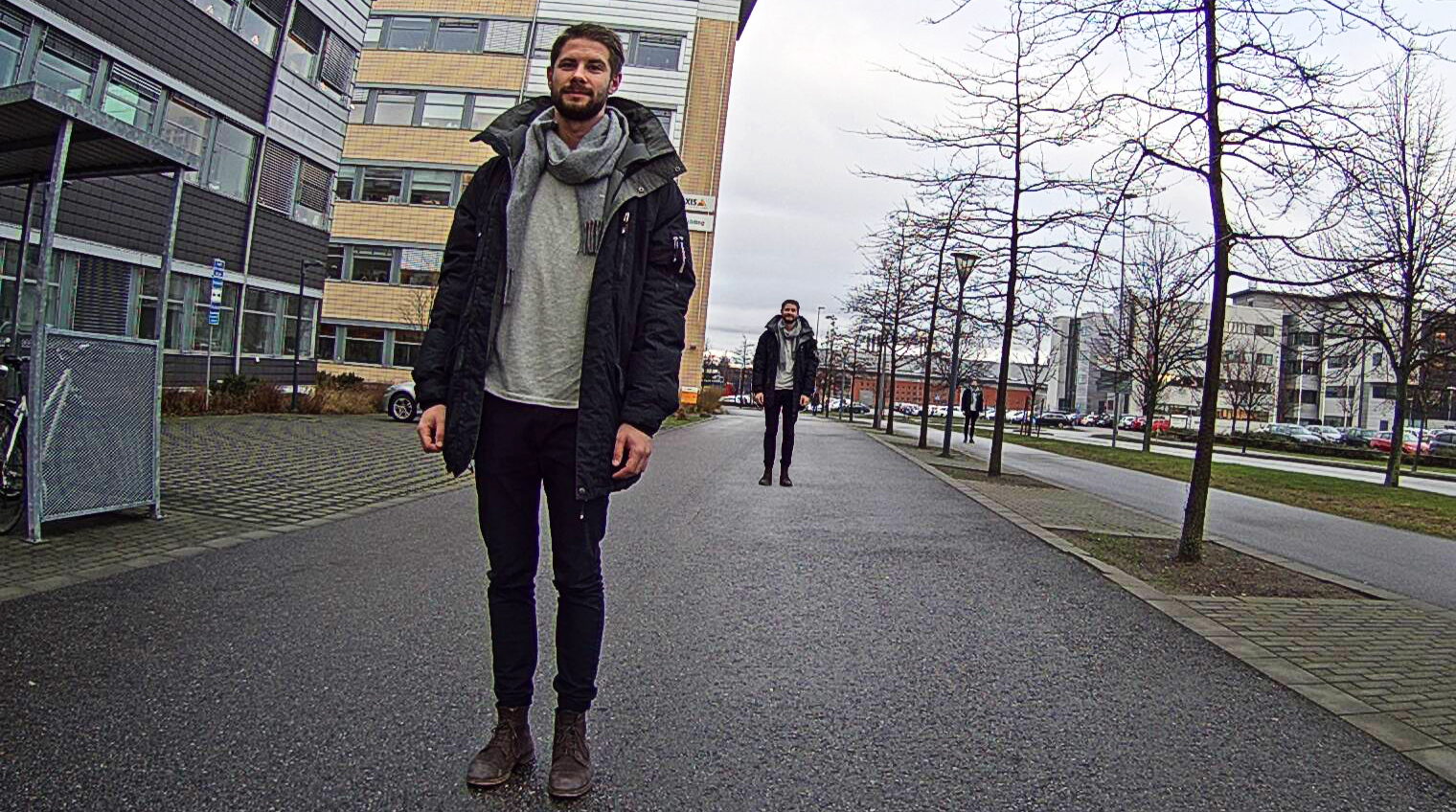
If detail is inadequate, consider a different position or appropriate lens rather than simply adding sharpening. Our camera range guide explains how distance and nighttime conditions interact.
Test the doorstep as well as the caller
Place a parcel where it would normally be left, then have the helper stand beside it. A doorbell’s vertical view and mounting geometry determine whether both the face and ground area are visible. A headline diagonal field-of-view number does not settle that practical question.
Check the clip before the person arrives, during the handover and after they leave. An event-based system may not retain the entire interval you want. A camera with a wide view may also place the parcel too far away to reveal useful activity around it.
Use our doorbell comparison when the two tasks cannot be met by the same position. A separate approach view can complement a doorbell without duplicating its exact scene.
Repeat the test after dark
Use the normal porch and garden lighting, not a temporary torch creating ideal conditions. Have the helper repeat the same route and pace. Examine both moving and stationary detail in the saved recording.
Watch for infrared reflecting off glass, pale walls, soffits or nearby debris. A light can illuminate the subject while also shining into the lens. Repositioning may solve an issue that would persist on a more expensive camera in the same spot.
Our nighttime blur guide distinguishes haze, motion smear and compression. Change the one factor that matches the symptom and repeat the same test.
Check ordinary lighting transitions
Test when indoor lights come on, when a porch lamp changes state and when vehicle headlights enter the scene where relevant. A camera that performs well under one stable condition can behave differently during those transitions.
For a motion-activated spotlight, inspect the beginning of the event as well as the brightly lit section. If illumination starts after the visitor reaches the door, the earlier approach may remain unhelpful.
Do not aim new lights at neighbors or traffic to make one test look better. The acceptable setup is one that works within a safe, proportionate installation.
Verify power and communication at the final location
Successful setup beside the router does not prove a reliable connection at the side gate. Test with doors closed and the equipment in its intended positions. Review device-reported signal or connection warnings where available.
For plug-in or PoE equipment, verify supported power and appropriate cable protection. For battery products, consider maintenance access and the expected event activity. A temporary test cord is not a permanent outdoor electrical plan.
Where the installation needs new wiring or difficult mounting, use a qualified installer. Specify the view and test requirements before the work so the final cable route supports the useful location rather than dictating an inadequate one.
Review what is actually saved
Check the recording stream, schedule and storage method. A high-quality live preview can coexist with lower-quality saved footage. Event markers, person classifications and actual video availability are separate features.
Choose a quiet interval as well as a triggered event if continuous recording is part of the requirement. Can you play that interval and export it? If not, investigate the supported mode and settings before assuming the camera records around the clock.
Test after a free trial or confirm the subscription-free feature list in advance. Our recording explainer covers why hardwired power alone is not proof of continuous history.
Privacy and audio belong in the acceptance test
Look at the whole frame for neighboring windows, shared entrances and private areas that are unnecessary to the purpose. Adjust the view or supported privacy masking appropriately and check the applicable rules for your location.
Audio recording is a separate decision from video. Do not leave it enabled merely because a microphone is included. Discuss indoor use with the household and avoid recording private rooms where a different sensor could meet the need.
Review who can access recordings and settings. A temporary installer or helper should not remain an administrator simply because they assisted with the first test.
Test controlled interruptions only where appropriate
Ask the manufacturer what should happen during an internet interruption, power loss or unavailable storage. These are different failures and may affect different functions. Do not assume a memory-card slot guarantees every offline scenario works as you expect.
Where safe and supported, test the relevant behavior during a noncritical period and verify recovery afterward. Avoid interrupting firmware updates or creating a needless outage in a monitored or business system.
Record the limits clearly. Local footage retained but remote alerts unavailable is a useful result, even though it is not complete uninterrupted service.
Keep an acceptance sheet
| Field | Example entry |
|---|---|
| Purpose | Show visitors and parcels at the front step |
| Position | Approved bracket beside door, angle recorded in photograph |
| Test conditions | Daylight and evening porch lighting |
| Detection | Normal approach registered on repeated checks |
| Recording | Full intended event saved and original export tested |
| Known limitation | Driveway background is overview only |
| Maintenance | Safe access and cleaning method documented |
The sample describes the type of information to record, not a claimed result from your camera. Fill it from the actual tests and keep it with the model and settings.
What to reject before permanent mounting
Reject a position that repeatedly misses the intended route, relies on unsafe power, creates an unnecessary privacy problem or produces unusable detail under normal lighting. Do not keep it solely because it looks symmetrical above the door.
A different lens, a closer position or another type of device may be required. A camera cannot satisfy an impossible combination of broad overview and detailed distant identification just because a mounting bracket is adjustable.
Once the installation is permanent, repeat the main test. The final angle can shift during tightening, cable routing or cover replacement. Commission the finished arrangement, not only the earlier temporary one.
Frequently asked questions
Is a good live view enough?
No. Verify detection, saved video, retention and export. A preview proves only that a current image is available.
Should every camera be mounted high?
No. Balance useful subject detail, appropriate protection and safe maintenance within the model’s instructions.
How many test walks should I do?
Repeat the important route enough to uncover obvious inconsistency and compare day and night conditions. This is a practical acceptance check, not a statistical performance certification.
What should I change first if the test fails?
Identify whether the problem is framing, detection, lighting, recording or notifications. Change one relevant variable and rerun the same event.


